ycliper

Популярное

Музыка Кино и Анимация Автомобили Животные Спорт Путешествия Игры Юмор

Интересные видео

2025 Сериалы Трейлеры Новости Как сделать Видеоуроки Diy своими руками

Топ запросов

смотреть а4 schoolboy runaway турецкий сериал смотреть мультфильмы эдисон
Скачать

Allen & Heath Qu Series - Qu-Drive

Автор: AllenandHeathUK

Загружено: 2014-03-12

Просмотров: 261139

Описание: Qu-Drive:

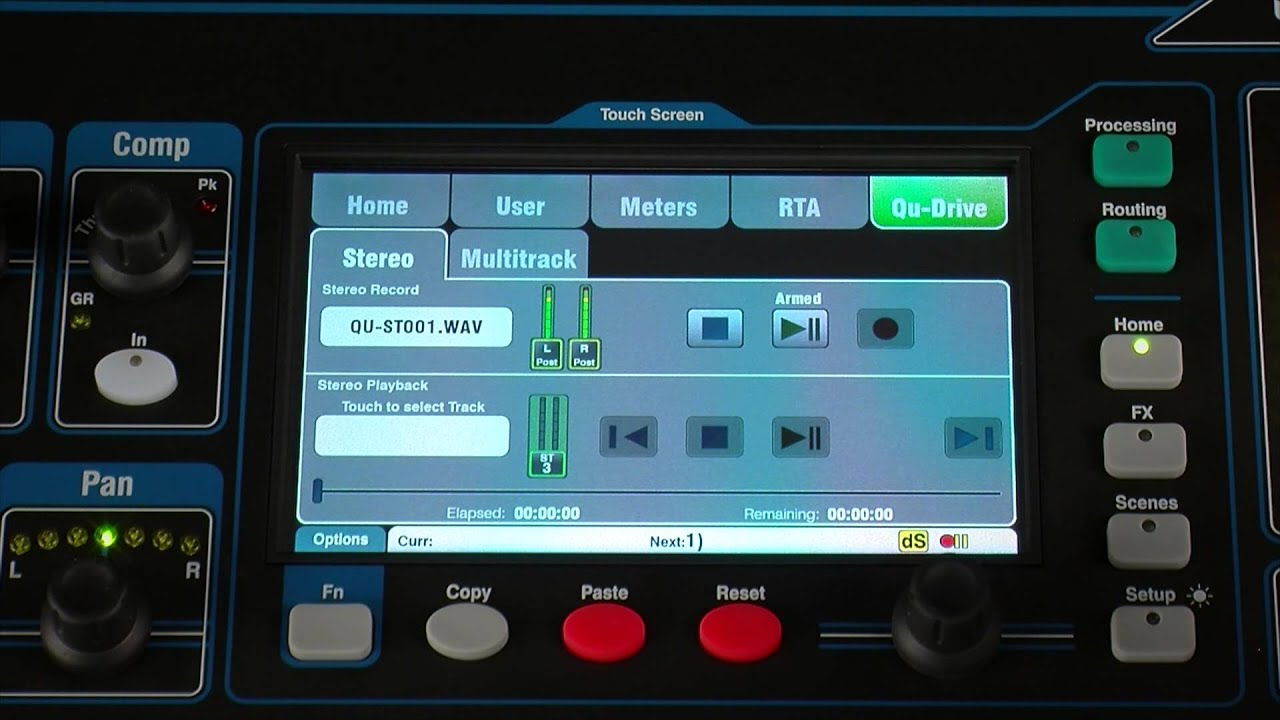
Qu-Drive is a facility to record and playback stereo or 18-channel multitrack audio to/from USB storage devices. You will need a USB hard disk for recording - USB flash 'keys' are supported for firmware updates, Show, scene or library archive and stereo playback only. The recording format is WAV 48kHz 24-bit, which gives you a data rate of about 8.3 MB per minute per each track.

Before starting, format the hard drive on the Qu mixer with the Setup / Utility screen. This clears the drive and sets up the Qu directory structure.

Patch the sources to be recorded using the Setup / Output Patch / USB Audio menu. The default for stereo recording is LR post-fade but you can change this to pre-fade or to a different pair of mixes. Up to 18 sources can be selected for Qu-Drive multitrack recording by touching the buttons on screen and scrolling through the options. These default to the input channels Insert Sends, but you may wish to record something different such as FX returns, or the LR mix.

The Qu-Drive tab in the Home screen presents familiar transport controls for both stereo and multitrack operation. These are disabled if a USB drive is not plugged in or recognized. Arm the recording by touching the red Record button, then touch Play to start.

Stereo files are stored on to USB in the AHQU / USBRec folder. Multitrack allocates a folder for each recording in the USBMtk folder, where the 18 files are named and numbered. You can export these files later to your computer for editing.

For stereo playback, place the files on to USB in the USBPLAY folder. Stereo playback supports 44.1 and 48kHz sample rate, 16 or 24 bit-depth WAV files only.

To play back the files, patch the required channels using the Source menu in the Processing screen. Make sure Qu-Drive is selected as the global USB source, then set Qu-Drive as the source for ST3 for stereo playback. For multitrack playback, set USB as the source for the required channels. For example, mono inputs 1 to 16 and ST1 on Qu-16.

Go to the Qu-Drive screen and select the track or multitrack session to play back. Press the Function key for options such as Play All and Repeat.

Не удается загрузить Youtube-плеер. Проверьте блокировку Youtube в вашей сети.
Повторяем попытку...
Allen & Heath Qu Series - Qu-Drive

Поделиться в:

Доступные форматы для скачивания:

Скачать видео

  • Информация по загрузке:

Скачать аудио

Похожие видео

Серия Allen & Heath Qu — настройка Qu-Pad и маршрутизатора

Серия Allen & Heath Qu — настройка Qu-Pad и маршрутизатора

How to choose the stereo signal to be sent over USB - Allen & Heath QU Series

How to choose the stereo signal to be sent over USB - Allen & Heath QU Series

Серия Аллена и Хита Ку — Работа со сценами и шоу

Серия Аллена и Хита Ку — Работа со сценами и шоу

Серия «Аллен и Хит Ку» — Начало работы

Серия «Аллен и Хит Ку» — Начало работы

Allen & Heath Qu против CQ | Какой микшер подойдет именно вам?

Allen & Heath Qu против CQ | Какой микшер подойдет именно вам?

QU Drive

QU Drive

Allen & Heath Qu Series Using with a DAW through USB (Qu-16, Qu-24, Qu-32, Qu-SB, Qu-Pac)

Allen & Heath Qu Series Using with a DAW through USB (Qu-16, Qu-24, Qu-32, Qu-SB, Qu-Pac)

ALLEN & HEATH - Preparación y configuración para grabación USB en consolas QU

ALLEN & HEATH - Preparación y configuración para grabación USB en consolas QU

Серия Аллена и Хита Ку — Обработка каналов

Серия Аллена и Хита Ку — Обработка каналов

Как выполнить многодорожечную запись с помощью цифрового микшера Allen & Heath SQ и Pro Tools или...

Как выполнить многодорожечную запись с помощью цифрового микшера Allen & Heath SQ и Pro Tools или...

Allen & Heath Q24 FX - 04

Allen & Heath Q24 FX - 04

Как настроить компрессор для вокала

Как настроить компрессор для вокала

Как использовать посылы FX3 и FX4 Qu16 без специальных фейдеров — серия Allen & Heath QU

Как использовать посылы FX3 и FX4 Qu16 без специальных фейдеров — серия Allen & Heath QU

Qu Tutorial Series

Qu Tutorial Series

Микшерные пульты Allen & Heath CQ — как настроить для трансляции и записи

Микшерные пульты Allen & Heath CQ — как настроить для трансляции и записи

How to use FX Send and Return - Part 1 - Allen & Heath QU series

How to use FX Send and Return - Part 1 - Allen & Heath QU series

Система мониторинга AH QU 24

Система мониторинга AH QU 24

Allen & Heath Qu-SB Mixer Review

Allen & Heath Qu-SB Mixer Review

Step2 Setting up Audio on the QU 24

Step2 Setting up Audio on the QU 24

Allen & Heath QU16 Livestream Setup

Allen & Heath QU16 Livestream Setup

© 2025 ycliper. Все права защищены.


  • Контакты
  • О нас
  • Политика конфиденциальности


Контакты для правообладателей: [email protected]