How to calculate Judd-Ofelt parameters and derived quantities from a luminescence spectrum of Eu3+.
Автор: sci-sim
Загружено: 2025-01-01
Просмотров: 784
Описание:
https://sci-sim.com/
Welcome ladies and gentlemen to this demo on how to calculate Judd-Ofelt parameters, derived quantities, and point group symmetries from a luminescence spectrum of Eu3+, by using JOLS online app developed by sci-sim.
Before we start, please hit like and subscribe to our channel so that we keep doing more work like this.
You need a luminescence spectrum of Eu3+ in TXT or CSV format.
Go to this following link: https://sciapps.sci-sim.com/judd_ofel....
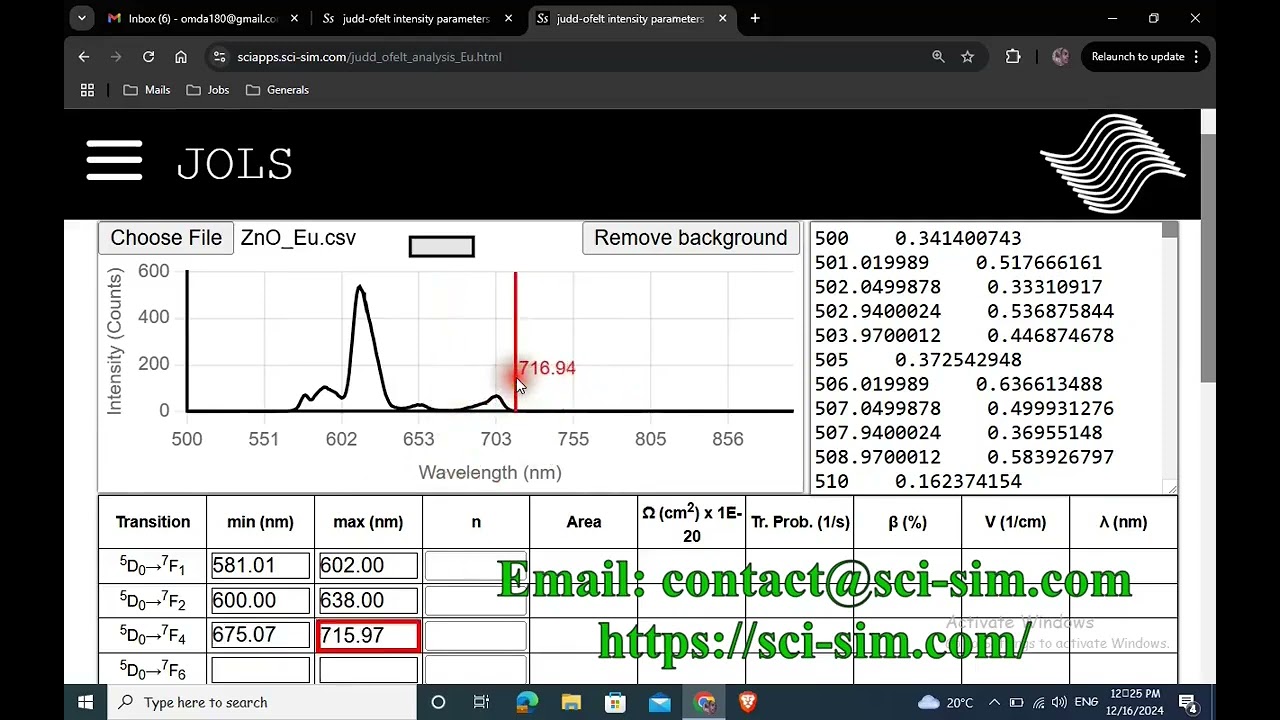
Click on choose file button, navigate to your luminescence spectrum file and click open.
The luminescence spectrum is shown on the analysis pane here, while the numerical data are shown on the right pane here.
Now it is time to specify the wavelength boundaries for each transition band, namely 5D0 to 7F1, 7F2, 7F4, or 7F6.
Move the mouse cursor over the spectrum to determine the wavelength.
You have two ways of adding the wavelength value on its respective field.
Either manually, or by activating the wavelength field by clicking on it and you can see that the field border turns red. Then move the mouse cursor over the spectrum to the required wavelength, and then double click and you see the value added right there.
Repeat the same process to populate all fields with their respective wavelength.
Quick note, at sci-sim we help STEM graduates to secure satisfying jobs. We provide the following services:
Cover letter and resume/CV review and tailoring.
Career advice and consultation.
Interview tips.
For more information, you can contact us at: [email protected] or alternatively visit our website at https://www.sci-sim.com
Lets get back to our software.
Note that the emission band facilitated by the 5D0 to 7F6 transition is weak and is not visible in most cases. You can leave it empty in this case otherwise you have to add them similar to other transition values.
Add values of the refractive index of the host material here in these fields. For accurate calculations, add refractive index corresponding to each wavelength.
For the sake of demonstration, I will add random refractive index values.
You can find the refractive index of your host material on the refractive index database website.
Now click on Calculate button, and that’s it.
To estimate the quantum efficiency and the optical gain of your material, you need to add the value of the experimental lifetime here and click the calculate button.
To find out the point group symmetry of Eu3+ in the host, calculate the number of splitting for each transition and map them here as follows.
Let’s suppose that the 5D0 to 7F0 transition band did not split, we choose one.
The rest of the transitions, each split into two.
The point group symmetry can be found this way.
Click on reset button to clear everything and start new calculations.
To find more scientific information about this software, please read the published article by visiting the following link:
https://doi.org/10.1016/j.rio.2024.10...
Thank you for your attention and have a wonderful career.
Повторяем попытку...
Доступные форматы для скачивания:
Скачать видео
-
Информация по загрузке:





![Почему работает теория шести рукопожатий? [Veritasium]](https://image.4k-video.ru/id-video/ggI1xKzoANs)