ycliper

Популярное

Музыка Кино и Анимация Автомобили Животные Спорт Путешествия Игры Юмор

Интересные видео

2025 Сериалы Трейлеры Новости Как сделать Видеоуроки Diy своими руками

Топ запросов

смотреть а4 schoolboy runaway турецкий сериал смотреть мультфильмы эдисон
Скачать

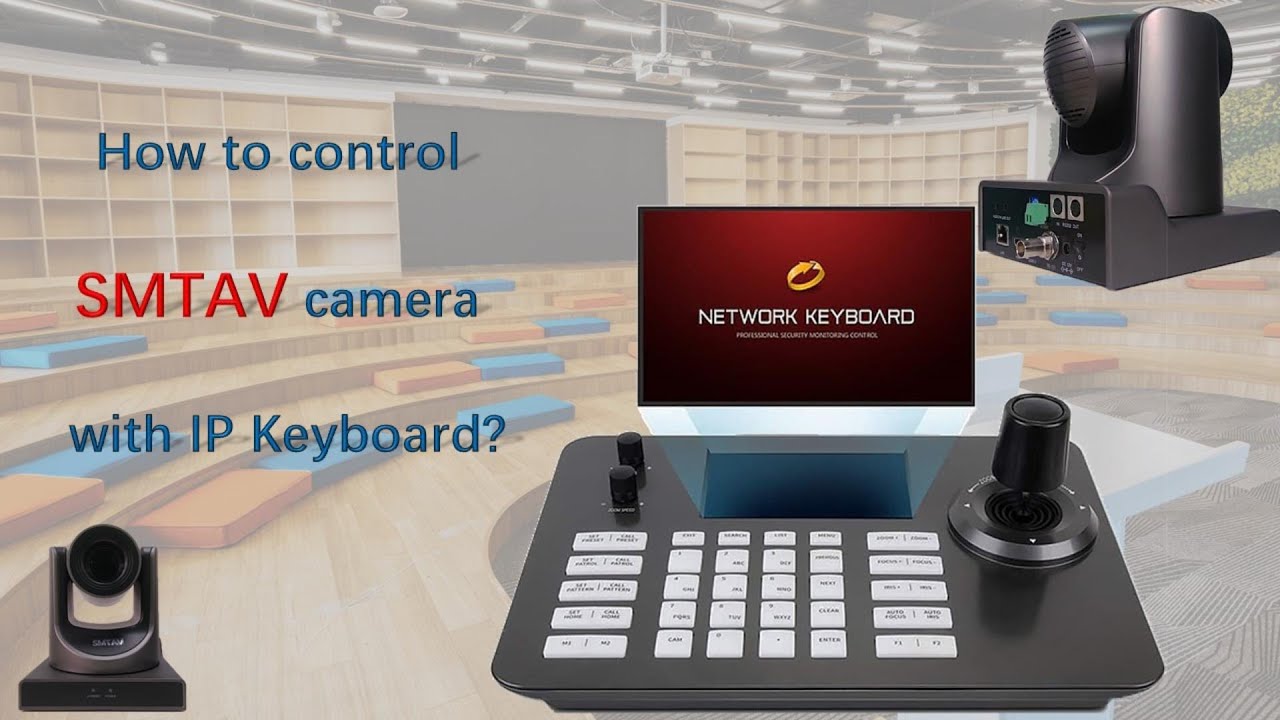
How to control SMTAV camera with IP Keyboard?

Автор: SMTAV Store

Загружено: 2022-10-26

Просмотров: 10990

Описание: For more support, please contact us at http://www.smtav.com Or send email to [email protected], thank you!

How to control SMTAV camera with IP Keyboard?

IP keyboard supports ONVIF protocol, compatible with 99% PTZ cameras on the market. It has an industrial-grade 5-inch LCD screen. Support 1920*1080P H.264/265 stream. Everything is visualized, so it is very easy to use.
1. Connect the camera and keyboard to the same LAN. Device connection diagram using onvif protocol
2. Make sure the camera has ONVIF protocol enabled.
Access the IP address of the camera through a web browser, open the WebUI of the camera, and check whether the ONVIF option is enabled in the Network tab.
After enabling the ONVIF option, click the save button below, and then restart the camera.
3. Search cameras in the control keyboard.
A. Press "SEARCH" key to enter, move the joystick to the right, select search, and press "ENTER" or the middle button of the joystick to confirm the search.
B. Use the joystick to select the IP, press the middle button of the joystick to select, joystick move right to select the new one, and press the middle button of the joystick to add.
C. Fill in the correct user name and password, and press the number keys continuously to switch between uppercase and lowercase letters.
D. Select Save and press the middle button of the joystick to confirm and save.
Note: the camera and keyboard must be on the same network segment.
4. Manual add cameras in the control keyboard.
Maybe because of your network rules, the keyboard controller cannot search for the camera. In this case, you need to manually add the camera to your keyboard controller
Press the MENU key to enter the menu, select manually add camera IP, port, user name, password, select Onvif protocol, and then click Save
Note: SMTAV Camera’s onvif port is 81, user name and password both admin.
5. Select and control cameras.
Successfully added devices can be viewed in the device list, you can view the added device list and edit or delete it.
Press EXIT key to return to the main user interface.
Press CAM key + number key + Enter key to select the online device.
For example, to select camera 1, press CAM + press 1 + press ENTER.

Не удается загрузить Youtube-плеер. Проверьте блокировку Youtube в вашей сети.
Повторяем попытку...
How to control SMTAV camera with IP Keyboard?

Поделиться в:

Доступные форматы для скачивания:

Скачать видео

  • Информация по загрузке:

Скачать аудио

Похожие видео

Control SMTAV BX series cameras via PTZ controller. #SMTAV #ptz #ptzcamera #camera

Control SMTAV BX series cameras via PTZ controller. #SMTAV #ptz #ptzcamera #camera

Ligando 4 PTZ smtav em um computador para gravação ou transmissão

Ligando 4 PTZ smtav em um computador para gravação ou transmissão

Лучшие PTZ-камеры, которые можно купить в 2026 году.

Лучшие PTZ-камеры, которые можно купить в 2026 году.

essa CÂMERA PTZ é a Escolha PERFEITA para LIVES com o OBS

essa CÂMERA PTZ é a Escolha PERFEITA para LIVES com o OBS

How to control multiple PA series cameras with YCS-31DP

How to control multiple PA series cameras with YCS-31DP

How to change the computer IP address so that it can connect to your PTZ camera?

How to change the computer IP address so that it can connect to your PTZ camera?

AVKANS Super IP Controller | Unboxing, Setup, & Review

AVKANS Super IP Controller | Unboxing, Setup, & Review

Zowietek PTZ Network Controller with 5 inch LCD Screen, decoding H.265 and H.264 Video

Zowietek PTZ Network Controller with 5 inch LCD Screen, decoding H.265 and H.264 Video

Setting up a PTZ Controller with ONVIF

Setting up a PTZ Controller with ONVIF

Review Completo do Controlador de Câmera PTZ SMTAV

Review Completo do Controlador de Câmera PTZ SMTAV

15 СЕКРЕТОВ Аэропорта, которые Авиакомпании СКРЫВАЮТ От Вас!

15 СЕКРЕТОВ Аэропорта, которые Авиакомпании СКРЫВАЮТ От Вас!

SMTAV BX serial PTZ Camera with new feature to add: AI tracking smarter and faster.

SMTAV BX serial PTZ Camera with new feature to add: AI tracking smarter and faster.

Учебное пособие по использованию джойстика для PTZ-камеры Tenveo: полное руководство

Учебное пособие по использованию джойстика для PTZ-камеры Tenveo: полное руководство

COMO CONFIGURAR A CAMERA PTZ COM A MESA CONTROLADORA JSK-8003C - SUPER FÁCIL

COMO CONFIGURAR A CAMERA PTZ COM A MESA CONTROLADORA JSK-8003C - SUPER FÁCIL

Best Budget PTZ  IP Controller for PTZ Camera | HSILITY PTZ CONTROLLER Review

Best Budget PTZ IP Controller for PTZ Camera | HSILITY PTZ CONTROLLER Review

Configuração PTZ e Controller Joystick via Conexão Ethernet LAN com Protocolo RS 232

Configuração PTZ e Controller Joystick via Conexão Ethernet LAN com Protocolo RS 232

Melhor controladora PTZ que já testei - Controladora PTZ Runpu NDI

Melhor controladora PTZ que já testei - Controladora PTZ Runpu NDI

AmneziaWG: Убийца платных VPN? Полный гайд по настройке. Нейросети без VPN. ChatGPT, Gemini обход

AmneziaWG: Убийца платных VPN? Полный гайд по настройке. Нейросети без VPN. ChatGPT, Gemini обход

Connect SMTAV PTZ camera to computer. #SMTAV #ptz #ptzcamera #camera

Connect SMTAV PTZ camera to computer. #SMTAV #ptz #ptzcamera #camera

Connect Tenveo's three PTZ cameras and TEVO-KB200 joystick keyboard using only network cables.

Connect Tenveo's three PTZ cameras and TEVO-KB200 joystick keyboard using only network cables.

© 2025 ycliper. Все права защищены.


  • Контакты
  • О нас
  • Политика конфиденциальности


Контакты для правообладателей: [email protected]