ycliper

Популярное

Музыка Кино и Анимация Автомобили Животные Спорт Путешествия Игры Юмор

Интересные видео

2025 Сериалы Трейлеры Новости Как сделать Видеоуроки Diy своими руками

Топ запросов

смотреть а4 schoolboy runaway турецкий сериал смотреть мультфильмы эдисон
Скачать

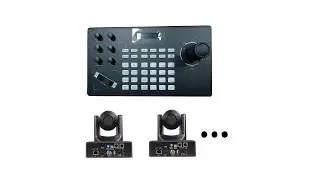
How to control multiple PA series cameras with YCS-31DP

Автор: SMTAV Store

Загружено: 2025-02-25

Просмотров: 305

Описание: For more support, please contact us at http://www.smtav.com Or send email to [email protected], thank you!

How to control SMTAV camera with IP Keyboard?
IP keyboard supports ONVIF protocol, compatible with 99% PTZ cameras on the market. It has an industrial-grade 5-inch LCD screen. Support 1920*1080P H.264/265 stream. Everything is visualized, so it is very easy to use.
1. Connect the camera and keyboard to the same LAN. Device connection diagram using onvif protocol
2. Make sure the camera has ONVIF protocol enabled.
Access the IP address of the camera through a web browser, open the WebUI of the camera, and check whether the ONVIF option is enabled in the Network tab.
After enabling the ONVIF option, click the save button below, and then restart the camera.
3. Search cameras in the control keyboard.
A. Press [SEARCH] key to enter, move the joystick to the right, select search, and press [ENTER] or the middle button of the joystick to confirm the search.
B. Use the joystick to select the IP, press the middle button of the joystick to select, joystick move right to select the new one, and press the middle button of the joystick to add.
C. Fill in the correct user name and password, and press the number keys continuously to switch between uppercase and lowercase letters.
D. Select Save and press the middle button of the joystick to confirm and save.
Note: the camera and keyboard must be on the same network segment.
4. Manual add cameras in the control keyboard.
Maybe because of your network rules, the keyboard controller cannot search for the camera. In this case, you need to manually add the camera to your keyboard controller
Press the MENU key to enter the menu, select manually add camera IP, port, user name, password, select Onvif protocol, and then click Save
Note: SMTAV Camera’s onvif port is 81, user name and password both admin.
5. Select and control cameras.
Successfully added devices can be viewed in the device list, you can view the added device list and edit or delete it.
Press EXIT key to return to the main user interface.
Press CAM key + number key + Enter key to select the online device.
For example, to select camera 1, press CAM - press 1 - press ENTER.

Не удается загрузить Youtube-плеер. Проверьте блокировку Youtube в вашей сети.
Повторяем попытку...
How to control multiple PA series cameras with YCS-31DP

Поделиться в:

Доступные форматы для скачивания:

Скачать видео

  • Информация по загрузке:

Скачать аудио

Похожие видео

Control SMTAV BX series cameras via PTZ controller. #SMTAV #ptz #ptzcamera #camera

Control SMTAV BX series cameras via PTZ controller. #SMTAV #ptz #ptzcamera #camera

Новый блэкаут в Киеве, Лавров вписался за Трампа, Россиян шокируют цены. Орешкин, Жуковский, Попова

Новый блэкаут в Киеве, Лавров вписался за Трампа, Россиян шокируют цены. Орешкин, Жуковский, Попова

Morning Energy 2026 ☕🌅 24/7 Live Radio 💻 Positive & Happy Chill Music To Have A Good Day

Morning Energy 2026 ☕🌅 24/7 Live Radio 💻 Positive & Happy Chill Music To Have A Good Day

Немедленный приказ Зеленского / МИД бьёт тревогу

Немедленный приказ Зеленского / МИД бьёт тревогу

Connect Tenveo's three PTZ cameras and TEVO-KB200 joystick keyboard using only network cables.

Connect Tenveo's three PTZ cameras and TEVO-KB200 joystick keyboard using only network cables.

КАК НАСТРОИТЬ HSILITY S3, PTZ IP-контроллер | LEFTEK S3: подключение и управление PTZ-камерами

КАК НАСТРОИТЬ HSILITY S3, PTZ IP-контроллер | LEFTEK S3: подключение и управление PTZ-камерами

Deep Feeling Mix 2026 - Deep House, Vocal House, Nu Disco, Chillout | Emotional / Intimate Mood

Deep Feeling Mix 2026 - Deep House, Vocal House, Nu Disco, Chillout | Emotional / Intimate Mood

Setting up a PTZ Controller with ONVIF

Setting up a PTZ Controller with ONVIF

SMTAV BX serial PTZ Camera with new feature to add: AI tracking smarter and faster.

SMTAV BX serial PTZ Camera with new feature to add: AI tracking smarter and faster.

Расслабляющая музыка, чтобы снять стресс, беспокойство и депрессию • разум, тело #23

Расслабляющая музыка, чтобы снять стресс, беспокойство и депрессию • разум, тело #23

Škoda to nechytit 4-2026: Nad vašimi dotazy

Škoda to nechytit 4-2026: Nad vašimi dotazy

How to control SMTAV camera with IP Keyboard? #SMTAV #ptz #ptzcamera #camera

How to control SMTAV camera with IP Keyboard? #SMTAV #ptz #ptzcamera #camera

Como ligar a controladora JOYSTICK na câmara PTZ

Como ligar a controladora JOYSTICK na câmara PTZ

Complete TP-Link Vigi NVR Setup Guide

Complete TP-Link Vigi NVR Setup Guide

Best Budget PTZ  IP Controller for PTZ Camera | HSILITY PTZ CONTROLLER Review

Best Budget PTZ IP Controller for PTZ Camera | HSILITY PTZ CONTROLLER Review

Доминируйте в своей трансляции: 5 лучших PTZ-камер 2024 года (трансляция, веб-камеры, трансляции)

Доминируйте в своей трансляции: 5 лучших PTZ-камер 2024 года (трансляция, веб-камеры, трансляции)

Is SMTAV still the cheap PTZ King?

Is SMTAV still the cheap PTZ King?

How to use the keyboard to control the SMTAV PTZ camera? #SMTAV #ptz #ptzcamera #camera

How to use the keyboard to control the SMTAV PTZ camera? #SMTAV #ptz #ptzcamera #camera

La Matinale 21/01 : Nouveau 49.3 : le gouvernement piétine la souveraineté du peuple !

La Matinale 21/01 : Nouveau 49.3 : le gouvernement piétine la souveraineté du peuple !

Which Sub $1000 PTZ Camera Is The Best? | Avideone, Fomako, SMTAV

Which Sub $1000 PTZ Camera Is The Best? | Avideone, Fomako, SMTAV

© 2025 ycliper. Все права защищены.


  • Контакты
  • О нас
  • Политика конфиденциальности


Контакты для правообладателей: [email protected]