Mitel 6940 Phone Training - Part 1 - Introduction to Features - Partners Technology
Автор: Partners Technology
Загружено: 2020-05-20
Просмотров: 9502
Описание:
#Mitel6940 #Mitel6940Training #Mitel6940Features
Quick introduction to the Mitel 6940 phone explained by Jen Ofstein of Partners Technology.
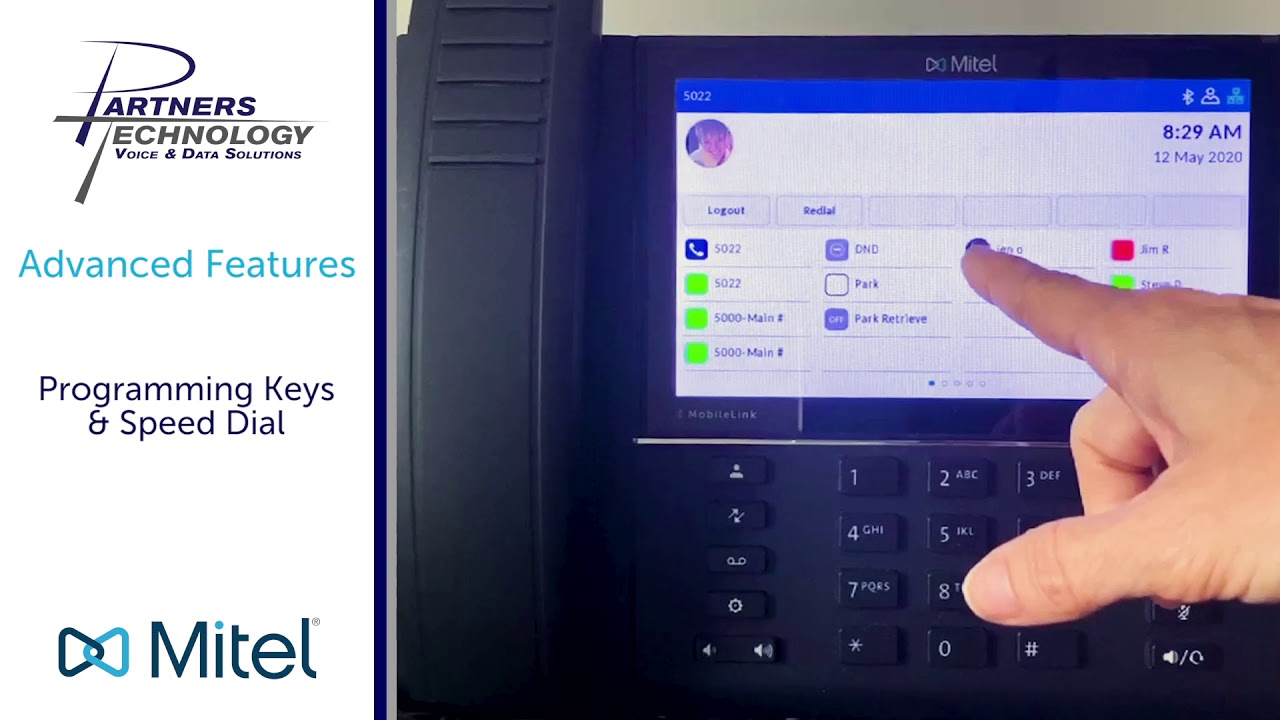
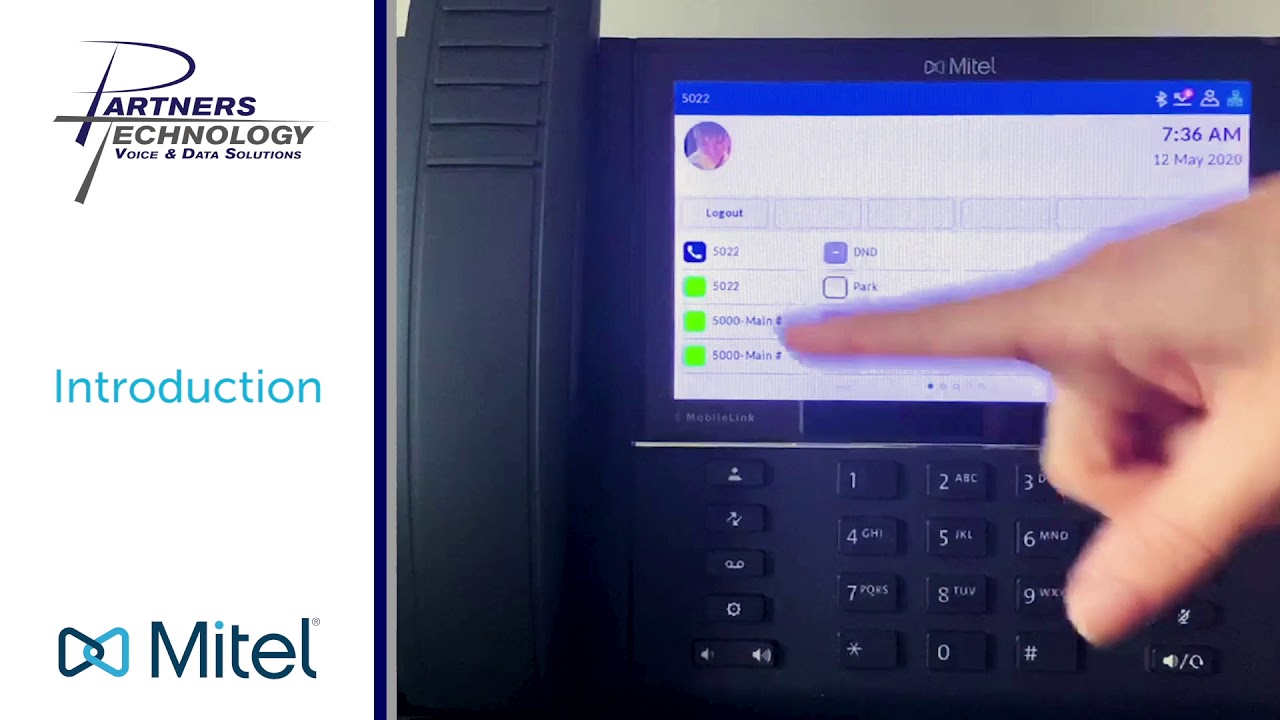
Hello. We are doing training today on the Mitel 6940 phone, which is what's being displayed currently. When you look at your phone, just to give you a little bit understanding of the layout that you're seeing, there's a blue banner that runs across the top of your screen which gives you some information. On the left side it shows your extension. On the right side it will show you some icons such as Bluetooth connectivity and your missed call history. Right below that it'll give you the time and date on the right side. The middle of the screen, this gray bar that runs across, is your soft keys is how we refer to it as. So anytime I mentioned soft keys, these are your soft keys here. They're always changing. They're dynamic, depending upon how you're using your phone. It'll give you such options as transferring calls, adding users to do a conference call, or you'll have another option on here to end the call as well if you happen to be on speakerphone. The keys down at the bottom of your display right here, those keys are keys that are typically done by your system administrator, for the most part, to give you a basic layout of keys that you're seeing on your display. And you also have the option of programming your own custom keys, if you wanted to. Now, if you look at the bottom of the screen over here, you're also going to see there's a couple of dots down at the bottom. And on mine you're seeing, on this type of phone, there's five dots. Because you have five screens of keys that we can program buttons on. So this is screen one, and you can see it has a little solid dot in the far left one. If we swipe it will bring me to my next screen of keys, which I have more personal speed dials to other people within my organization. But I swipe to the third screen, I have more keys which happens to be outside speed dial numbers. Go to my fourth screen, have a couple more keys here. You can see I have a lot of blank keys that I could program if I wanted to. And then on the last screen I don't have anything because I just didn't have any more keys to program yet, okay? If I want to just get back to my main screen, I can just keep swiping back. And this is my main screen here. Just so everybody knows, the main screen consists of your personal line keys and then any other feature keys that had been programmed on your phone by default, okay? So this is what it will look like on your phone initially. The bottom half of your phone, these are all fixed keys, whether you're on this type of phone, the one that's below this model phone, a 6930 or 6920, it's all typically laid out the same exact way on the bottom of your display. So these are some fixed keys. You have an end call key, you have your redial key, hold, mute, speakerphone, or headset. Your contacts key, missed calls, voicemail, settings, and your volume bar up and down. So this is just, again, just a lay of the land as far as the phone goes. When it comes to your wireless handset, you will have some controls on the handset as well. You'll have a little key right here at the top where you can pick up and hang up calls, which is a green and red dot. And then you'll have a long bar similar to your volume key, which is volume up and volume down. And the button right in the middle that has a little dot on it is for mute. So if you happen to be walking around with your handset and you hear your phone ringing, and it will also ring on the little handset as well, you can hit the green red key to answer that call when you're away from your desk. All right. If you wanted to adjust the volume, you will also have the ability to do that using this as well. So again, this is your main display. These are the fixed keys at the bottom, and then you have your wireless handsets.
Partners Technology
Voice & Data Solutions
www.partnerstechnology.com
471 E. Page Street, Unit 6
Stoughton, MA 02072
Visit our website to learn more: https://partnerstechnology.com/
Facebook: / partnerstechnology
Twitter: / partnerstech
LinkedIn: https: / partners-technology-llc
• Mitel 6940 Phone Training - Part 1 - Intro...
Повторяем попытку...
Доступные форматы для скачивания:
Скачать видео
-
Информация по загрузке: