ycliper

Популярное

Музыка Кино и Анимация Автомобили Животные Спорт Путешествия Игры Юмор

Интересные видео

2025 Сериалы Трейлеры Новости Как сделать Видеоуроки Diy своими руками

Топ запросов

смотреть а4 schoolboy runaway турецкий сериал смотреть мультфильмы эдисон
Скачать

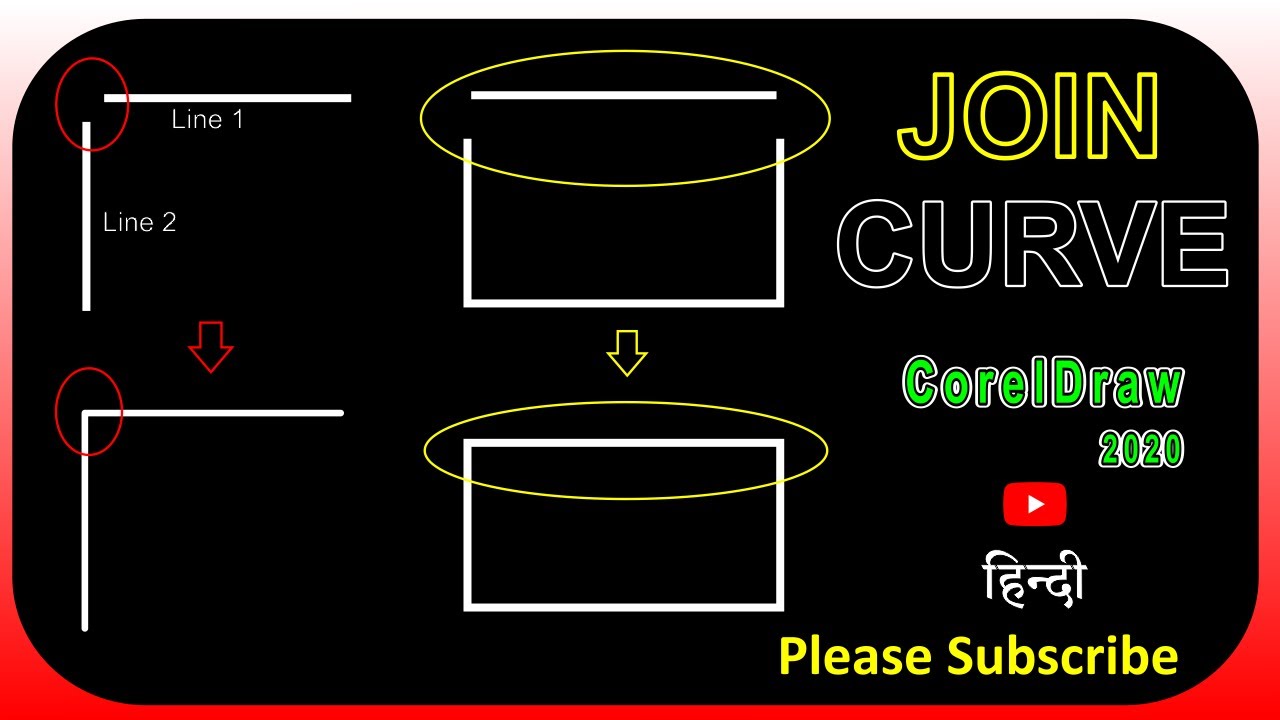
How to join two nodes in Coreldraw || Join curves || Coreldraw 2020 | Detail | IN HINDI.

Автор: FJ KI TECH PATHSHALA

Загружено: 2022-04-22

Просмотров: 21663

Описание: Coreldraw 2020 Playlist_
   • CorelDraw 2020  

Joining curves
You can join curves and line segments to create more complex curves as well as closed objects. The shape of the connecting lines is determined by the mode that you choose: Extend, Chamfer, Fillet, or Bézier Curve.

You can also set the gap tolerance, which is the maximum distance between endpoints that can be joined. If the endpoints are further apart than the gap tolerance, they cannot be joined.

When you join curves, the resulting curve takes on the properties of the last object that was selected.
To join curves
1 . Hold down Shift, and select each object using the Pick tool .
2 . Click Object Join curves.
3 . In the Join curves docker, choose one of the following modes from the list box:
• Extend
• Chamfer
• Fillet
• Bézier curve

4 . Click Apply.
If the curves are not joined, you must increase the gap tolerance.
Adding, removing, and joining nodes
When you add nodes, you increase the number of segments and, therefore, the amount of control you have over the shape of the object. You can delete selected nodes to simplify an object’s shape.

When curve objects contain many nodes, it is difficult to edit and output them to devices such as vinyl cutters, plotters, and rotary engravers. You can have the number of nodes in a curve object reduced automatically. Reducing the number of nodes removes overlapping nodes and can smooth a curve object. This feature is especially useful for reducing the number of nodes in objects imported from other applications.

You can join the start and end nodes of an open path such as a line to create a closed object. This feature is useful for filling an object with color because you can apply fills only to the inside of closed objects. For information about applying fills, see Applying fills to objects.

You can align the nodes of a curve object horizontally or vertically.

To add or delete a node
To
Do the following
Add a node
In the toolbox, click the Shape tool , select a curve object, and double-click where you want to add a node.
Delete a node
In the toolbox, click the Shape tool, select a curve object, and double-click a node.
To reduce the number of nodes in a curve object Back to Top
1 . In the toolbox, click the Shape tool .
2 . Click a curve object, and do one of the following:
• To reduce the number of nodes in the entire object, click the Select all nodes button on the property bar.
• To reduce the number of nodes in a part of a curve object, marquee select the part you want to change.
3 . Do one of the following:
• Click Reduce nodes on the property bar to have overlapping and redundant nodes automatically removed.
• Move the Curve smoothness slider to control the number of nodes that are removed. Removing many nodes can reshape the curve object.
To join the end nodes of a single subpath Back to Top
1 . In the toolbox, click the Shape tool .
2 . Click a subpath.
3 . Click the Close curve button on the property bar.
To join the nodes of multiple subpaths Back to Top
1 . In the toolbox, click the Shape tool .
2 . Hold down Shift, and click a node from each subpath.
3 . Click the Extend curve to close button on the property bar.


Thanks For watching

Please Like & Subscribe our Channel _
   • CorelDraw 2020  

Не удается загрузить Youtube-плеер. Проверьте блокировку Youtube в вашей сети.
Повторяем попытку...
How to join two nodes in Coreldraw || Join curves || Coreldraw 2020 | Detail | IN HINDI.

Поделиться в:

Доступные форматы для скачивания:

Скачать видео

  • Информация по загрузке:

Скачать аудио

Похожие видео

How to Design Business Card / Visiting Card in CorelDraw | Beginners tutorials | Detail | in Hindi.

How to Design Business Card / Visiting Card in CorelDraw | Beginners tutorials | Detail | in Hindi.

CorelDraw Join Curves (when you can't fill a shape)

CorelDraw Join Curves (when you can't fill a shape)

coreldraw hindi | join curves option - हिन्दी मे

coreldraw hindi | join curves option - हिन्दी मे

20 НОВЫХ ТОВАРОВ с АЛИЭКСПРЕСС 2026, Новые ГАДЖЕТЫ От Которых Точно ОФИГЕЕШЬ + КОНКУРС

20 НОВЫХ ТОВАРОВ с АЛИЭКСПРЕСС 2026, Новые ГАДЖЕТЫ От Которых Точно ОФИГЕЕШЬ + КОНКУРС

Join Curves in CorelDraw | Join Two Nodes  | CorelDRAW tutorial in Hindi, Urdu

Join Curves in CorelDraw | Join Two Nodes | CorelDRAW tutorial in Hindi, Urdu

Сводные таблицы Excel с нуля до профи за полчаса + Дэшборды! | 1-ое Видео курса

Сводные таблицы Excel с нуля до профи за полчаса + Дэшборды! | 1-ое Видео курса "Сводные Таблицы"

Понимание инженерных чертежей

Понимание инженерных чертежей

Советы и рекомендации по Corel Draw: преобразование линии в объект и зачем это нужно

Советы и рекомендации по Corel Draw: преобразование линии в объект и зачем это нужно

Smoke Mood — Just Relax | Deep House Mix 2026 • Chill / Night Vibes / Stress Relief  #3

Smoke Mood — Just Relax | Deep House Mix 2026 • Chill / Night Vibes / Stress Relief #3

Сочетания клавиш для выравнивания в Coreldraw — Бахадур Бхай — Учебное пособие по Coreldraw на ур...

Сочетания клавиш для выравнивания в Coreldraw — Бахадур Бхай — Учебное пособие по Coreldraw на ур...

CorelDRAW Join curves all option,Extend,Fillet,Chamfer,Bezier Curve in CorelDRAW in hindi part 16

CorelDRAW Join curves all option,Extend,Fillet,Chamfer,Bezier Curve in CorelDRAW in hindi part 16

#CorelDraw introduction | Basic  Class | User interface Explain - in Hindi

#CorelDraw introduction | Basic Class | User interface Explain - in Hindi

CorelDraw Calendar Wizard - Generate and Design Automatic Year Calendar In CorelDraw.

CorelDraw Calendar Wizard - Generate and Design Automatic Year Calendar In CorelDraw.

Создание логотипа с текстом и фигурой в Corel Draw. Упражнение № 3 | YN Tutor

Создание логотипа с текстом и фигурой в Corel Draw. Упражнение № 3 | YN Tutor

System Design Concepts Course and Interview Prep

System Design Concepts Course and Interview Prep

Изучите редактирование фотографий в GIMP 3.0 для начинающих за 25 минут

Изучите редактирование фотографий в GIMP 3.0 для начинающих за 25 минут

Introduction to CorelDRAW Full tutorial basic to advance Part 1 in Hindi

Introduction to CorelDRAW Full tutorial basic to advance Part 1 in Hindi

Все 80+ инструментов Adobe Illustrator объясняются за 20 минут

Все 80+ инструментов Adobe Illustrator объясняются за 20 минут

How to TRACE Bitmaps in Coreldraw || TRACE BITMAP || CORELDRAW 2020 |     Detail Video | IN HINDI.

How to TRACE Bitmaps in Coreldraw || TRACE BITMAP || CORELDRAW 2020 | Detail Video | IN HINDI.

#368 | How to use Weld | Trim | Intersect | Simplify in Coreldraw

#368 | How to use Weld | Trim | Intersect | Simplify in Coreldraw

© 2025 ycliper. Все права защищены.


  • Контакты
  • О нас
  • Политика конфиденциальности


Контакты для правообладателей: [email protected]