Exploring the Red Poll Registry Search Functionality
Автор: Red Poll Cattle Australia
Загружено: 2024-07-01
Просмотров: 6
Описание:
SOP: Utilizing the Search Function on the RedPoll Registry
Objective:
To effectively use the search function on the RedPoll registry to find specific information about animals registered in the system.
Key Steps:
1. *Accessing the Search Function:*
Navigate to the RedPoll registry and locate the search bar.
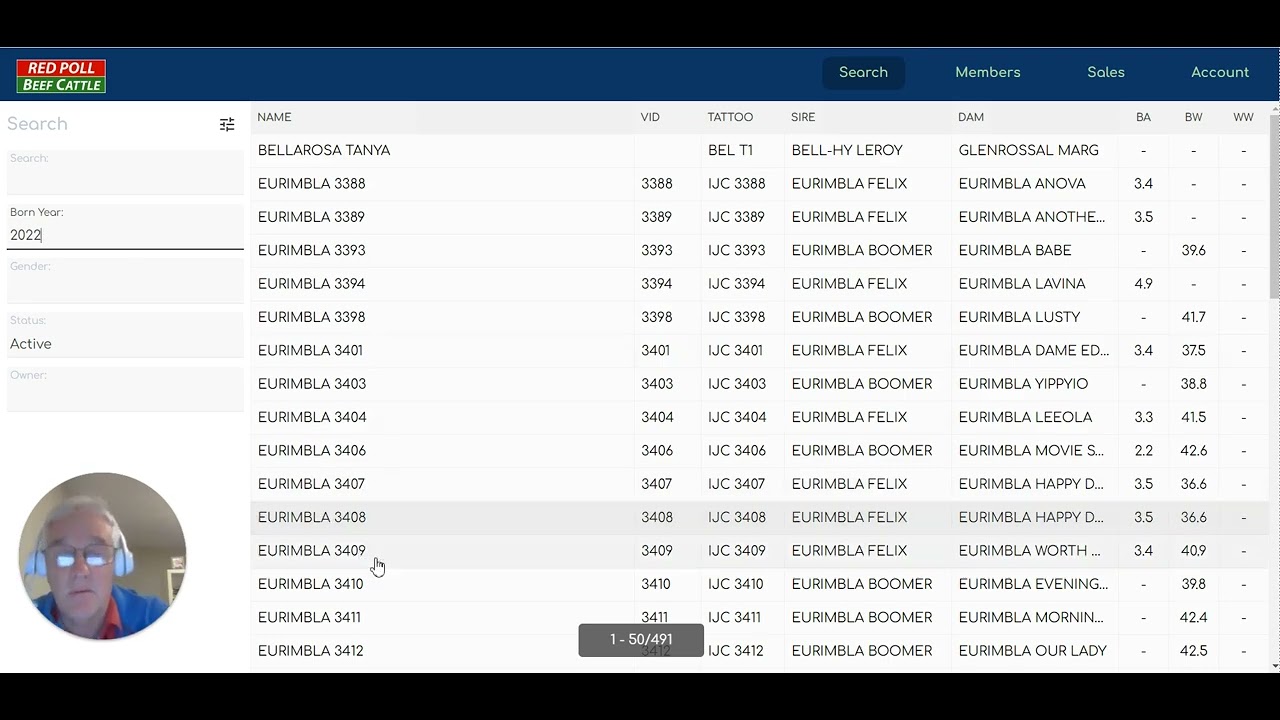
2. *Searching by Born Year:*
Type the desired born year (e.g., 2021) in the search bar to view animals born in that year.
Adjust the born year (e.g., 2022) to see animals born in a different year.
3. *Searching by Animal Name:*
Type the name of the animal (e.g., "titan") to find all animals with that name in the system.
Filter the search results by marking animals as active or inactive.
4. *Refining Search Results:*
Use additional filters such as gender (e.g., females) to narrow down search results.
5. *Exploring Search Results:*
Click on individual animals to view detailed information.
Cautionary Notes:
Ensure accuracy in typing search criteria to obtain relevant results.
Be cautious when marking animals as active or inactive to avoid errors in data representation.
Tips for Efficiency:
Utilize partial animal names for quicker search results.
Experiment with different search criteria to explore various data sets.
Familiarize yourself with the search function to optimize efficiency in finding information.
By following these steps, you can effectively utilize the search function on the RedPoll registry to retrieve specific information about registered animals.
Link to Loom
https://www.loom.com/share/2e8c99131d...
Повторяем попытку...
Доступные форматы для скачивания:
Скачать видео
-
Информация по загрузке: