How to Create a Photo manipulation Composite (ps touch / ps cc 2019)
Автор: Creative Ralph
Загружено: 2021-08-30
Просмотров: 643
Описание:
#photomanipulation#pstouch #pscc #android #pscc2019 #phtoshop #touch
Loving couple photo manipulation tutorial in photoshop Touch | ps touch | PS CC 2019
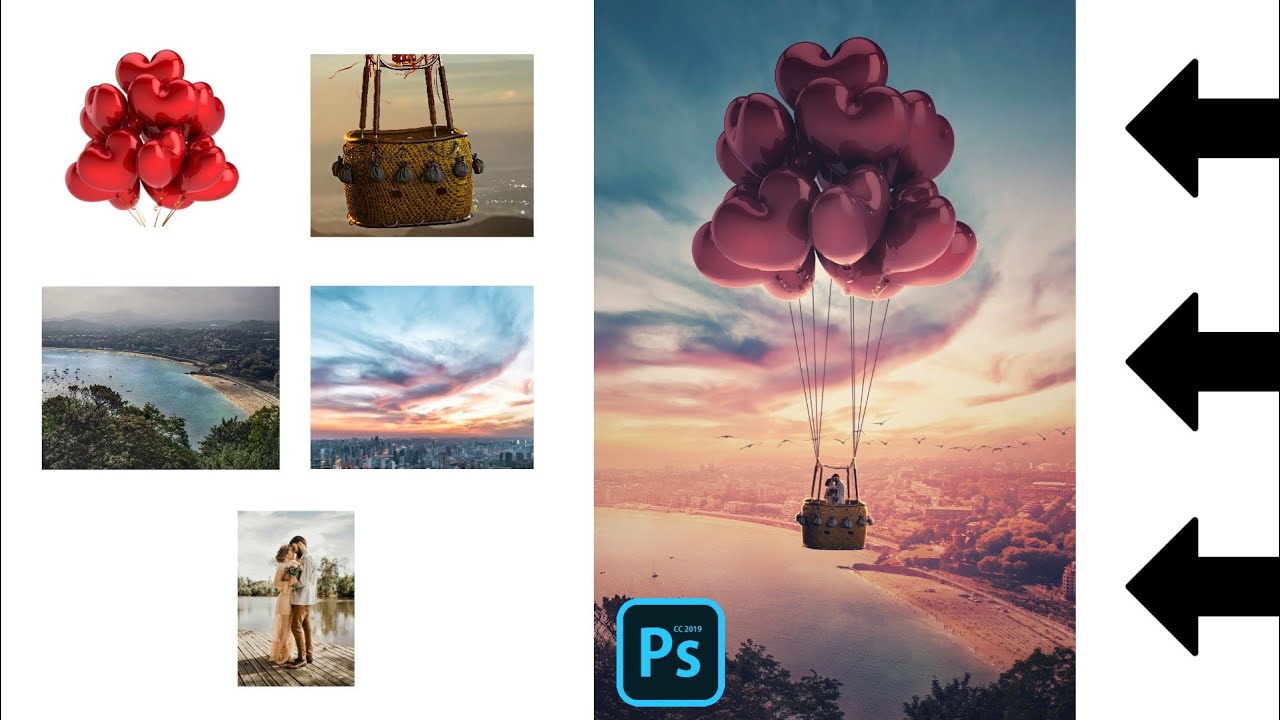
In this photoshop manipulation tutorial am going to show you a very easy and simple way that you can use to this amazing photo manipulation i tilted the loving couple in ps touch and ps cc 2019. This is a fun and easy tutorial that everyone can follow even for beginners or if you are new to photoshop touch( ps touch and ps cc 2019).
So if you like this video and you want more of this then click on the subscribe button and also give a thumbs up for this video because more of this kind of video and other photo manipulation tutorials are coming soon... All you need is an android mobile device and ps touch or ps cc 2019 installed and you good to become and amazing graphics designer and a mobile editor just with a mobile phone.
➖➖➖➖➖➖➖➖➖➖
📥DOWNLOAD📥
PS TOUCH APP ( photoshop touch for android) : • LEGIT Website to download Photoshop touch ...
IMAGE(S) USED: https://drive.google.com/folderview?i...
➖➖➖➖➖➖➖➖➖➖
TIMESTAMPS:
00:00 Introduction
00:11 getting Started with the composition
00:28 adding and positioning the sky
01:00 adding and blending in the landscape to the sky
06:15 Adding and positioning the basket
08:36 importing and positioning the love balloons
09:30 Attaching the love balloons to the basket
13:30 blending the love balloons to the composition
14:02 Creating highlights to the balloons and the basket
17:58 importing and blending the couple image to the composition
21:07 blending some birds in the sky
22:27 color grading in snapseed
➖➖➖➖➖➖➖➖➖➖
IN SUMMARY
Firstly we create our project size of about 1000 x 1500 pixels and then import the sky image after which we imported and blend in the landscape image to it. At this point we started working on our subjects and the first thing we imported was a basket I extracted from an hot air balloon. So to give this more lovely look, i decided to add a love balloon which we then blend in with adjustment and highlights. We then import the couple, position them so it seems like they are in the basket and then blend them in with some adjustments and highlights as well. So moving on, I blended some birds in the sky to add a bit to the photo composition. And I finalize everything with snapseed for the overall color grading.
Повторяем попытку...
Доступные форматы для скачивания:
Скачать видео
-
Информация по загрузке: