How to View your Data Usage | Safe Data Storage
Автор: Safe Data Storage Ltd
Загружено: 2019-06-28
Просмотров: 124
Описание:
As part of our how-to series, we'll be teaching you the ins and outs of our software and what to expect. As always, if at any point you become unsure, please contact our support team, they'll be more than happy to assist you.
Overview:
If you're unaware of your data usage, this video is for you! Follow the onscreen instructions and voice over to navigate your way through the client. If for whatever reason you're unable to listen to the audio, you can follow the script below:
00:06 – 00:15
If you’re unsure of your data usage, you’re always able to view it within the client. Our technical support team will notify you of any pressing issues.
00:15 – 00:21
Login to the backup client with your user credentials and navigate your way to the top right square, labelled report.
00:21 – 00:31
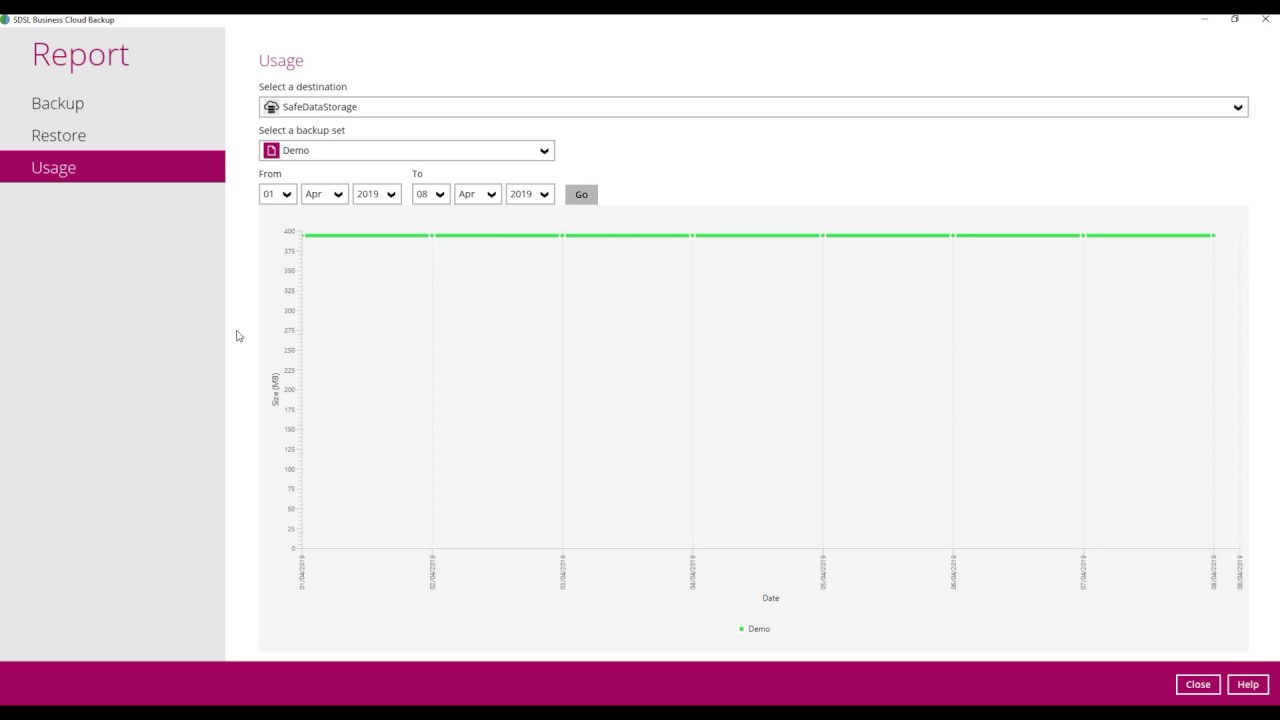
Select the subheading usage on the left side column. If needed, you can filter the dates you would like to see reports for, ranging from the most recent up until the backup set was created.
00:31 – 00:41
The graph presented below will show the volume of data usage over the specified period of time. Additional information can be found through expanding the individual dots along the line.
Links:
Office: 016890661030
Email: [email protected]
Address: Safe Data Storage Ltd | 4a Victoria Works | 6 Fairway | Petts Wood | Kent | BR5 1EG
Website: www.safedatastorage.co.uk
Support Site: support.safedatastorage.co.uk
Повторяем попытку...
Доступные форматы для скачивания:
Скачать видео
-
Информация по загрузке: