Healthcare Website with Bootstrap 5 | Responsive Web Design Tutorial
Автор: youssef benyamine
Загружено: 2026-02-16
Просмотров: 3
Описание:
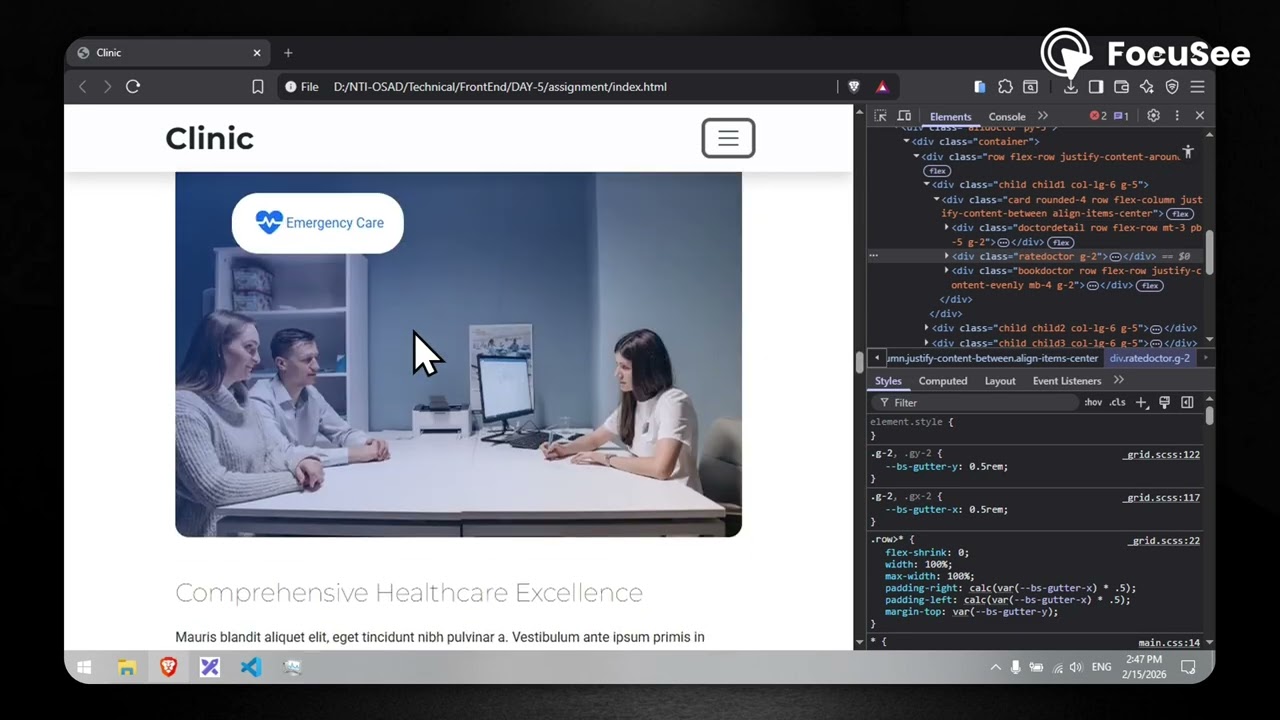
🏥 Healthcare Clinic Website - Full Bootstrap 5 Responsive Design
In this video, I showcase my first web development project built during Week 1 of the NTI Open Source Application Developer Track. This is a fully responsive healthcare clinic website built using Bootstrap 5, HTML5, and CSS3.
🎯 PROJECT OVERVIEW
A modern, professional healthcare website featuring responsive navigation, interactive doctor profiles, department showcases, and custom CSS animations. Built with mobile-first design principles.
✨ KEY FEATURES
✅ Responsive Navigation with Dropdown Menus
✅ Hero Section with Statistics (15+ years, 5000+ patients, 50+ experts)
✅ Interactive Doctor Profile Cards with Availability Status
✅ Featured Departments with Hover Effects
✅ Services Showcase Section
✅ Emergency Contact Call-to-Action
✅ Fully Responsive Design (Mobile, Tablet, Desktop)
✅ Custom CSS Animations and Transitions
✅ Clean, Semantic HTML Structure
💻 TECH STACK
HTML5 (Semantic markup)
CSS3 (Custom properties, Flexbox, Grid)
Bootstrap 5.x (Responsive framework)
Font Awesome (Icons)
Google Fonts (Montserrat, Roboto, Lato)
📚 WHAT YOU'LL LEARN
→ Bootstrap 5 grid system and components
→ Responsive design principles
→ CSS custom properties for theming
→ Creating smooth animations with CSS
→ Mobile-first development approach
→ Semantic HTML for accessibility
🔗 PROJECT LINKS
🌐 Live Demo: [https://yb122.github.io/Clinic/]
📂 GitHub Repository: [https://github.com/YB122/Clinic]
📖 Full Documentation: Available in README
📊 PROJECT STATS
Development Time: 1 week
Lines of Code: 700+ (HTML/CSS)
Responsive Breakpoints: 4 (Mobile, Tablet, Desktop, Large)
Components: 15+ interactive sections
🎓 LEARNING CONTEXT
This project is part of the National Telecommunication Institute's (NTI) Open Source Application Developer Track - Hire Ready Program. Week 1 focused on mastering HTML, CSS, and Bootstrap fundamentals.
💡 WHY THIS PROJECT?
Building a healthcare website teaches essential web development skills:
Professional layout design
User-friendly navigation
Trust-building UI elements
Accessibility considerations
Cross-browser compatibility
🚀 DEPLOYMENT
Deployed on: GitHub Pages
Using: Git, GitHub, CI/CD pipeline
📱 RESPONSIVE TESTING
Tested on:
✅ Chrome, Firefox, Safari, Edge
✅ iPhone, iPad, Android devices
✅ Multiple screen sizes (320px - 1920px+)
🎨 DESIGN HIGHLIGHTS
Color Scheme: Professional medical blue (#165cdd)
Typography: Multiple Google Fonts for visual hierarchy
Layout: Bootstrap grid with custom spacing
Animations: CSS transitions on hover states
Shadows & Depth: Modern card-based design
👨💻 ABOUT ME
I'm a developer in training at NTI's Open Source Application Developer Track, documenting my journey from beginner to hire-ready. This is Week 1 of my structured learning path.
🔔 SUBSCRIBE for more web development projects, tutorials, and coding journey updates!
📧 CONTACT & CONNECT
GitHub: [https://github.com/YB122/Clinic]
LinkedIn: [https://www.linkedin.com/in/youssef-benyam...]
Email: [[email protected]]
#Bootstrap #WebDevelopment #HTML #CSS #ResponsiveDesign #FrontendDevelopment #WebDesign #BootstrapTutorial #NTI #CodingJourney #WebDeveloper #Programming #Tutorial #Healthcare #WebsiteDesign
---
💬 QUESTIONS?
Drop them in the comments below! I'll respond to every question.
👍 If this helped you, please like and subscribe!
⭐ Star the GitHub repo if you find the code useful!
---
© 2025 [YoussefBenyamine] | NTI Open Source Developer Track
Повторяем попытку...
Доступные форматы для скачивания:
Скачать видео
-
Информация по загрузке: