IMA 2026 Congress Registration and Payment Guide
Автор: Meetopia
Загружено: 2026-03-04
Просмотров: 12
Описание:
IMA 2026 Congress Registration and Payment Guide
Part 1: Congress Registration
Step 1: Select Registration Type
At the top of the page, select your appropriate registration type (e.g., Professional, Student, Accompanying person). The system will automatically display the corresponding fee based on the Early-bird or Standard timeline.
Step 2: Confirm Personal Information
Fill in or verify your basic details, including Full Name, Affiliation, Country, Gender, Email, and Cellphone number.
Step 3: Enter Discount Code
Input an applicable Discount Code in this field, if you have one (Optional).
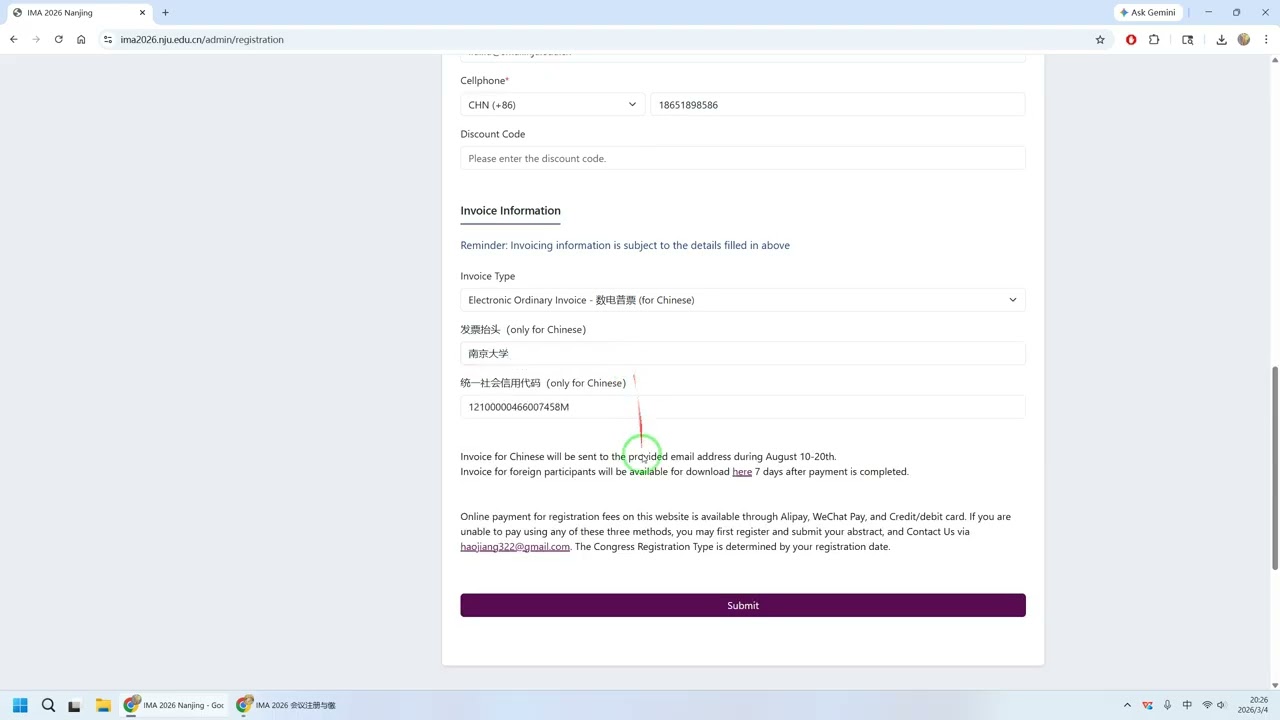
Step 4: Confirm Invoice Information
Foreign attendees should select Invoice for foreigner and provide billing details. Chinese attendees should select the ordinary invoice option and provide the Invoice Title and 18-digit Unified Social Credit Identifier.
Step 5: Initiate Payment
Review the Order Information at the bottom, select the NJUPay card, and click the purple Pay the order button to proceed to payment. If you need to modify your information, click the red Update button.
Part 2: Order Payment
Step 6: Choose Payment Method and Complete Transaction
Upon reaching the Campus Unified Payment Platform, choose one of the following options:
Option A - QR Code Payment (Alipay/WeChat): Click the 二维码支付 (Qrcode payment) icon, then click the green 确认支付 (Confirm payment) button. Scan the QR code displayed in the pop-up window using your mobile Alipay or WeChat app to pay.
Option B - Foreign Currency (International Cards): Click the 外币支付 (FOREIGN CURRENCY) icon. Note that a 2.80% service charge will be added to the total amount. Click the green Enter button. You will be redirected to the ICBC secure gateway, where you must enter your Card Number, Expiry Date, CVV2/CVC2, and the displayed Verification Code, then click Confirm.
Повторяем попытку...
Доступные форматы для скачивания:
Скачать видео
-
Информация по загрузке: