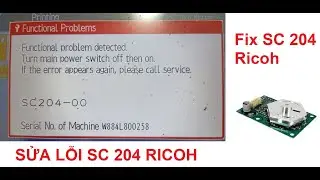
Laser Error sc202 sc203 sc204 sc210 sc220 Copier RICOH MPC3002 MPC3502
Автор: COPY-EXPERT by Tomasz Jemiołek
Загружено: 2018-10-24
Просмотров: 55797
Описание:
Removing the laser optics housing unit RICOH Aficio MPC3002 MPC3502 MPC4502 MPC5502 and Installing a new Polygon Mirror Motor and Drive Board
Before removing the old laser optics housing unit
Do the following settings before removing the laser optics housing unit. These are adjustments for skew
adjustment motors in the laser optics housing unit.
1. Plug in and turn on the main power switch of the copier.
2. Enter the SP mode.
3. Execute SP2220-001 to clear the L2 lens positioning motor setting for Magenta.
4. Execute SP2220-002 to clear the L2 lens positioning motor setting for Cyan.
5. Execute SP2220-003 to clear the L2 lens positioning motor setting for Yellow.
6. Exit the SP mode
After installing the new laser optics housing unit
Do the following adjustment after installing the new laser optics housing unit.
1. Plug in and turn on the main power switch.
2. Adjust the main scan magnification only for black (Bk).
• Input the standard value [A] provided with a new laser optics housing unit for the main scan
magnification adjustment with SP2-185-001.
• The value [A] is different for each laser optics housing unit.
• Print the test pattern (14: 1-dot trimming pattern in the SP2-109-003).
• Check that the left and right trim margin is within 4 ± 1 mm. If not, change the standard value
for the main scan magnification adjustment.
3. Adjust the main scan registration only for black (Bk).
• Input the registration value [B] provided with a new laser optics housing unit for the main scan
registration adjustment with SP2101-001.
• The value [B] is different for each laser optics housing unit.
• Print the test pattern (14: 1-dot trimming pattern in the SP2-109-003).
• Check that the left trim margin is within 2 ± 1 mm. If not, change the registration value for the
main scan registration adjustment.
4. Select "0" with SP2-109-003 after printing the "1-dot trimming pattern.
5. Do the line position adjustment.
• First do SP2-111-3.
• Then do SP2-111-1.
4. Replacement and Adjustment
230
To check if SP 2-111-1 was successful, watch the screen during the process. A message is
displayed at the end. Also, you can check the result with SP 2-194-10 to -12.
6. Exit the SP mode.
After you replace the housing unit, do the adjustments in the following section of the manual: Image
Adjustment – Registration.
After installing the polygon mirror motor:
• 1) Do the "Forced Line Position Adj. Mode c" (SP2-111-3).
• 2) Then do the "Forced Line Position Adj. Mode a" (SP2-111-1).
To check if SP2-111-1 was successful, watch the screen during the process. A message is displayed at
the end. Also, you can check the result with SP2-194-10 to -12.
After you replace the motor, do the adjustments in the following section of the manual: Image Adjustment
– Registration.
ERROR RICOH:
SC202 Polygon motor error - Defective polygon motor - Replace the polygon motor / Replace the laser optics housing unit
SC203 Polygon motor error 2 - Defective polygon motor - Replace the polygon motor.
SC204 Polygon motor error 3 - Defective polygon motor - Replace the polygon motor
SC210-01 SC210-02 SC210-03 SC210-04 Laser synchronizing detection error: end position - Replace the laser optics housing unit
SC220-01 SC220-02 SC220-03 SC220-04 - Laser synchronizing detection error: start position - Replace the laser-synchronizing detector
YOUTUBE SUPPORT: / @mrricoh
PATREON: / copyexpertmoviestudio
PATRONITE: https://www.patronite.pl/1796
📽Camera: CANON EOS250D
🎬 Plan lighting: Sachtler Reporter 200D
🎤 Microphone: Trust GXT 252 + Emita Plus Steraming
💻 Movie editing program: WonderShare Filmora
Copier parts http://www.copy-expert.pl/
Facebook: / copy-expert-113431678801597
Used copier parts http://www.copy-expert.com/
Are you interested in cooperation? That's good.
📧 Please contact: [email protected]
#laser #ricoh #MPC3002 #error #service #copier
Повторяем попытку...

Доступные форматы для скачивания:
Скачать видео
-
Информация по загрузке: