LLM-Driven Architectural Massing | Rhino Grasshopper C#
Автор: Wickerson Studios
Загружено: 2026-01-02
Просмотров: 283
Описание:
Wickerson Studios — vCAD4.x “LLM-Driven Architectural Massing” Script Series (R&D Services 2026)
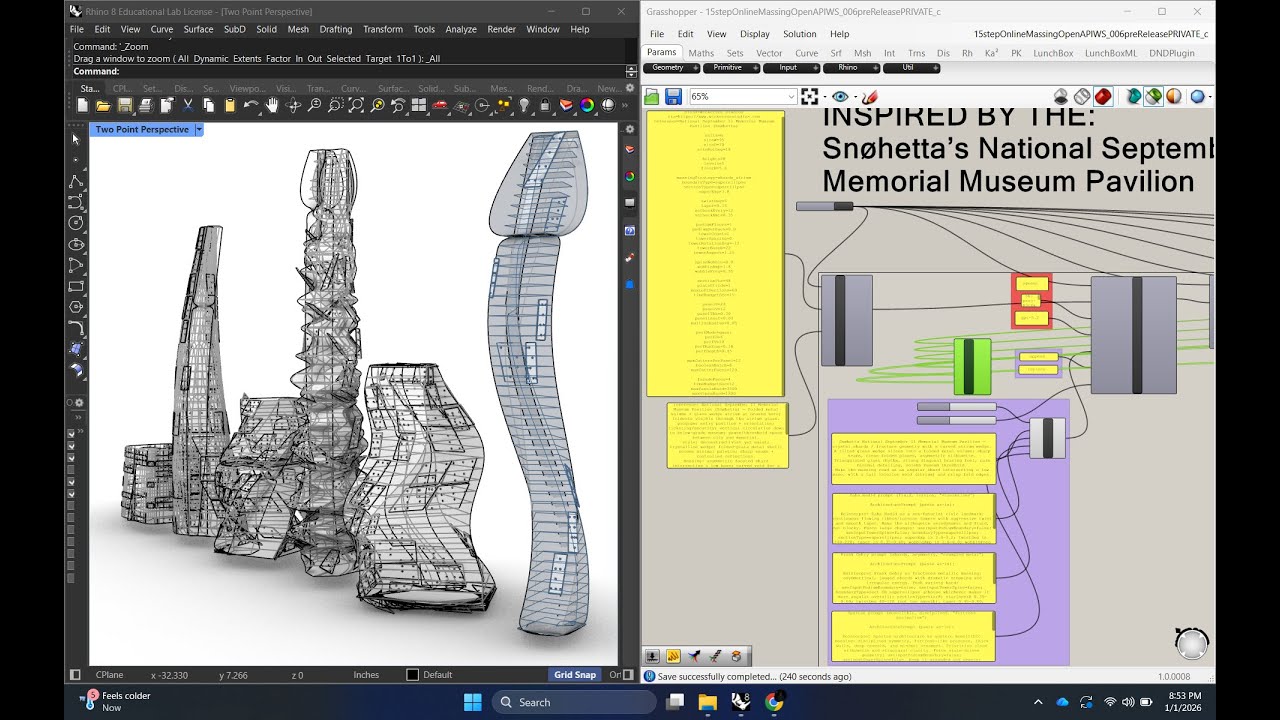
This Grasshopper C# STEP_00 → STEP_10 pipeline is a production-minded research system for generating high-LOD architectural massings and 3D CAD geometry assemblies from compact text control strings (cfg) plus narrative intent channels (sfg)—optionally driven by an OpenAI key for rapid design iteration and style steering.
At its core, the series separates design intent (cfg/sfg + prompt) from geometry execution (floorplates → massing → façade → perforation → packaging), so you can iterate quickly without breaking downstream geometry.
What this system does
1) Converts “design intent” into deterministic parametric controls
cfg (configuration) stores canonical numeric + discrete knobs that downstream steps always read (height, levels, siteW/siteD, taper, twist, setbacks, panelization counts, perforation density, performance caps, etc.).
sfg (structured focus guidance) stores multi-channel “intent text” like:
reference: (architectural precedent / source concept)
program: (use + occupancy)
style: (material + language)
massing: (tower/podium logic)
facade: (panel/diagrid/perf logic)
math: (Fourier wobble / twist / taper)
The system normalizes synonyms and ensures defaults so every downstream STEP always has valid inputs.
2) Generates buildable 3D architectural assemblies at high LOD
Downstream steps produce:
Floorplates, cores, plates, spines
Lofted massing Breps (taper/twist/setbacks/wobble)
Panel + mullion façade systems
Perforation cutters and optional boolean cutting (performance-safe)
Final packaging outputs (layer-tagged Breps/Curves) for baking/export
3) Stays “solver-safe” in Grasshopper
The series includes performance controls and “safe” strategies to prevent:
runaway boolean operations
exploding panel counts
document update re-solve loops (especially in bake/export steps)
STEP-by-STEP overview (the pipeline)
STEP_00 — Init / State / Defaults
Creates the EngineState JSON that travels through the whole pipeline.
Parses cfg + sfg, normalizes keys, applies defaults, derives selections (archetype/reference).
Output: STATE_OUT + readable debug logs + effective cfg.
Why it matters: every later step relies on canonical keys coming out of STEP_00 so the system behaves consistently even with messy user input.
STEP_01b — LLM / Prompt → cfg+sfg Generator
Takes an “ArchitecturePrompt” (often derived from a reference image or precedent) and generates deterministic cfg overrides so the prompt always visibly changes geometry.
Merges overrides into state (append/replace modes).
Output: updated STATE_OUT, CFG_MERGED, SFG_MERGED, plus an explicit CFG_OVERRIDE.
Why it matters: this is the “creative steering wheel”—fast iteration across distinct architectural families (twin towers, podium+tower, courtyard ring, shards/atrium, stepped ziggurat, etc.).
STEP_02 — Floorplates
Reads canonical cfg (siteW/siteD/levels/floorH/sectionType/rotation…)
Generates floorplate curves (and optional podium logic).
Output: plate curves, level planes, basic structural guides.
STEP_03 — Massing
Converts floorplate logic into true 3D building bodies:
lofted tower Breps
taper/twist/setbacks
optional skybridge / multi-tower spacing
Output: MassingBreps (+ reference curves/spines as needed).
STEP_04 — Façade System v1 (Panels + Mullions)
Derives façade segmentation from massing:
panel grids (U/V)
mullions / frame primitives
panel thickness/inset
Output: PanelBreps, MullionBreps, plus tag streams for packaging.
STEP_05 — Bake-Ready Panels (SAFE + CAPPED)
Selects/buckets façade elements to keep computations realistic:
caps per façade zone
batching logic
avoids “boolean everything” failure modes
Output: curated Breps for downstream perforation / export.
STEP_06 — Perforation System
Generates perforation cutters first (fast + inspectable).
Optional boolean cutting (guarded by caps/time budgets).
Output: PerforationCutters, optional PerforatedPanels, plus performance logs.
STEP_07 / STEP_08 / STEP_09 — Assembly + Optimization + Export Prep (optional but common)
Depending on your build, these nodes typically handle:
assembly consolidation (AllBreps/AllCurves)
tagging (LayerTags…)
performance caching / simplified previews
JSON/GIS/IFC prep (when applicable)
STEP_10_SAFE — Packaging / Bake to Rhino (Edge-Triggered)
Bakes Breps/Curves into Rhino once per toggle (False→True).
Sorts by LayerRoot + tag-based sublayers, optional grouping.
Avoids doc-event infinite loops by design.
Output: baked object IDs + report.
Why this matters for Wickerson Studios R&D (2026)
A platform, not a one-off script
This series is a research-grade generative architecture framework:
fast concept exploration
consistent parametric control
repeatable results across client briefs
expandable step architecture (drop-in new “STEP modules”)
Built for services + deliverables
Wickerson Studios can deploy this pipeline for:
files at www.wickersonstudios.com
Повторяем попытку...
Доступные форматы для скачивания:
Скачать видео
-
Информация по загрузке: