ycliper

Популярное

Музыка Кино и Анимация Автомобили Животные Спорт Путешествия Игры Юмор

Интересные видео

2025 Сериалы Трейлеры Новости Как сделать Видеоуроки Diy своими руками

Топ запросов

смотреть а4 schoolboy runaway турецкий сериал смотреть мультфильмы эдисон
Скачать

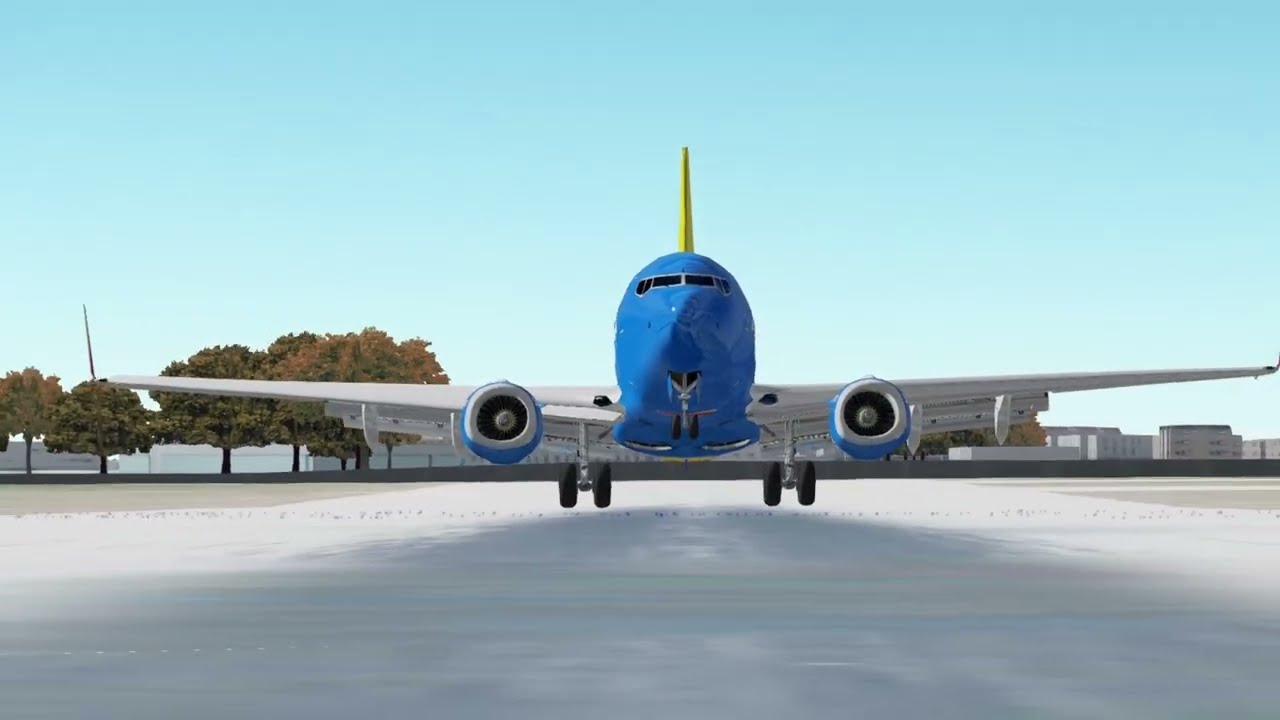
How to use Sky Dolly v0.3

Автор: GGamerGGuy Addons

Загружено: 2026-01-22

Просмотров: 21

Описание: Note: You cannot delete or edit a single keyframe without deleting everything.

Get GeoFS Sky Dolly: github.com/tylerbmusic/GeoFS-Sky-Dolly/blob/main/userscript.js
GeoFS Sky Dolly is based on this MSFS2020 addon: flightsim.to/file/9067/sky-dolly

How to use GeoFS Sky Dolly:
If you haven't already, download the script.
Then, go to GeoFS. At the bottom, you'll see a button titled "Addon Settings". Click that and scroll down to Sky Dolly. Click the "Open GUI" button. This will open a window with all of the controls and things that Sky Dolly uses.

To start a recording, press the "Start Recording" button, then fly around.
When you're done recording, press the "Stop Recording" and "Pause" buttons. Don't forget to save the flight by pressing the orange "Save" button.

To see your recorded flight, drag the time slider to zero and fly or taxi your aircraft to a spot somewhere near your recording's starting place. Then, press "Start Playback" to spawn the recorded aircraft. Press "Play" to unpause the recording.

If you want to see a visualization of your recorded flight path, drag the time slider to the end of the recording, press "Visualize Flight Paths", and wait for a colored line to appear.
This colored line shows exactly where your aircraft went, until the point that the time slider is at.
To remove the visualization, press "Remove Flight Path Visualization."

Sky Dolly also has a camera animation feature, similar to the Replay Mod for Minecraft. To use it, press the "Initialize Camera" button. Your view will automatically be updated to "Free Cam". A black bar will appear at the top of the screen. Inside of the bar, there is a grey time slider, which functions exactly like the one in the Sky Dolly window. Directly below the time slider, there is a darker grey bar for keyframes. Below the black bar, there is a series of buttons.

Once you're ready to record the animation, go to the first keyframe and press the "Start Recording" button. If your framerate is less than 30, it might be a good idea to press the "Set sim speed to one fourth" button first, and speed up the footage later. When you press the "Start Recording" button, the UI will automatically hide and a popup will appear prompting you to select something to record. Select "window", then select the window that has Geo F S.
At the end of your animation, press the "Stop sharing window" button. Once finished processing, a video called "capture.webm" will download.
To exit the camera animation mode, reload the page. This will clear all of your keyframes.

In addition to recording, Sky Dolly is perfect for practicing formation flights without any friends! If you have my Utilities Addon, you can press "Q" to toggle aerobatic smoke. Smoke will show in the recording, even if there are multiple aircraft using it.

Не удается загрузить Youtube-плеер. Проверьте блокировку Youtube в вашей сети.
Повторяем попытку...
How to use Sky Dolly v0.3

Поделиться в:

Доступные форматы для скачивания:

Скачать видео

  • Информация по загрузке:

Скачать аудио

Похожие видео

20 РЕАЛИСТИЧНЫХ СИМУЛЯТОРОВ ВОЖДЕНИЯ! ЛУЧШИЕ СИМУЛЯТОРЫ НА ПК 2025!

20 РЕАЛИСТИЧНЫХ СИМУЛЯТОРОВ ВОЖДЕНИЯ! ЛУЧШИЕ СИМУЛЯТОРЫ НА ПК 2025!

Пилотаж на Як-52 в симуляторе, такой же как и вреальности? Пилот расскажет и покажет

Пилотаж на Як-52 в симуляторе, такой же как и вреальности? Пилот расскажет и покажет

Cessna 172 Ground School Class 1

Cessna 172 Ground School Class 1

ОБЫЧНЫЙ VPN УМЕР: Чем обходить блокировки в 2026

ОБЫЧНЫЙ VPN УМЕР: Чем обходить блокировки в 2026

25 Запрещенных Гаджетов, Которые Вы Можете Купить Онлайн

25 Запрещенных Гаджетов, Которые Вы Можете Купить Онлайн

Интернет подключён, но сайты не открываются — 5 рабочих способов (Windows)

Интернет подключён, но сайты не открываются — 5 рабочих способов (Windows)

Потери России и Украины в период СВО. Разбор и анализ.

Потери России и Украины в период СВО. Разбор и анализ.

Для Чего РЕАЛЬНО Нужен был ГОРБ Boeing 747?

Для Чего РЕАЛЬНО Нужен был ГОРБ Boeing 747?

Как Windows деградировала: ME, Vista, 8 и путь к Windows 11

Как Windows деградировала: ME, Vista, 8 и путь к Windows 11

Чем ОПАСЕН МАХ? Разбор приложения специалистом по кибер безопасности

Чем ОПАСЕН МАХ? Разбор приложения специалистом по кибер безопасности

Полный полет на A320 в Microsoft Flight Simulator 2024 | Гайд со всеми фазами полета

Полный полет на A320 в Microsoft Flight Simulator 2024 | Гайд со всеми фазами полета

Потянет ли VR на слабом ПК? Тест Pimax Crystal Light на i9-9900K и GTX 1080 Ti

Потянет ли VR на слабом ПК? Тест Pimax Crystal Light на i9-9900K и GTX 1080 Ti

Как НА САМОМ ДЕЛЕ работает GoodbyeDPI и Zapret?

Как НА САМОМ ДЕЛЕ работает GoodbyeDPI и Zapret?

31 ФАКТ ПРО АВИАЦИЮ — то, чего вы хотели спросить у пилота

31 ФАКТ ПРО АВИАЦИЮ — то, чего вы хотели спросить у пилота

Сборка и испытательный полет симулятора движения

Сборка и испытательный полет симулятора движения

Почему НЕЛЬЗЯ включать это в Telegram! Защити себя ПРОСТЫМ и ЗАКОННЫМ способом

Почему НЕЛЬЗЯ включать это в Telegram! Защити себя ПРОСТЫМ и ЗАКОННЫМ способом

VPN НЕ ПОМОЖЕТ: РКН Закрывает Интернет в 2026

VPN НЕ ПОМОЖЕТ: РКН Закрывает Интернет в 2026

Самые страшные приземления при боковом ветре, снятые на камеру

Самые страшные приземления при боковом ветре, снятые на камеру

TV приставка для просмотра видео с Home Assistant и добавлением Wifi Tuya устройств локально.

TV приставка для просмотра видео с Home Assistant и добавлением Wifi Tuya устройств локально.

Удивительный процесс изготовления пуль для боеприпасов на местном заводе.

Удивительный процесс изготовления пуль для боеприпасов на местном заводе.

© 2025 ycliper. Все права защищены.


  • Контакты
  • О нас
  • Политика конфиденциальности


Контакты для правообладателей: [email protected]