mobi.Resource - User Creation Training
Автор: mobi corp
Загружено: 2014-06-26
Просмотров: 28
Описание:
Http://www.mobicorp.com
In today's training video, you will learn how to create a user in mobi.Resource.
---------------------------------------------
Welcome to Mobi Resource.
Today we are going to walk through the creation of a user.
First we will login with an administrative user that is authorized to create additional users.
Upon logging into the application, you will notice all the modules that a user is entitled to access.
Today we will be looking at mobi Resource.
Upon clicking the mobi resource icon, you will be presented with a summary screen that displays a pleathera of information. From organization levels to Points of interest.
Mobi resource allows you to manage all of the company's resources in one easy to manage location
For today's purpose, we are focusing on user creation.
Let's select the Users icon in the lower left hand side of the screen.
You will notice the user screen displays the usernames, Displays weather the user has Administrative access or not, as well as the first name, last name, and email address.
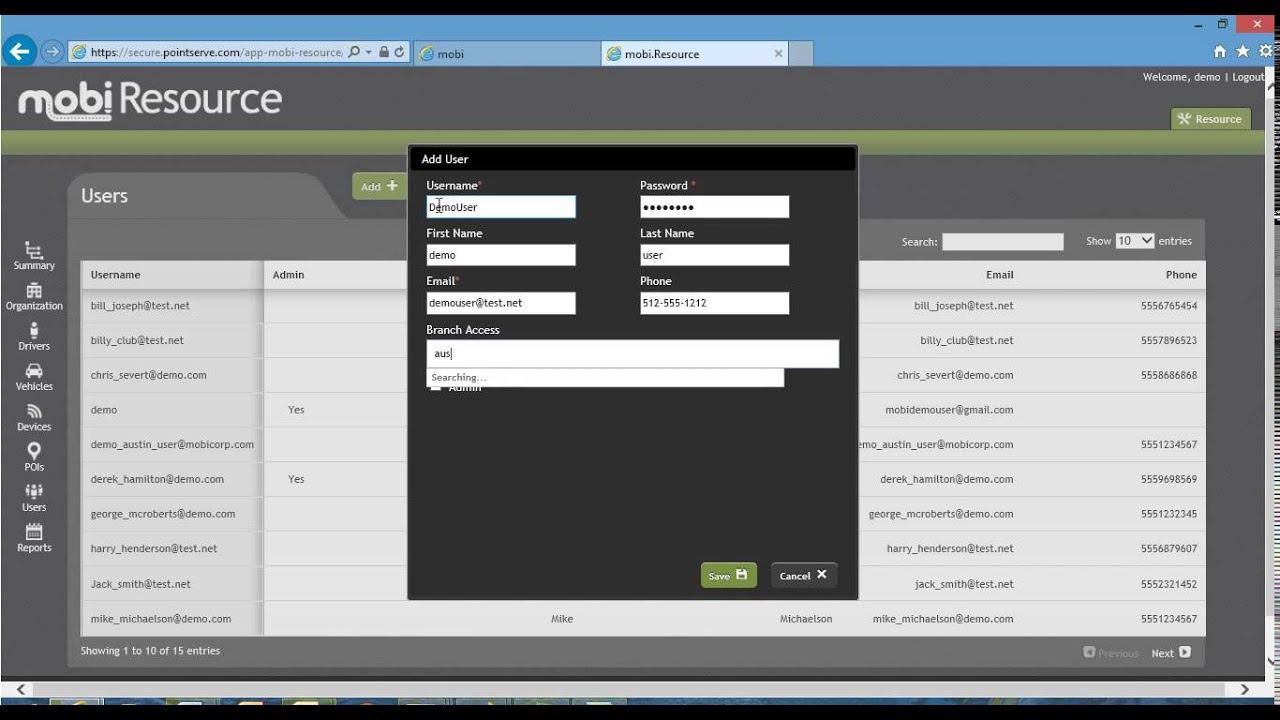
To begin user creation, Click on the Add icon in the top center portion of the screen.
In this screen, we will add the username, Password, First Name, Last Name, Email address, Phone number and Branch access.
The only required fields in this form are the username, password and email address.
Upon completion of the form, click the save icon in the lower right hand side of the screen.
We will now be taken back to the User Summary Screen.
Next let's verify the user you created,
In the upper right hand corner of the screen, there is a search field that you can utilize to search for the user you just created.
Type the name and you will notice the user list is automatically narrowed to display the user that meets the search criteria.
You can select the user by clicking on the name to edit or view information about the user.
You will also notice the ability to remove the user in the lower left hand corner. For our purposes today, we will click cancel, which brings us back to the main user summary screen.
Congratulations. You just learned how to create your first user in the Mobi Resource module.
If you have any question on this training module, please contact our support staff at [email protected].
Повторяем попытку...
Доступные форматы для скачивания:
Скачать видео
-
Информация по загрузке: