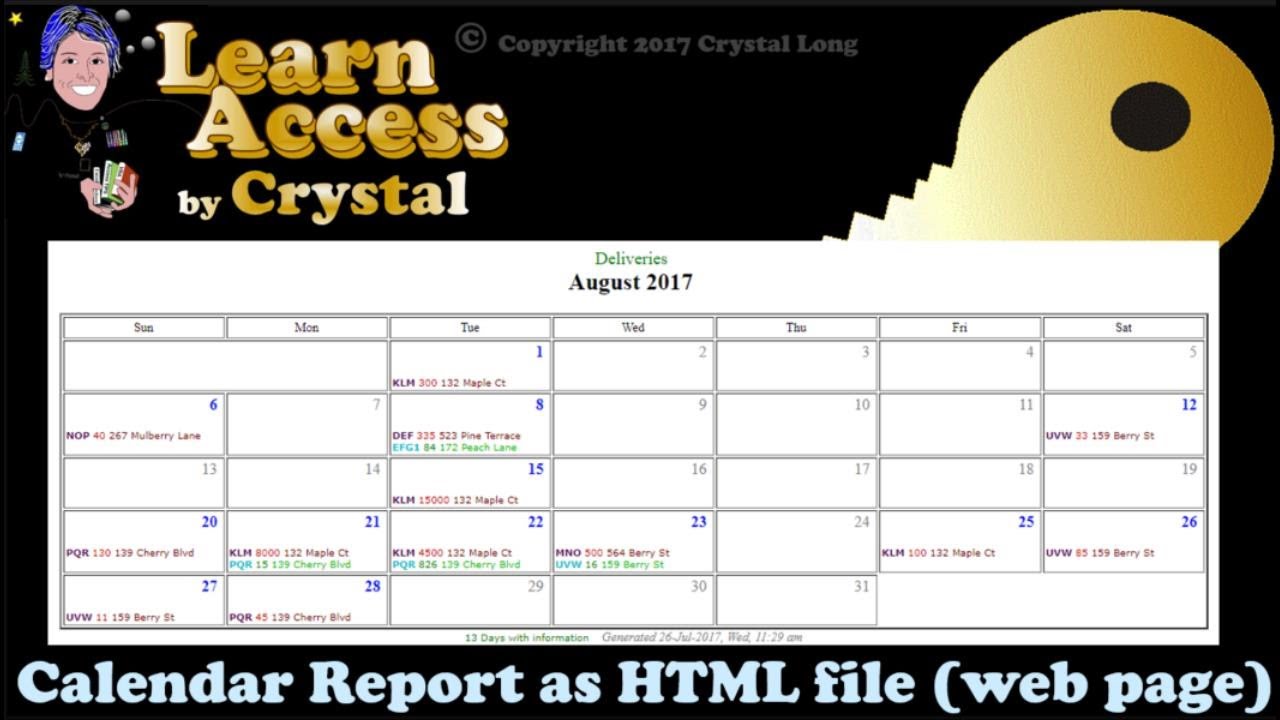
How to Create Calendar Reports from Access Queries with dates! ... as shareable Web Pages
Автор: LearnAccessByCrystal
Загружено: 2017-07-27
Просмотров: 38465
Описание:
Have you created a query with information for a calendar? ... and then, abra-cadabra, the calendar is done?! I am going to show you how to make that happen.
Visualize your data! ... really see it
To use the code to create a calendar from a query, simply import the (only) module (mod_HtmlCalendarReport_s4p) from the download (see link below) into your working database (and then compile and save, of course). You can get the same code by choosing File, Import in the VBE (Visual Basic Editor -- Alt-F11) and choosing the BAS file.
Importing VBA doesn't, of course, include easy-to-launch macros (even though the macros run VBA procedures) ... triggering them is a snap -- especially if you use a menu form with buttons and other controls.
Please, as you make changes, rename the 'test' procedures to have more meaningful names depending on how you customize them and how they are used. And add your own comments ... and indent?
If you feel like sharing, your ideas are welcome, and appreciated.
Download free tool:
https://msaccessgurus.com/tool/HtmlCa...
Using vba:
Application.FollowHyperlink Create_HtmlCalendar(sQueryName)
will open a web page with the calendar created from the query specified by sQueryName
The Create_HtmlCalendar function creates the calendar as an HTML file (web page)
it returns the path and filename when done.
You have a calendar file you can email and share with others.
add your own Error Handling
What do you need to know to use this feature?
If you are a seasoned expert, no explanation needed ...
but for those of you who want to use this ... but don't quite understand yet -- take a breath and see things from a different perspective. Don't be overwhelmed. It is quite simple, once you get past the code thing. Just line up the data you want to show in the calendar using a query. Name the fields what is expected. Define some field, or calculation, to be CalDate, and then, optionally, the calendar title (CalTitle), and up to 3 pieces of text (Text1, Text2, Text3) to show on days.
Once you have the query ... use it to make a calendar. You do not need to understand each line of this code to use this feature in YOUR databases ... only how to call it to make it give you what you want
... but if you want to take the time to understand, that is great. Ask questions below if you need help -- and remember, if you don't know, chances are that someone else doesn't either. I want to give you a good tool -- and share my love of Access. Realize that if you do ask questions, the 'answers' may just lead you to find the answers yourself -- learning never stops.
to make things really easy ...
There is a macro in the sample database that asks for a query name and then ... presto! a calendar is displayed!
... and it even works for parameter queries, which I do say lightly because not near enough testing was done. If you can reproduce a problem (for instance, date might be a problem for non_American and non-ISO formats), please post a comment specifying the details, and let's all fix it.
A Calendar Report for one month will be made as an HTML file (web page) -- so everyone with a browser, which is just about everyone! can see it too!
It just doesn't get any easier than this! Access is wonderful.
Please Like, Comment, and Share with your friends. Thank you.
Through sharing, we will all get better.
respectfully,
crystal
http://msaccessgurus.com/
~ have an awesome day ~
Повторяем попытку...
Доступные форматы для скачивания:
Скачать видео
-
Информация по загрузке:

![Best of Deep House [2026] | Melodic House & Progressive Flow](https://imager.clipsaver.ru/Il-ZpBuC8tA/max.jpg)