How to Record Scripted Browser Demos with Webreel by Vercel Labs
Автор: Eddy Says Hi #EddySaysHi
Загружено: 2026-03-15
Просмотров: 21
Описание:
Stop struggling with manual screen recordings and say hello to pixel-perfect automation! 🎬 In this video, we’re diving deep into webreel, a powerful tool from Vercel Labs that lets you record professional browser demos using simple scripts. 🚀
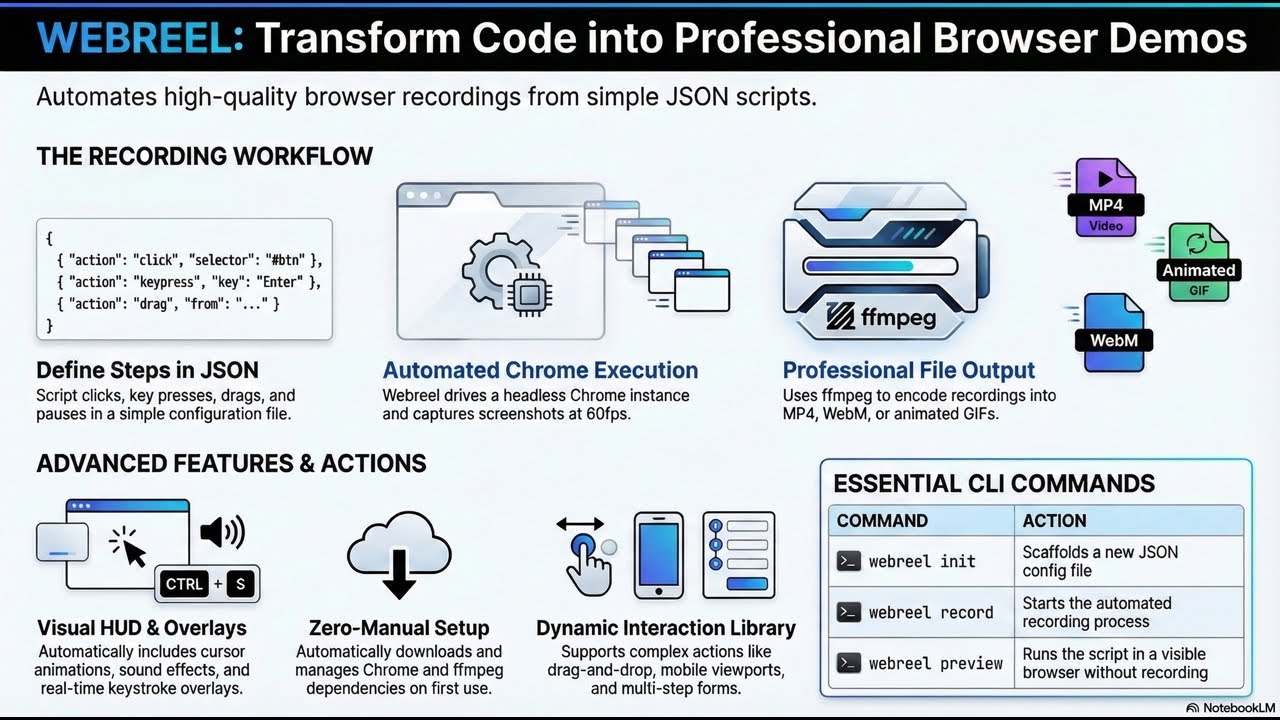
Webreel takes your JSON configurations and turns them into high-quality videos complete with smooth cursor animations, keystroke overlays, and even sound effects! 🎵 No more re-recording a ten-minute demo just because you made a typo—simply update your script and let webreel drive a headless Chrome instance to capture everything at a crisp 60fps. 🎞️
What makes webreel a game-changer for developers and creators? ✨ Automated Polish: Includes a built-in HUD for keys and realistic cursor movements
✨ Format Flexibility: Export your demos as MP4, WebM, or even animated GIFs
✨ Full Control: Script complex actions like drag-and-drop, page scrolling, and modifier-key clicks
✨ Mobile Ready: Easily record in mobile viewport dimensions for responsive app demos
✨ Developer Friendly: Built with TypeScript and powered by ffmpeg and Chrome, which it even downloads for you automatically
Whether you are building documentation, marketing assets, or just showing off your latest side project, webreel ensures your demos are reproducible and look stunning every single time. 🌟
GitHub - vercel-labs/webreel: Record scripted browser demos as video · GitHub
#Webreel #VercelLabs #BrowserAutomation #WebDev #SoftwareDemo #CodingTools #HeadlessChrome #TypeScript #DevTools #Automation #TechTutorial
Повторяем попытку...
Доступные форматы для скачивания:
Скачать видео
-
Информация по загрузке: