ycliper

Популярное

Музыка Кино и Анимация Автомобили Животные Спорт Путешествия Игры Юмор

Интересные видео

2025 Сериалы Трейлеры Новости Как сделать Видеоуроки Diy своими руками

Топ запросов

смотреть а4 schoolboy runaway турецкий сериал смотреть мультфильмы эдисон
Скачать

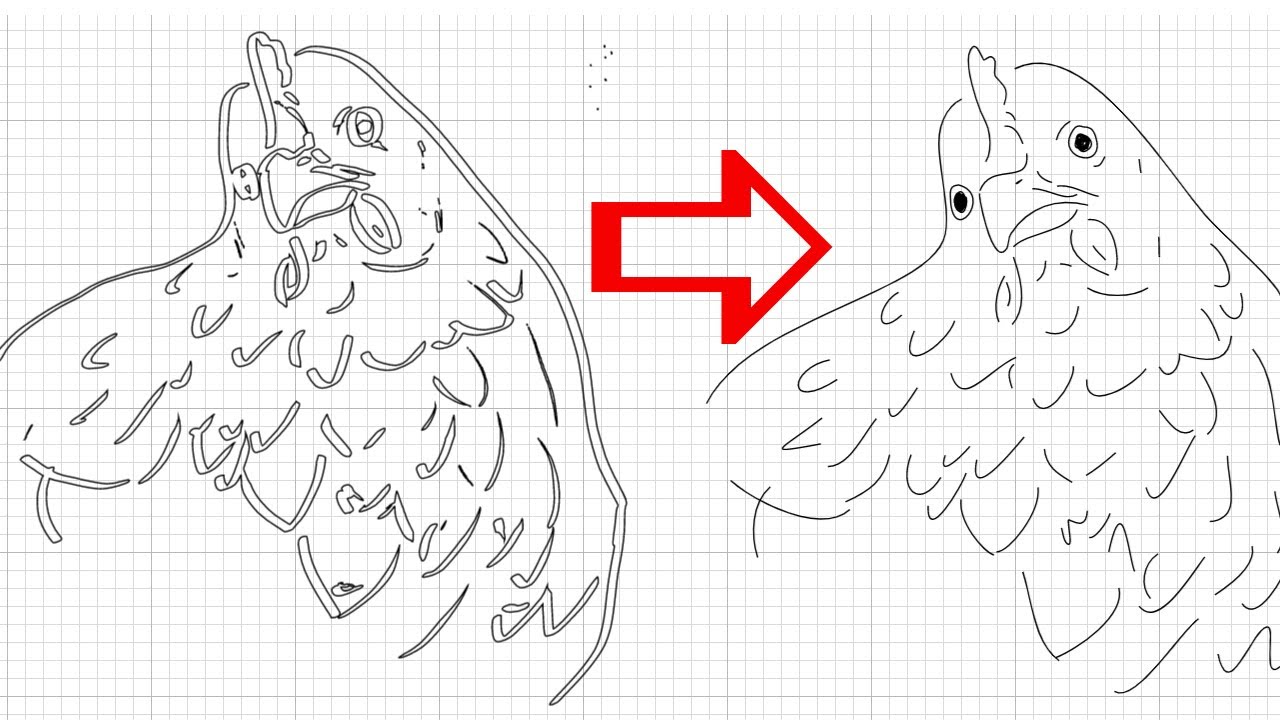
How to get the Draw function on a Cricut Maker to actually work

Автор: H Grimes

Загружено: 2022-12-04

Просмотров: 16540

Описание: Some Cricut machines are capable of drawing. Well, supposedly. Unlike the cut function though, the draw function on these machines is not at all user friendly! Unless you want an outline of every line you drew. After wasting many hours trying out what feels like every tutorial on the internet on this topic only to have nothing actually work, I eventually figured something else out. I've done so much mucking around that I'm bound to forget what worked by tomorrow, so I decided to add yet another tutorial video to the mix on youtube for keepsake and in the hopes it helps another tired, frustrated soul out there. Best wishes, cricut friends.

If your design is simple and you don't mind some resketching, it's not so difficult.

Download Inkscape: https://inkscape.org/

Step-by-Step Instructions:
1. Download Inkscape.
2. Open Inkscape, create a new document.
3. Import your original drawing. Resize it to fit on the canvas.
4. Add a second layer.
5. Reduce the opacity of the first layer (your original drawing) to 20%.
6. Switch back to the second layer.
7. Click on the "Draw freehand lines" tool. For mode, select "Create regular Bezier path". For smoothing, change to 50.
8. Draw first line. Change opacity to 100. Go to "Fill and Stroke" menu. For fill, select X for no fill. For stroke paint, select the first filled in square for Flat color. For stroke style, change width to the width of the cricut pen you will be using.
9. Draw the remaining lines.
10. Save the file as an SVG file. Then delete the first layer. Save again as a separate SVG file.
11. Upload the second file (the one with the single layer) into Cricut Design Space.
12. Add to canvas. Then lastly click "attach" to combine all the stroke layers into one. Then go ahead and make it!

Не удается загрузить Youtube-плеер. Проверьте блокировку Youtube в вашей сети.
Повторяем попытку...
How to get the Draw function on a Cricut Maker to actually work

Поделиться в:

Доступные форматы для скачивания:

Скачать видео

  • Информация по загрузке:

Скачать аудио

Похожие видео

Upload Drawings to make Decals in Cricut Design Space | Turn Kids Drawings into SVGs

Upload Drawings to make Decals in Cricut Design Space | Turn Kids Drawings into SVGs

How to Convert a ChatGPT Image to a Layered SVG | Free Cricut File + Inkscape Tutorial

How to Convert a ChatGPT Image to a Layered SVG | Free Cricut File + Inkscape Tutorial

Почему Собаки Вдруг ЗАЛЕЗАЮТ На Вас? (Причина шокирует)

Почему Собаки Вдруг ЗАЛЕЗАЮТ На Вас? (Причина шокирует)

SVGs to Make and Sell

SVGs to Make and Sell

How to create a layer SVG with Inkscape

How to create a layer SVG with Inkscape

Perfect Intricate Cuts Every Time with your Cricut Machine

Perfect Intricate Cuts Every Time with your Cricut Machine

Как загрузить выкройку для шитья в формате PDF в Cricut Design Space | Загрузка распечатанных вык...

Как загрузить выкройку для шитья в формате PDF в Cricut Design Space | Загрузка распечатанных вык...

Почему ваши линии выглядят плохо в Procreate — и это не то, что вы думаете (советы Procreate)

Почему ваши линии выглядят плохо в Procreate — и это не то, что вы думаете (советы Procreate)

The Art of Drawing With Cricut Pens: Step By Step Tutorial With Tips For Stunning Designs!

The Art of Drawing With Cricut Pens: Step By Step Tutorial With Tips For Stunning Designs!

CHANGING DOUBLE LINES TO SINGLE SCORE LINES IN INKSCAPE

CHANGING DOUBLE LINES TO SINGLE SCORE LINES IN INKSCAPE

How to Draw then Cut with your Cricut Machine

How to Draw then Cut with your Cricut Machine

Easily Transform Clipart Into Free Svg Files - Diy Svg Tutorial

Easily Transform Clipart Into Free Svg Files - Diy Svg Tutorial

How to Combine Words & Shapes in Cricut Design Space

How to Combine Words & Shapes in Cricut Design Space

Как гравировать акрил и металл с помощью гравировального инструмента Cricut Maker 3 | Серия Cricu...

Как гравировать акрил и металл с помощью гравировального инструмента Cricut Maker 3 | Серия Cricu...

Inkstitch — От изображения к файлу для вышивания — Мультяшная бабочка

Inkstitch — От изображения к файлу для вышивания — Мультяшная бабочка

How to Make Custom Stencils with Your Cricut (& save a lot of money!)

How to Make Custom Stencils with Your Cricut (& save a lot of money!)

Как раскрасить эскиз в Procreate 🖍️ 8 важных советов для начинающих

Как раскрасить эскиз в Procreate 🖍️ 8 важных советов для начинающих

Convert any image into an SVG in Cricut Design Space [jpg to svg or png to svg]

Convert any image into an SVG in Cricut Design Space [jpg to svg or png to svg]

Как делать тиснение и дебоссирование с помощью Cricut Maker

Как делать тиснение и дебоссирование с помощью Cricut Maker

🖌️Make a Larger Than Mat STENCIL with your Cricut

🖌️Make a Larger Than Mat STENCIL with your Cricut

© 2025 ycliper. Все права защищены.


  • Контакты
  • О нас
  • Политика конфиденциальности


Контакты для правообладателей: [email protected]