Restore Odoo 18 Style POS Order line in Odoo 19
Автор: Codesphere Tech
Загружено: 2026-02-26
Просмотров: 2
Описание:
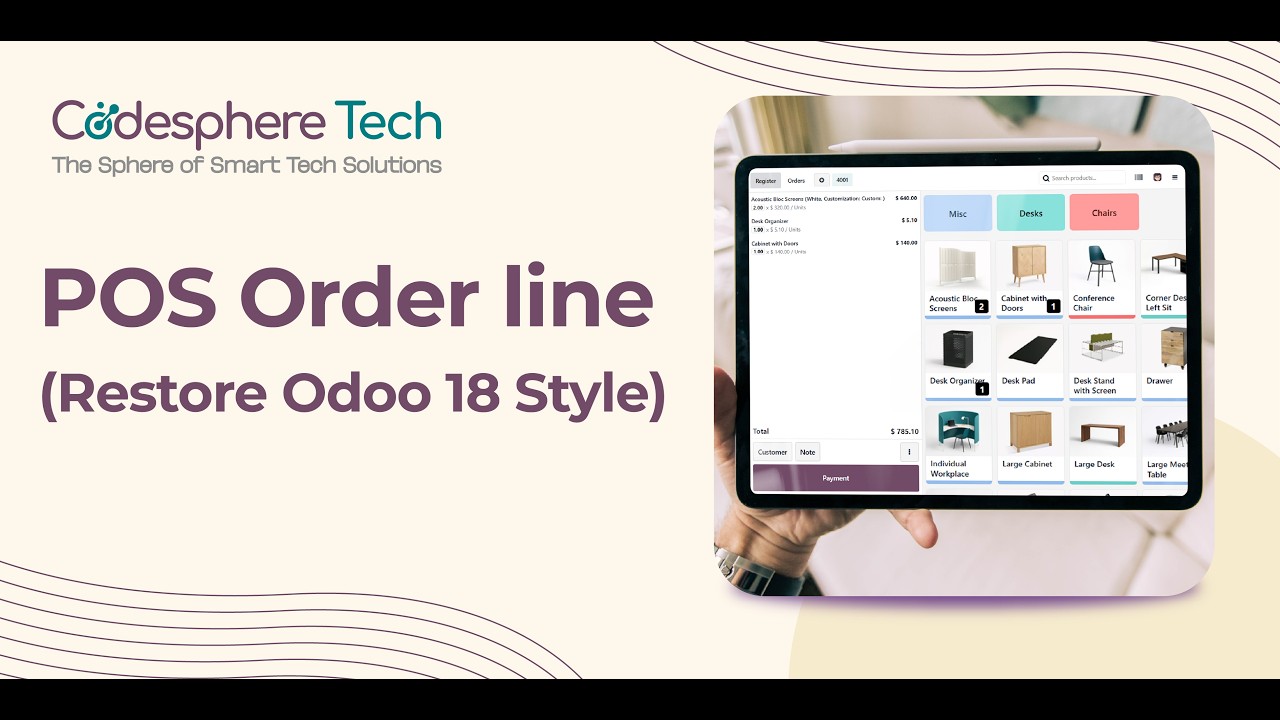
This module brings back the structured and detailed Odoo 18-style orderline layout inside the POS screen, improving billing clarity and cashier efficiency — while keeping the standard receipt layout unchanged.
🔥 Key Highlights
✔️ Optional toggle to enable Classic Orderline Layout from POS Settings
✔️ Product name and attribute values displayed clearly in a single line
✔️ Quantity × Unit Price breakdown (e.g., 2 × 100)
✔️ Improved price alignment for better readability
✔️ Better visibility for multi-line and variant products
✔️ Enhances POS screen only (Receipt layout remains unchanged)
✔️ Lightweight & upgrade-friendly implementation
🔗 Get it from the Odoo App Store
👉 https://apps.odoo.com/apps/modules/19...
🛍️ Explore More Odoo Apps
https://apps.odoo.com/apps/modules/br...
🌐 Website
https://codespheretech.in/
#odoo #odooapps #odooerp #odoopos #poscustomization #odoocustomization #odoopartner #retailpos #restaurantpos #odooenterprise #odoocommunity #erpsoftware #odooservices #cleanui #odooindia #pointofsalesoftware #possoftware #possolutions #odoopartner #odoo18 #odoo19 #oldstyle
Повторяем попытку...
Доступные форматы для скачивания:
Скачать видео
-
Информация по загрузке:




![[4K FULL HD] Relaxing Water Background | 1 HOUR | Calm Water Wallpaper (No Sound)](https://imager.clipsaver.ru/y9PTNTSpGJs/max.jpg)