GSP-9300 How To Measure 10MHz Reference Output signals?
Автор: GW Instek
Загружено: 2014-10-23
Просмотров: 3788
Описание:
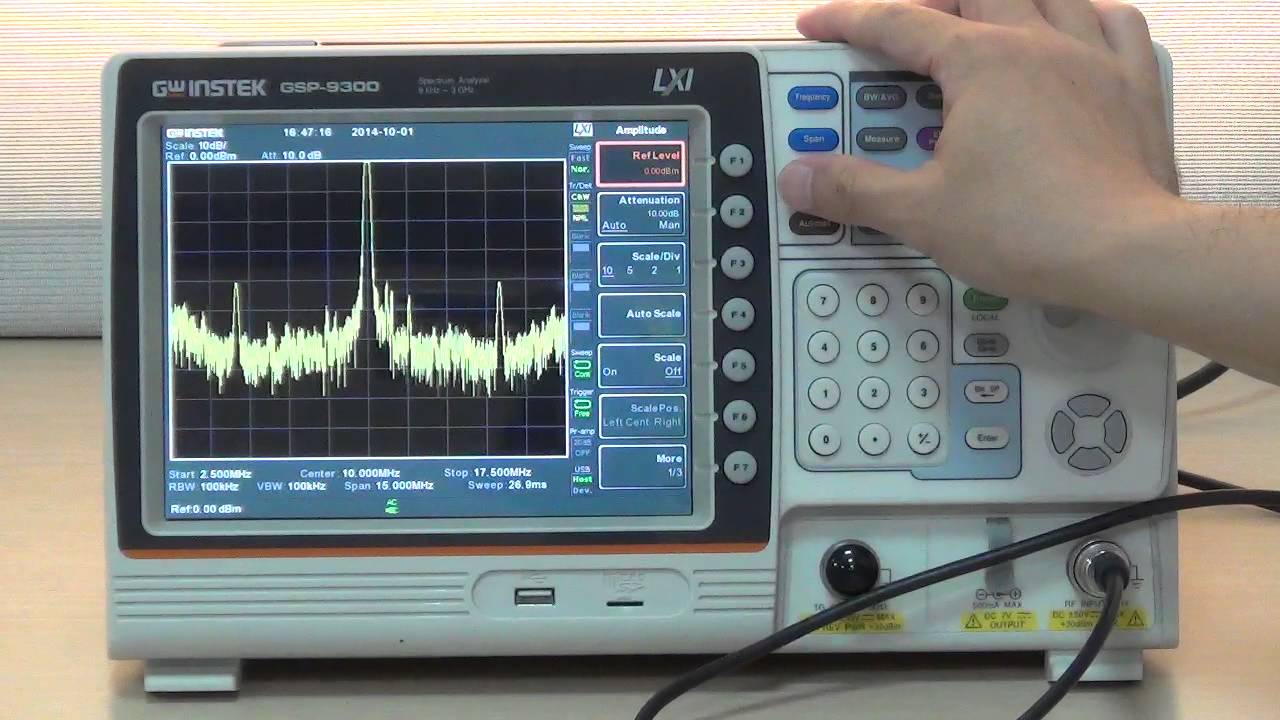
I am going to demonstrate GW Instek GSP-9300 Spectrum Analyzer Function Demonstration-How to measure 10MHz Reference Output signals?
On the rear panel of the GSP-9300 spectrum analyzer, there is a 10MHz reference frequency output signal source. Users can use BNC cable and adaptor to connect Ref out with RF Input on the front panel.
To begin the demonstration:
1. Press Preset, set GSP-9300 spectrum analyzer on default
2. Press Frequency, Center Freq[F1],input 1,0,MHz[F2] to set center frequency as 10MHz.
3. Press Span, Span[F1],input 1,5,MHz[F2] to set bandwidth as 15MHz.
4. Press Amplitude, Ref Level[F1],input 1,0,dBm[F1] to set reference level as 10dBm.
5. Press Peak Search to rapidly search signal’s peak value.
6. Now, marker is shown on the screen displaying 10MHz frequency and power value
7. Next, activate and set different traces to record the maximum and minimum value of trace.
8. Press Trace, select Trace[F1], Trace2[F2], MaxHold[F3] to activate trace 2 and set maximum hold to record the maximum value for each signal.
9. Press select Trace[F1], Trace3[F3], MinHold[F4], to activate trace 3 and set minimum hold to record the minimum value for each signal.
This concludes 10 MHz reference output signal measurement demonstration by using a GSP-9300 spectrum analyzer.Thank you very much for watching.
Повторяем попытку...
Доступные форматы для скачивания:
Скачать видео
-
Информация по загрузке:






