How to Prepare HLB Layout Map in 1 Minute! (Step-by-Step)
Автор: KPTCL EXAMS
Загружено: 2026-04-17
Просмотров: 6103
Описание:
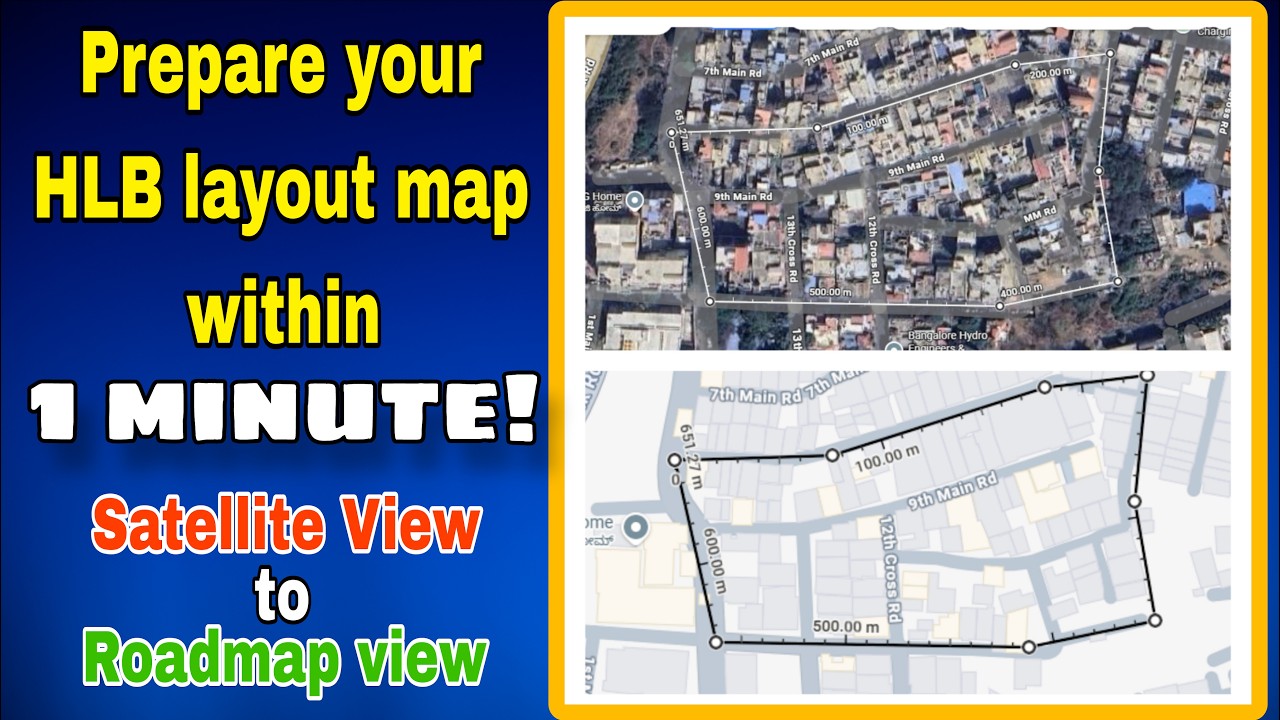
Stop struggling with hand-drawn sketches! Learn how to create a high-precision Census 2027 HLB Layout Map using Google Maps in just a few minutes. This digital method ensures your HLB Layout field Map is professional, accurate, and ready for supervisor approval.
📌 10 Quick Steps to Create an Accurate HLB Layout Map:
1. Locate your Area: Open Google Maps and find your assigned House Listing Block (HLB) address. Adjust the view to match the provided reference map.
2. Activate Measuring Tool: Right-click anywhere on the map and select the "Measure distance" option.
3. Set Initial Boundaries: Click on one corner of the HLB to set your first point. Click on the next corner to create a boundary line.
4. Close the Perimeter: Continue clicking on the remaining corners, finally clicking back on the 1st corner to complete the boundary circuit.
5. Refine the Shape: You can adjust, drag, or bend the boundary line at any point to match the exact physical borders of the HLB.
6. Switch View: Click the "Layers" button in the bottom-left corner of your screen.
7. Optimize Visibility: Zoom in as much as possible while ensuring the entire HLB remains visible; this ensures clarity when printed.
8. Open Print Menu: Right-click anywhere on the map and select "Print."
9. Confirm Print: Click the secondary "Print" button on the settings sidebar.
10. Save or Print: Choose "Save as PDF" to keep a digital copy, or send it directly to your printer.
✅ WHY USE THIS METHOD ?
Precision: Ensures the HLB boundary matches the satellite view exactly, preventing overlaps with adjacent blocks.
Efficiency: Streets, landmarks, and existing buildings are pre-marked, making it much easier to locate structures while in the field.
#Census2027 #HLBMap #NazriNaksha #HLOApp #EnumeratorTraining #GoogleMapsTutorial #DigitalLayoutMapping #HouseListing #CensusIndia #FieldSurvey
Повторяем попытку...
Доступные форматы для скачивания:
Скачать видео
-
Информация по загрузке: