Tally Add Ons : Auto Backup of Tally.ERP9 Data | Daily Zip Backups
Автор: Discover Tally
Загружено: 2016-04-12
Просмотров: 13646
Описание:
Tally Tutorial : Best way to Auto Backup Data in Tally
For instant buy out visit our online store, https://bit.ly/2X2GJp9
To Get this Tally Customization / AddOn Now, Fill this form http://goo.gl/forms/kbBjb4ivP0
Step 1. Get the Add-On. Write to us us https://goo.gl/k4nS4z
Step 2. Copy the tcp file in the main Tally folder.
Step 3. Open Tally. Click F12 (Bottom Right Corner).
Step 4. Select, 'ProducT & Features'.
Step 5. Click on F4, Manage Local TDL( Right Screen)
Step 6. Ensure 'Local TDL files on startup' is Yes.
Step 7. Enter the name of the file as ANIN360.tcp
Step 8. Once the file has loaded, come to Gateway of Tally.
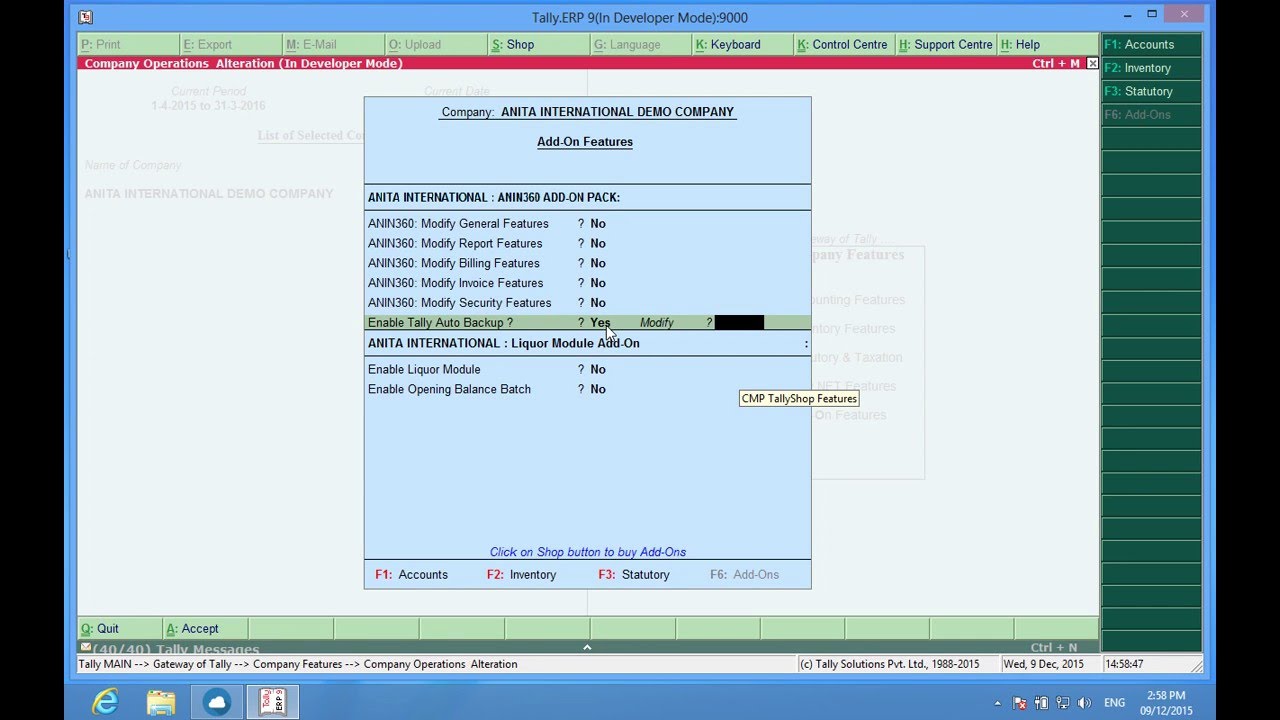
Step 9. Under F11, select Add-On Features.
Step 10. Kindly 'Enable Tally Auto Backup' to Yes. Also, Configure as Yes.
Step 11. Check for the destination path.
Step 12. Save the changes by pressing, Ctrl + A.
Watch More AddOn Videos : goo.gl/Zkvjv3
Buy Tally.ERP9 or Renew Tally Subscription Online :
http://goo.gl/zM1VsH
Call/Whatsapp : +91 9796504444
Mail us at : [email protected]
Team ANITA INTERNATIONAL
Повторяем попытку...
Доступные форматы для скачивания:
Скачать видео
-
Информация по загрузке: