How to generate a ISBN-Bar-Code Graphic for your self-published book cover
Автор: Paul Stryer
Загружено: 2025-12-22
Просмотров: 49
Описание:
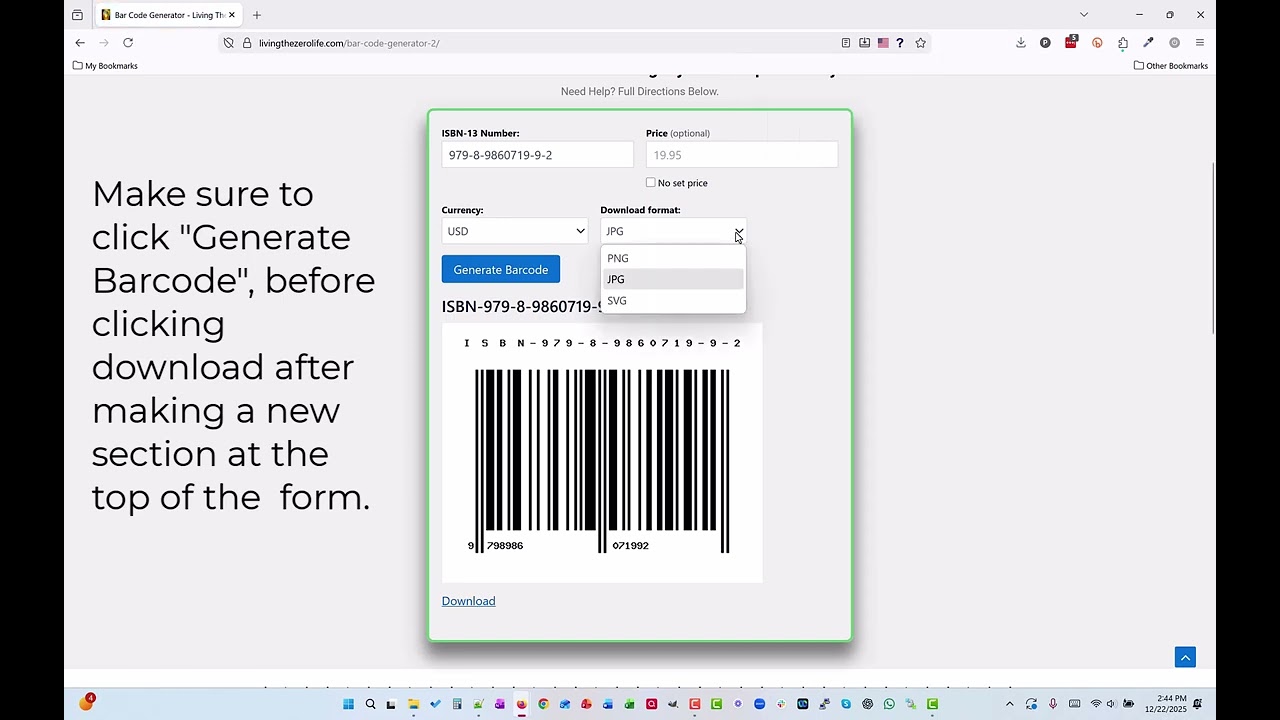
In Video 3 of 3 in the ISBN Series, I show you how to generate a professional ISBN barcode graphic for the back of your self-published book.
Once your ISBN is assigned, it needs to be turned into a barcode that printers, bookstores, and retailers can scan. In this video, I walk you through exactly how to do that.
You’ll learn how to generate an ISBN barcode that:
• Uses the EAN-13 standard
• Is print-ready at 300 DPI
• Can be downloaded as JPG, PNG, or SVG
• Allows you to add a price barcode if needed
This barcode generator was designed and built by Paul Stryer, the founder of Living The Zero Life, and it’s hosted on the Living The Zero Life website.
The best part?
It’s completely free and available for you to use anytime.
I show you exactly where to enter your ISBN, how to customize the barcode, and how to download the correct file so it’s ready to place on the back cover of your book.
If you’re following the ISBN process from start to finish, make sure you’ve watched the first two videos in the series:
👉 Video 1: How to Buy ISBN Numbers
• How to buy ISBN numbers for your self-publ...
👉 Video 2: How to Assign an ISBN to Your Self-Published Book
• How to assign an ISBN number to your self-...
This video completes the ISBN journey and helps you finish your book with a professional, industry-standard barcode, ready for printing and distribution.
#ISBN
#ISBNNumber
#WhatIsAnISBN
#BuyISBN
#AssignISBN
#BowkerISBN
#SelfPublishing
#SelfPublishedAuthor
#PublishingYourBook
#HowToPublishABook
#BookPublishing
#AuthorLife
#IndieAuthor
#publishingtips
#ISBNForAuthors
#SelfPublishingTips
#FirstTimeAuthor
#BookLaunch
#AuthorEducation
Повторяем попытку...
Доступные форматы для скачивания:
Скачать видео
-
Информация по загрузке: