ycliper

Популярное

Музыка Кино и Анимация Автомобили Животные Спорт Путешествия Игры Юмор

Интересные видео

2025 Сериалы Трейлеры Новости Как сделать Видеоуроки Diy своими руками

Топ запросов

смотреть а4 schoolboy runaway турецкий сериал смотреть мультфильмы эдисон
Скачать

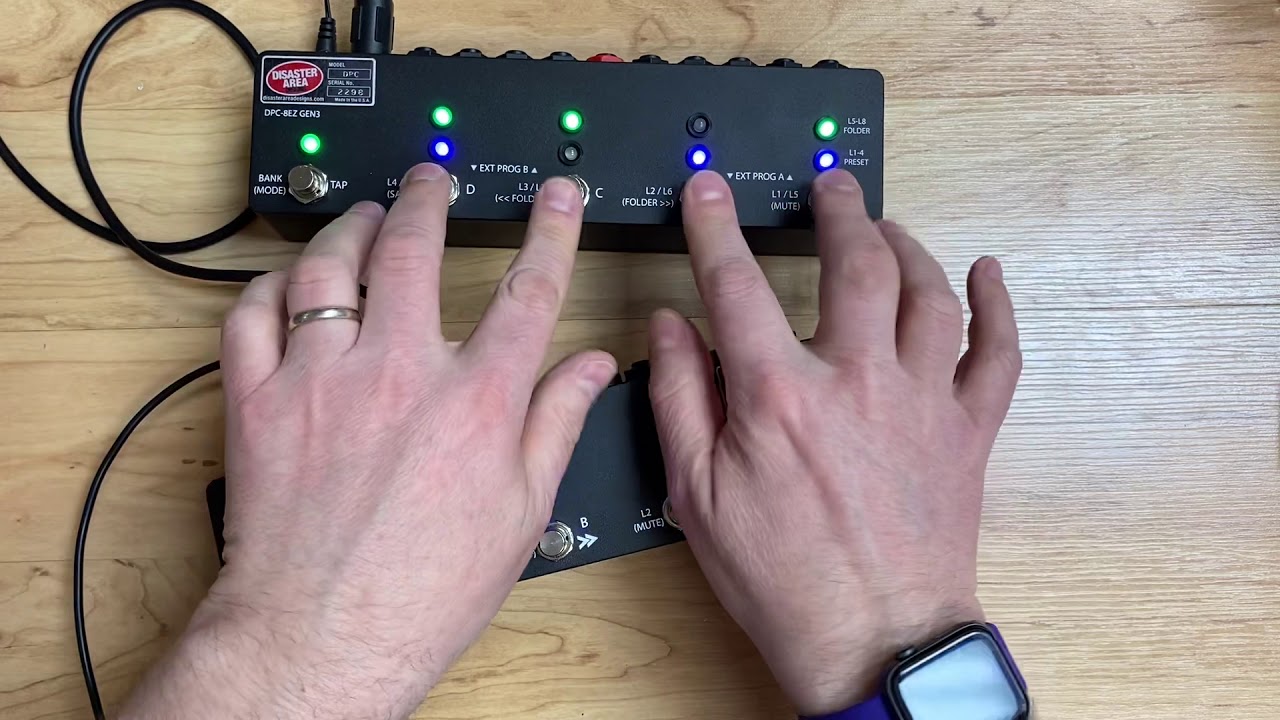
Disaster Area Quick Tips 3 - Connecting your DMC Gen3 to a DPC 8EZ

Автор: Disaster Area Designs

Загружено: 2017-02-10

Просмотров: 8578

Описание: UPDATE: the DPC-8EZ has been replaced by the DPC-8EZ Gen3, which uses Channel 16 as the default. These steps still work to set its MIDI channel, though!

Check out the DPC-8EZ Gen3 here:    • DPC 8EZ Gen3 Intro  

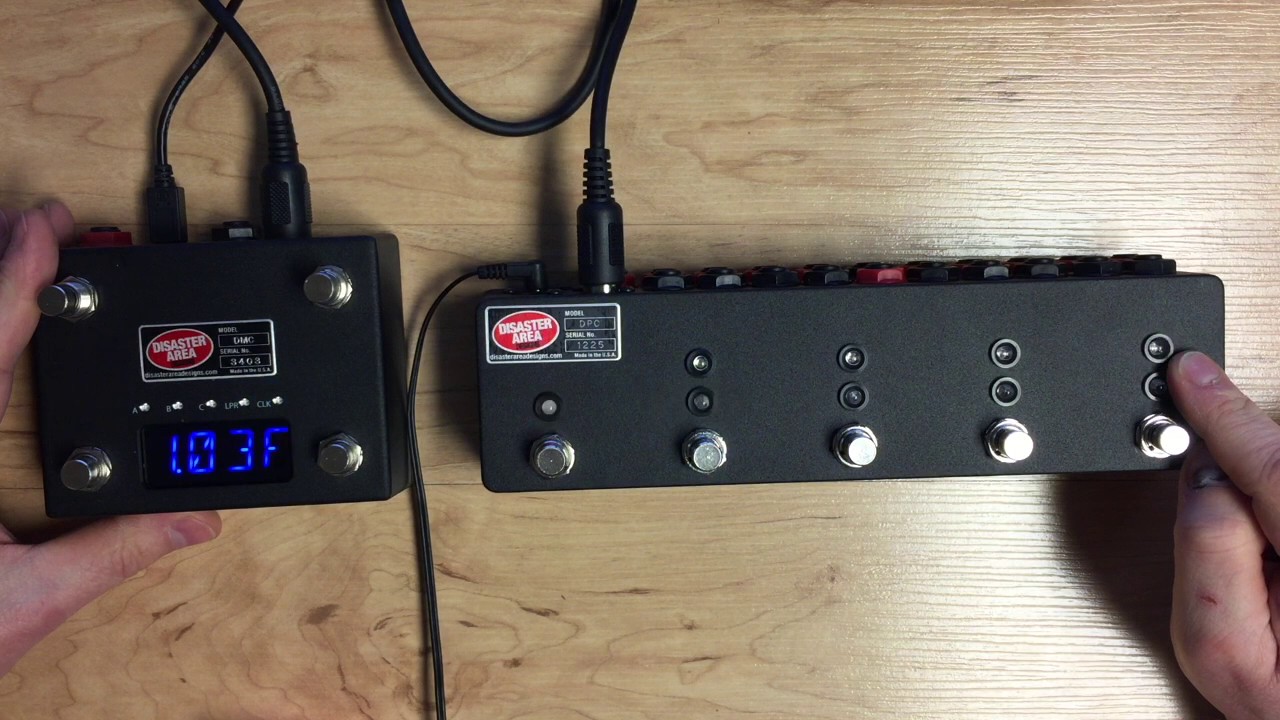
So you want to add a Gen3 controller to your DPC-8EZ? No problem, right? Except that once you hook it all up the 8EZ is acting funny, changing presets when you're trying to scroll your Timeline.

This means that your DPC-8EZ needs to be configured to listen to the correct MIDI channel. It's a pretty easy process but you have to act fast! In this video, Matthew shows you how to get the two units talking in the correct way, as well as showing what happens if the process DOESN"T work.

Make sure that your controllers are connect together with a MIDI cable. If you have other MIDI devices in the chain, you can leave them connected as long as they're powered on and capable of passing MIDI data.

Step 1: Power off both DMC Gen3 and DPC-8EZ.
Step 2: Power on DPC-8EZ while holding button B1 (far right.)
Step 3: Power on DMC Gen3 quickly!

If the process is successful, the blue light over B1 on the DPC-8EZ will blink rapidly. If it doesn't, try again.

This procedure works with all of the Gen3 controllers, including the DMC-3XL, DMC-4, DMC-6, DMC-8, and DPC-5.

Questions? Comments? Post them! We're happy to help.

Не удается загрузить Youtube-плеер. Проверьте блокировку Youtube в вашей сети.
Повторяем попытку...
Disaster Area Quick Tips 3 - Connecting your DMC Gen3 to a DPC 8EZ

Поделиться в:

Доступные форматы для скачивания:

Скачать видео

  • Информация по загрузке:

Скачать аудио

Похожие видео

Disaster Area Quick Tips 4 - USB Host Mode

Disaster Area Quick Tips 4 - USB Host Mode

Programming MIDI Baby 3

Programming MIDI Baby 3

DPC 8EZ Gen3 Intro

DPC 8EZ Gen3 Intro

Disaster Area Designs DPC-8EZ  GEN 3 Bypass Switcher with MIDI

Disaster Area Designs DPC-8EZ GEN 3 Bypass Switcher with MIDI

MIDI Baby

MIDI Baby

Для Чего РЕАЛЬНО Нужен был ГОРБ Boeing 747?

Для Чего РЕАЛЬНО Нужен был ГОРБ Boeing 747?

Умное реле. Самое дешёвое. Скрытые возможности. Небольшая модернизация.

Умное реле. Самое дешёвое. Скрытые возможности. Небольшая модернизация.

micro.clock & DPC 8EZ Setup

micro.clock & DPC 8EZ Setup

Disaster Area Quick Tips 1 - Chase Bliss Audio

Disaster Area Quick Tips 1 - Chase Bliss Audio

Больше никогда не покупайте антенну! Вставьте два карандаша в разветвитель сигнала и посмотрите н...

Больше никогда не покупайте антенну! Вставьте два карандаша в разветвитель сигнала и посмотрите н...

Как сделать синусоиду от UPS. Простая схема. Отключение green mode таймера UPS.

Как сделать синусоиду от UPS. Простая схема. Отключение green mode таймера UPS.

5 УДИВИТЕЛЬНЫХ САМОДЕЛОК ДЛЯ АВТОМОБИЛЯ

5 УДИВИТЕЛЬНЫХ САМОДЕЛОК ДЛЯ АВТОМОБИЛЯ

Из чего лучше сделать щуп для осциллографа: из константана, манганина или нихрома?

Из чего лучше сделать щуп для осциллографа: из константана, манганина или нихрома?

Disaster Area Quick Tips 2 - DMC-6 / DMC-8 Gen3 Presets

Disaster Area Quick Tips 2 - DMC-6 / DMC-8 Gen3 Presets

DPC-5 Gen3 + DPC-8EZ Gen3 Configuration

DPC-5 Gen3 + DPC-8EZ Gen3 Configuration

Disecting my Pedalboard: Disaster Area Designs DMC 3XL Gen 3

Disecting my Pedalboard: Disaster Area Designs DMC 3XL Gen 3

Бесплатный плагин поющий за вас. ReSing FREE

Бесплатный плагин поющий за вас. ReSing FREE

Disaster Area MIDI Baby 1: Introduction

Disaster Area MIDI Baby 1: Introduction

5 САМОДЕЛОК ИЗ DVD ПЛЕЕРА

5 САМОДЕЛОК ИЗ DVD ПЛЕЕРА

Quick Tips 10: Custom Device Setup

Quick Tips 10: Custom Device Setup

© 2025 ycliper. Все права защищены.


  • Контакты
  • О нас
  • Политика конфиденциальности


Контакты для правообладателей: [email protected]