Cruisin USA arcade monitor upgrade using converter.
Автор: darthbobo
Загружено: 2015-04-09
Просмотров: 15156
Описание:
This video shows the set up I have used to replace my old CRT monitor in my Crusin USA twin cabinet with an Panasonic LED TV.
The original monitor board had been repaired multiple times over the course of a couple of years, finally blowing the Flyback transformer. At that stage it made more sense to convert to LED monitor rather than continually spending money on repairing old tech.
The LED TV has no VGA input (discovered after I purchased the first TV) so I needed to convert the signal from CGA/RGB to HDMI, which involved using two converter units.
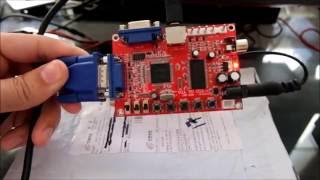
The first board is a GBS 8200 described as a CGA/EGA/YUV to VGA Arcade Converter PCB, retailing for $39 plus shipping (via Trademe in NZ).
The second is a VGA to HDMI Converter Adapter retailing for $38.90 plus shipping (also via Trademe in NZ).
The Jamma plug that normally connects to the arcade monitor board does not directly connect to the converter, so I cut the plug off and soldered the wires firstly to the 5 pin on the converter itself (didn't seem to work as well so removed them), and then to the 8 pin RGBS plug that was supplied with the converter. The jamma plug had 5 wires, Red (Red) Green (Green) Brown (Blue) White (Video Sync) and Black (Ground). The 8 pin RGBS plug has 6 wires, Red (Red) Green (Green) Blue (Blue) Black (Ground) Grey and Yellow (Video Sync horizontal and vertical). To connect to the Jamma line the Yellow and Grey are joined and soldered to the white video sync from the Jamma cable.
The power plug that is supplied with board is connected to the arcade power supply, Red wire to the DC +5v 12A connection, and the Black wire to the Ground connection. Board only needs 2amps and will only draw what it needs, so the 12A connection won't damage converter board.
The Clamp settings I used for the converter were slightly different to those usually recommended, usually it's Clamp ST 03, SP 04. I used ST 00, SP 04. For some reason (possibly unrelated) the screen was flicking at other settings, but settled down at the ones I used. I did also play with Horizontal and Vertical settings for a good 30 minutes.
Повторяем попытку...

Доступные форматы для скачивания:
Скачать видео
-
Информация по загрузке: