How To Develop a House Plan in Sketchup
Автор: Spec House Design Pro
Загружено: 2018-07-06
Просмотров: 270
Описание:
*Viewing TIP* Short on time? Go to the settings button in the lower right of your screen and set your play speed faster.
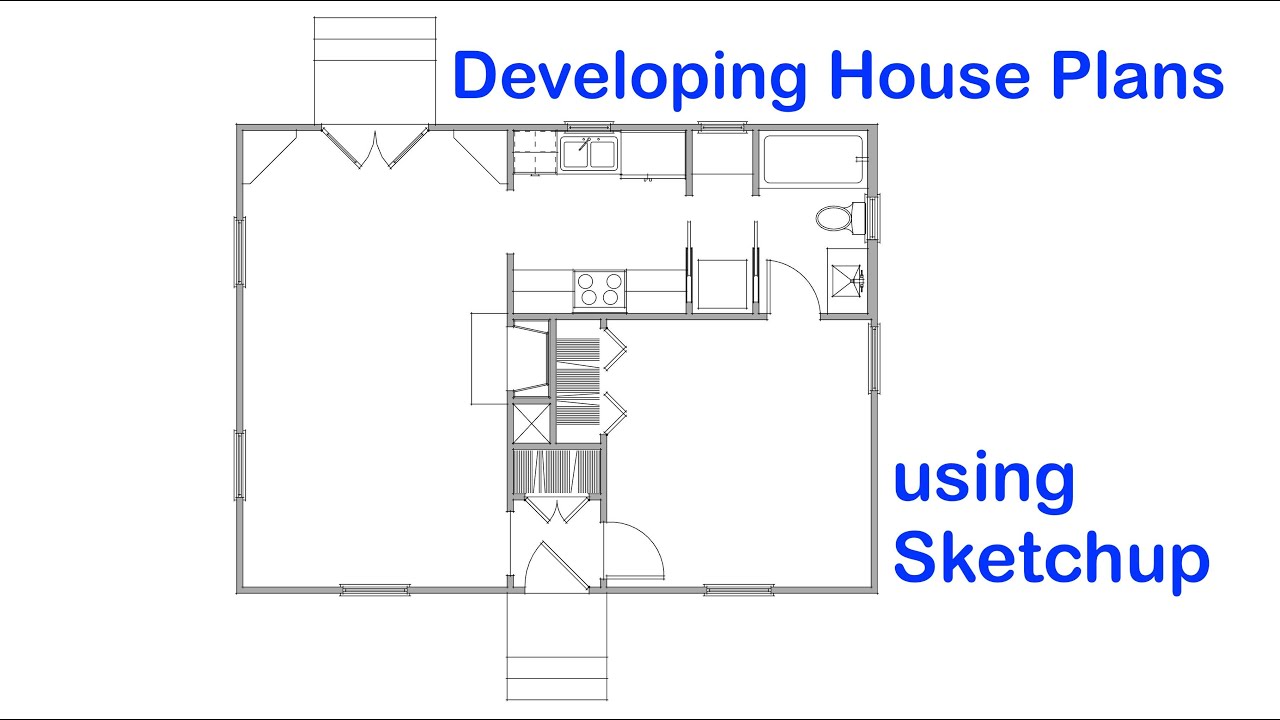
This video guide illustrates how you correctly and accurately create a floor plan for a house using Sketchup software. Examine how the toolbars and tools display in this presentation before you proceed. You may want to replicate these settings in your Sketchup if you intend to utilize this exact method, especially if you are a beginner. The Key Principles presented to suit any drawing software and can, with a few exceptions, also apply to mechanical drawing, that is, with real pencil and paper. Sketchup's free software, Make, can achieve all of the steps performed in the presentation. You can practice what you learn without investment and later decide which software suits your needs. As well, this example presents imperial measurements, but you can use the same methods for metric dimensions.
The plan developed within this presentation is previously solved, so keep in mind that developing a new design takes longer than this video. Also, this video demonstrates the Design Development step, which means that you would have already worked out a suitable scheme for your project based on the project requirements.
There are 10 Key Principles explained in this content.
KEY PRINCIPLE: Draw structural elements, such as walls & posts, at their actual dimension. This aids in dimensioning construction documents. Whether using Imperial or Metric sizes, represent stud walls, block walls, and any primary structural components realistically.
KEY PRINCIPLE: Since you indicate walls at actual physical dimensions, leave space for finish materials, such as drywall, to ensure the final fit.
KEY PRINCIPLE: Learn standard dimensions for conventional household fixtures so that you design them to fit without wasting space.
Standardized elements include plumbing fixtures, appliances, doors, and windows, among other items.
KEY PRINCIPLE: Consider how features function within a plan, such as how appliances open, so that you allow them to operate correctly and without interfering with other elements.
KEY PRINCIPLE: Whether using Sketchup or another CAD program, you want to set up your initial layout and walls in a way that allows you to adjust room dimensions easily. This helps you to make changes quickly.
KEY PRINCIPLE: Drawings must read clearly and convey emphasis on the elements essential to the purpose. Depending on how you generate your images and presentations, consider methods to improve graphic representation, whether by shades, textures, colors, or line weights.
KEY PRINCIPLE: Floor plan symbols enhance legibility and aid in identifying essential features in the design. In Sketchup, Components or Groups serve as plan symbols. If you intend to design with Sketchup, you must learn how Components and Groups differ and how to use them correctly.
KEY PRINCIPLE: Have graphic representations hint at their function or use within a floor plan. For example, doors shown at 90º open, stand ajar most of the time in real life. Doors displayed at half-open, actually remain closed most of the time.
KEY PRINCIPLE: Have graphic representations hint at their function or use within a floor plan. For example, show door swings either closed or half-open depending on their typical use and illustrate closet features by accurately dimensioned hanging space.
KEY PRINCIPLE: Examine how door swings operate within the plan. Doors that open to 90º where they meet a doorstop on a wall are best. Check that doors do not interfere with the function of other elements. Pocket door cavities, for instance, cannot host electrical boxes.
KEY PRINCIPLE: Carefully consider the placement of kitchen appliances. Tolerances for their features such as how they open and their relation to utility supply, like gas or electrical, affects their ultimate function. Many building codes also mandate how you place appliances to satisfy mechanical systems.
SOCIAL CHANNELS
IG: / howtodesignhouses
Send business inquiries to HomeDesignMentor at Gmail
#architecture #architect #homedesign #residentialdesign #residentialarchitecture #houses #studentarchitect
DISCLAIMER: This video and description contain affiliate links, meaning I'll receive a small commission if you click on one of the product links. This helps support my channel and allows us to continue making awesome videos like this. I appreciate your support!
Повторяем попытку...
Доступные форматы для скачивания:
Скачать видео
-
Информация по загрузке: