Agency Advantage - Text Option for Receipt
Автор: Jenesis Software
Загружено: 2023-02-20
Просмотров: 160
Описание:
How to Text a Receipt within Agency Advantage.
Jenesis insurance software for agents was thoughtfully designed to help insurance agents serve more clients excellently, and now, we get to serve Agency Advantage users too! This video shows how to text a receipt within Agency Advantage. We're so happy to announce the acquisition of Advantage Information Systems, Inc., more popularly known as The Agency Advantage.
Find out more about the July 2021 acquisition here:https://www.jenesissoftware.com/2021/...
______
Jenesis Software, an affordable insurance CRM software, helps Insurance Agents to efficiently manage personal and commercial clients, by keeping relevant agency and coverage information in an organized, easy-to-edit, and use insurance agency management system.
For more valuable information on building your insurance agency, get your copy of "The Perfect Insurance Agency" - an Amazon Bestseller by Jenesis' founder, Eddie Price. Learn how to grow your agency faster, improve team training, and implement simple changes to ensure success!
http://bit.ly/ThePerfectInsuranceAgency
Have you heard about our new Jenesis Software podcast?
Listen here: https://www.jenesissoftware.com/podca...
Or on iTunes at https://podcasts.apple.com/ca/podcast...
______
Make sure to connect with us on social media!
/ jenesissoftware
/ jenesissoftware
______
Agency Advantage - Text Option for Receipt
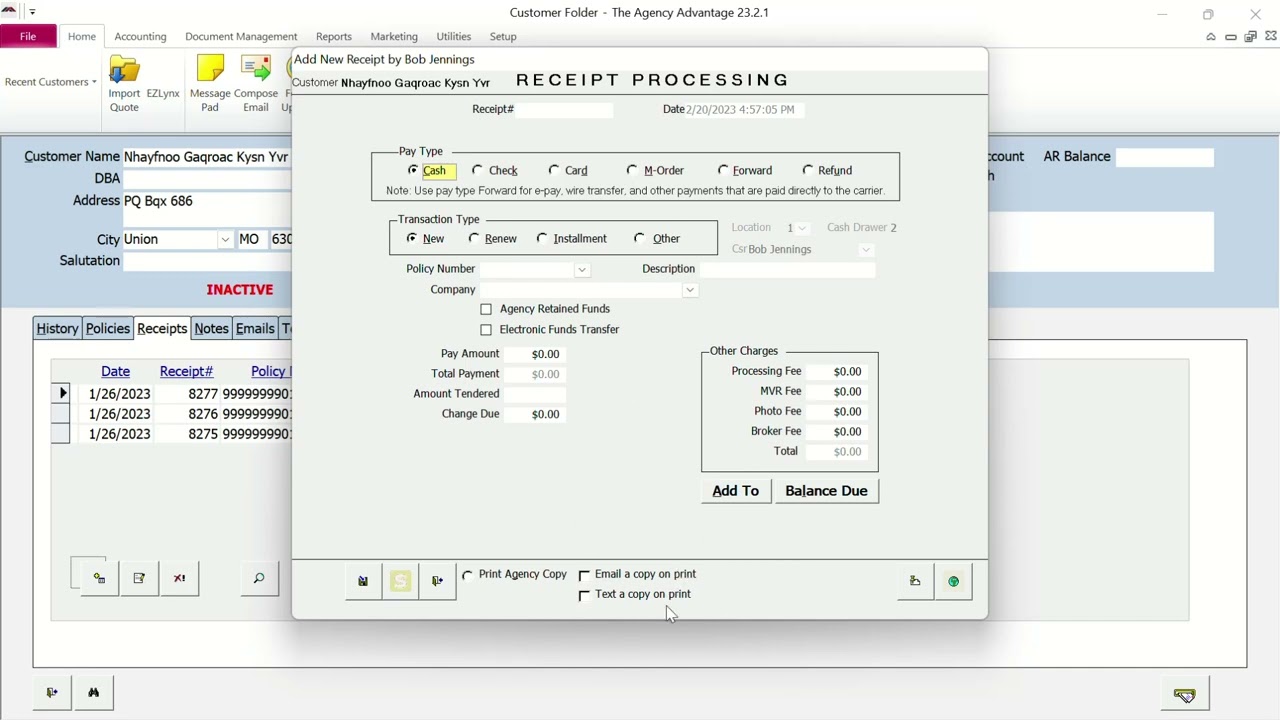
To text a receipt to a customer, go to the customer, and then in the bottom section, click on the Receipt tab. Click the receipt you want to text, which will bring up a pop-up window.
In this window, go to the bottom and click on the box next to Text a copy on print; after you click this box, the phone number associated with this account will automatically populate. If you would like to change it to another number you can highlight the number and change it to the phone number you would like it to send to, and then click the print button.
This will bring up your text box, so you can type the message you want to send with the receipt and click the send button once completed. This will send the message to your customer and save a copy in your text message tab.
Still, have questions? Check out www.jenesissoftware.com or Request a demo here: https://www.jenesissoftware.com/reque...
______
Feel free to contact us with any questions
• Email [email protected]
• Chat with us at www.JenesisSoftware.com
• Call 828-245-1171 Option 1
Subscribe to this YouTube Channel at / @jenesissoftware
Send any additional questions to [email protected]
To learn about attaching images and files in Agency Advantage, watch this: • Agency Advantage - Attaching Images & Files
^^^^^^^^^
About Jenesis Software
^^^^^^^^^^
After struggling to find the solutions he craved in insurance agency CRM software, Eddie Price began taking programming classes to create his own. He spent the 90's crafting and developing the robust JenesisNow system you know today.
His appreciation for technology and marketing, combined with the desire to serve customers efficiently while helping agencies grow, is reflected in the user-friendly insurance agency management software named proudly after his daughter, Jenna.
This agency management system (created by an agent for agents) was incorporated in 1999 and continues to provide the same personalized customer service and commitment Eddie has always shown for his customers.
Повторяем попытку...
Доступные форматы для скачивания:
Скачать видео
-
Информация по загрузке: