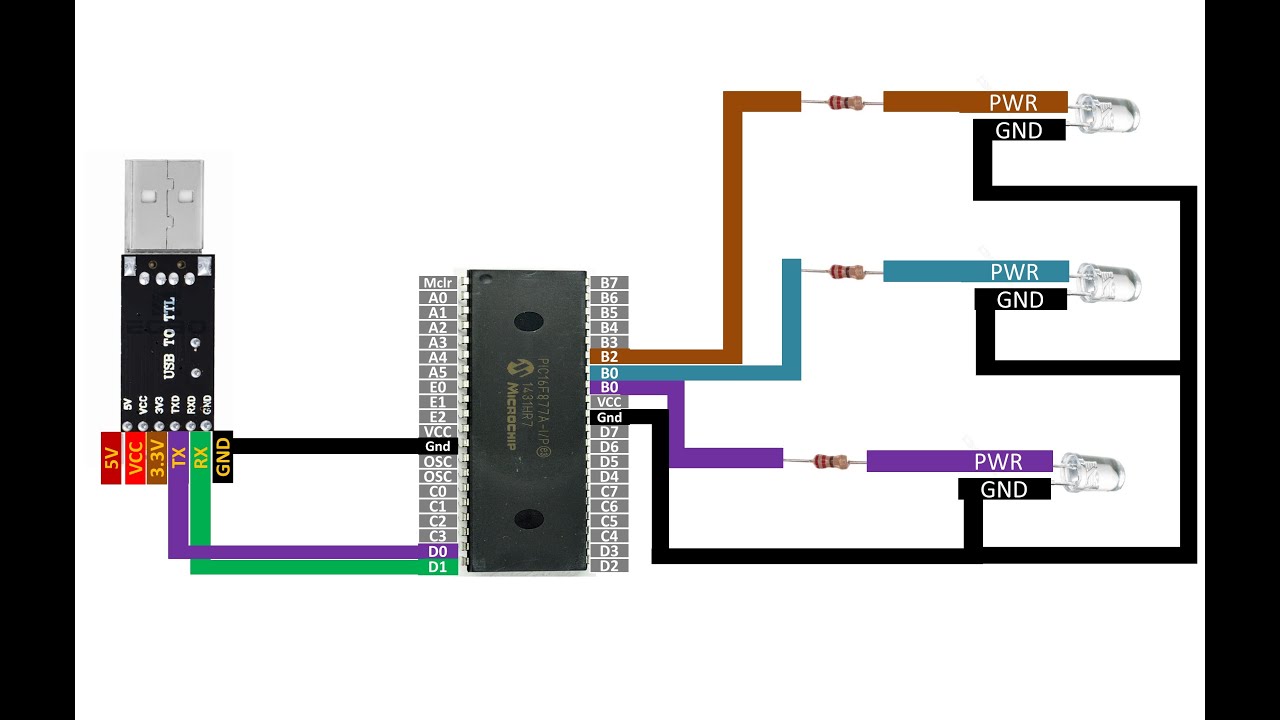
MikroC for PIC software serial read data tutorial. Send bytes from PC to PIC16F877A to toggle 3 LEDs
Автор: Learning Microcontrollers
Загружено: 2024-03-24
Просмотров: 455
Описание:
Guys, My lectures are free for everyone.
If you want to support my channel, then become a Youtube member by following link below:
/ @learningmicrocontrollers3561
Seek knowledge from the cradle to the grave
/// /////////////////////////////////////////////////////**********************************///////////////////////////////// Hello guys,
Welcome to Learning Microcontrollers youtube Channel,
Guys I have also compiled course on Udemy as well. Where you will learn under my direct supervision in a more supervised way.
Here is the links to the courses I have on Udemy, By taking any of these courses you will be supporting my channel aswell.
This will help me to make more videos with better hardware in the future. I hope you look forward to it.
Courses Links:
1- https://www.udemy.com/course/pic16f87...
2- https://www.udemy.com/course/mikroc-f...
3- https://www.udemy.com/course/mikroc-f...
4- https://www.udemy.com/course/pic-micr...
5- https://www.udemy.com/course/learn-ar... ///////////////////////////////////////////////////// 1- How to download and install MikroC for PIC full version for free from official website. 100% Legit.
• How to download and install MikroC for PIC...
2- Tutorial on downloading, installing and using PICKIT 3 programmer tool.
• Tutorial on downloading, installing and us...
3-Setting up a PIC16F877A/PIC16F887/PIC18F****.
• Setting up a PIC16F877A/PIC16F887/PIC18F****
4- PIC16F877A a basic Introduction.
• PIC16F877A a basic Introduction
5- If you guys like my work you can support my work using Patreon link below:
patreon.com/user?u=81261678
6- MikroC for PIC code for current video :
char error;
char char1;
void main() {
TRISB.F0 = 0;
PORTB.F0 = 0;
Delay_ms(20);
TRISB.F1 = 0;
PORTB.F1 = 0;
Delay_ms(20);
TRISB.F2 = 0;
PORTB.F2 = 0;
Delay_ms(20);
Soft_UART_Init(&PORTD, 0, 1, 9600, 0);
Delay_ms(100);
char1 = 'z';
while(1)
{
char1 = Soft_UART_Read(&error);
if ( char1 == 'a' )
{
PORTB.F0 = 1;
Delay_ms(200);
}
else if ( char1 == 'b' )
{
PORTB.F1 = 1;
Delay_ms(200);
}
else if ( char1 == 'c' )
{
PORTB.F2 = 1;
Delay_ms(200);
}
else if ( char1 == 'd' )
{
PORTB.F0 = 0;
PORTB.F1 = 0;
PORTB.F2 = 0;
char1 = 'z';
Delay_ms(200);
}
}
}
Повторяем попытку...
Доступные форматы для скачивания:
Скачать видео
-
Информация по загрузке: