ycliper

Популярное

Музыка Кино и Анимация Автомобили Животные Спорт Путешествия Игры Юмор

Интересные видео

2025 Сериалы Трейлеры Новости Как сделать Видеоуроки Diy своими руками

Топ запросов

смотреть а4 schoolboy runaway турецкий сериал смотреть мультфильмы эдисон
Скачать

Rigging in After Effects - Part 1

Adobe

After Effects

Rig

Rigging

Expressions

Master Properties

Mogrt

Motion Graphics Template

programming

Essential Graphics

Tutorial

Workflow

Animation

Mograph

Video

Motion

cgi

design

computer fx

fx

digital art

motion

motion graphics

3D

effex

visual fx

software

tutorials

tip

hint

help

quick tip

trick

Visual

Movies

Film

GFX

Images

Create

Make

Javascript

code

Автор: Workbench

Загружено: 2019-10-03

Просмотров: 7446

Описание: Using Master Properties and Expressions to Make Useful Rigs in AE
Project File: http://workbench.tv/tutorials/2019-10...
Patreon:   / workbench  
Merch: http://workbench.tv/products/merch/
Paypal: https://www.paypal.me/workbenchtv

Social
***********************************************************
Instagram:   / workbenchtv  
Twitter:   / workbench_tv  
Facebook:   / workbenchtv  
Twitch:   / failbench  

Master Properties in After Effects enable us to make more complex rigs than we could previously. And because of that, we're going to talk about techniques to rig objects. We start with a simple cube that has some pretty cool behaviors. It can flatten into the ground, which means it comes with its own transition built-in. It can also be scaled without scaling its strokes.

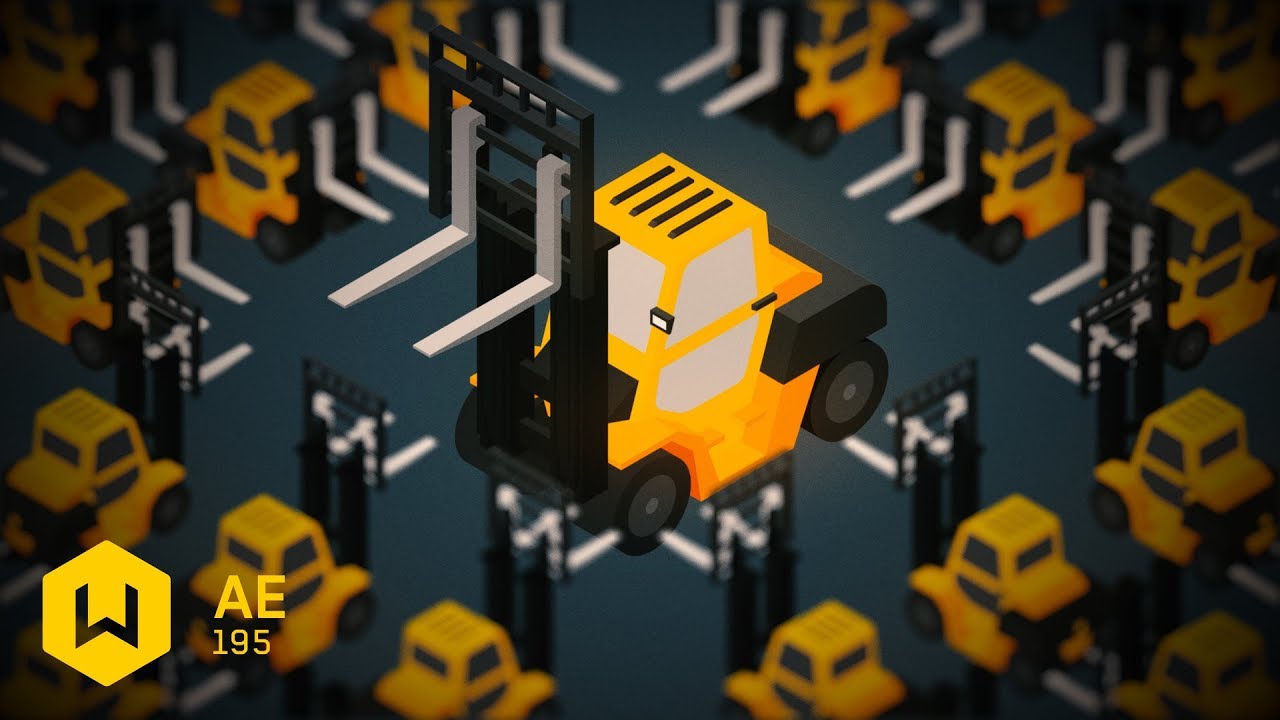
Then we take a look at a rigged forklift. All of the colors have been linked to control layers so you can change the colors of the forklift if you desire. There's an Angle Control that lets us pick between the 4 isometric angles that the forklift can face, even though only two angles were ever illustrated. This is accomplished by scaling our shape layers horizontally to make up the other two angles. While that would normally change our lighting, we've built and rigged luminosity layers—using grey tones and the overlay blend mode—that can swap the lighting back so that the lighting direction doesn't ever change. The forks of the forklift are also rigged so that the main section moves up, and then the rest of the lift sections extend fully.

In short, there's a lot built into this tutorial, and a lot of the techniques are designed to be applicable to all sorts of rigs. For example, one of the expressions shows you how you can build a checkbox that can switch between two keyframes for a property. We use it to change the lighting of the luminosity layers, but you could use to to switch between keyframes on a path, or intensities of an effect. There's a lot of versatility here.

And the best part is that this is only part one. There will at least be a second tutorial, if not a third. The next one will focus on more efficient ways to build this sort of model if you were going to make a whole bunch of different rigs. We're going to show how to take an actual 3D model, render out a minimal amount of frames and yield even more complex animation, versatility, and speed. And there's also something interesting that I want to try, but haven't had a chance to build yet. So please, stay tuned! And if you didn't see Tutorial 188: Isopush (http://workbench.tv/tutorials/2019-08..., check it out! It's helpful for moving layers in isometric directions.

The expression code can be found on our site here (http://workbench.tv/tutorials/2019-10....

#AfterEffects #MotionGraphics #Mograph

Не удается загрузить Youtube-плеер. Проверьте блокировку Youtube в вашей сети.
Повторяем попытку...
Rigging in After Effects - Part 1

Поделиться в:

Доступные форматы для скачивания:

Скачать видео

  • Информация по загрузке:

Скачать аудио

Похожие видео

Generate patterns and moving dots in After Effects

Generate patterns and moving dots in After Effects

Rigging ideas for After Effects - Part 2

Rigging ideas for After Effects - Part 2

Creatively Using Text Animators in After Effects

Creatively Using Text Animators in After Effects

Bring Rigged 3D Characters into After Effects!

Bring Rigged 3D Characters into After Effects!

Я подделал местоположение за 10 000 долларов за 0 долларов (руководство по Blender и AE)

Я подделал местоположение за 10 000 долларов за 0 долларов (руководство по Blender и AE)

Введение в прямую и обратную кинематику в After Effects

Введение в прямую и обратную кинематику в After Effects

That Was Really Filmed on Camera

That Was Really Filmed on Camera

Невероятные авиационные моменты, снятые на камеру

Невероятные авиационные моменты, снятые на камеру

Внутри зарядного устройства для ноутбука скрыт УДИВИТЕЛЬНЫЙ компонент, о котором миллиарды людей....

Внутри зарядного устройства для ноутбука скрыт УДИВИТЕЛЬНЫЙ компонент, о котором миллиарды людей....

Map Elements onto Images with this After Effects Technique

Map Elements onto Images with this After Effects Technique

Building a Functional LEGO Typewriter

Building a Functional LEGO Typewriter

10 лет рисовал логотипы и вот что понял

10 лет рисовал логотипы и вот что понял

【4K】Satisfying 3D Simulations Showcase 【60fps】

【4K】Satisfying 3D Simulations Showcase 【60fps】

16 Useful Expressions in After Effects - Part 1 of 2

16 Useful Expressions in After Effects - Part 1 of 2

Это лучший рабочий процесс для DUIK!

Это лучший рабочий процесс для DUIK!

Moving Layers in Isometric Projection in After Effects

Moving Layers in Isometric Projection in After Effects

Using expressions to glitch paths - Tutorial 171: Glitch Paths

Using expressions to glitch paths - Tutorial 171: Glitch Paths

ПОЛНОЕ руководство по риггингу персонажей в After Effects

ПОЛНОЕ руководство по риггингу персонажей в After Effects

Освещение в Unreal Engine 5 для начинающих

Освещение в Unreal Engine 5 для начинающих

Nano Banana Pro vs 3D художник: КТО ПОБЕДИТ? ТОП 5 навыков

Nano Banana Pro vs 3D художник: КТО ПОБЕДИТ? ТОП 5 навыков

© 2025 ycliper. Все права защищены.


  • Контакты
  • О нас
  • Политика конфиденциальности


Контакты для правообладателей: [email protected]