Button box for the DCS Su-33 and other FC3 aircraft
Автор: Alex Stoll
Загружено: 2020-07-25
Просмотров: 20360
Описание:
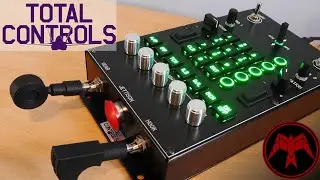
This is a button box I made for the left-cockpit off-throttle controls for the Flaming Cliffs 3 aircraft. I modeled it after the Su-33’s cockpit, since that’s the FC3 aircraft that has the most left-cockpit off-throttle controls, but I laid it out so it works well for most or all of the left-cockpit off-throttle controls of all the FC3 aircraft. (I play in VR, so it’s not confusing having the wrong labels when I fly other aircraft - the labels are just for fun since I can’t see them in VR anyway.) I have to say, it feels so much better to use what’s basically the actual controls for these aircraft rather than just pressing buttons on the throttle or keyboard to accomplish the same actions! And it’s much easier than groping for the keyboard in VR.
I’m using a Leo Bodnar BBI-32 board with 32 inputs:
• 3 single-throw toggle switches (including the landing gear lever)
• 4 single-throw momentary toggle switches (including the landing lights switch)
• 2 double-throw momentary toggle switches
• 9 momentary buttons (used e.g. for autopilot controls on the Su-25T, Su-27/33, and MiG-29)
• An interlock pushbutton switch with two buttons (pushing one button will "unpush" the other button - used for flaps, for aircraft with only two flaps settings)
• A 5-position rotary switch (used e.g. for setting operating mode on the Su-27/33, MiG-29, and A-10A)
• A regular rotary encoder
• A rotary encoder with an integrated momentary push button
and I use Joystick Gremlin to do things like sending the command when a switch is moved, so I can map the on and off movement of single-throw switches to two commands.
(Honestly a VIRPIL throttle would have gotten me most of the way there with a lot less work, but they’re always sold out and I haven’t been able to order one, so… here we are!)
This was a pretty fun learning process - I learned how to use Fusion 360, how to use a laser cutter, and how to 3D print. The button caps, the mode select knob, the landing lights switch cap, and the landing gear lever are all 3D printed. The faces of the panels are three layers of 3 mm laser-cut acrylic, so that I could get the top of the toggle switch bases flush with the panels. The top layer is white acrylic that I spray-painted black and then etched away the paint with the laser cutter. (The button labels are done the same way - they’re acrylic inserts that drop into the top of the button caps.) I thought about replicating the Su-33’s blue cockpit colors, but doing three colors (white, black, and blue) was much more complicated than two, so I went with just black and white since I can’t see it anyway in VR. The base, which allows for my TWCS throttle to be attached aft of the button box, is 6 mm plexiglass, and I have the whole thing mounted on a J-PEIN desk mount. The side panels are ¼" thick Delrin (also cut on the laser cutter, and then spray-painted matte black), which was easy to drill into so I could screw the whole thing together.
I have a new appreciation now for the price of higher-level sim gear like the Warthog throttle now - I spent close to $100 (over $100 with shipping) on switches and encoders etc. alone (and that’s not including about $50 for the Leo Bodnar board)!
Повторяем попытку...

Доступные форматы для скачивания:
Скачать видео
-
Информация по загрузке:



![[NEW] Making F-16 Simulator Cockpit Panels](https://image.4k-video.ru/id-video/vK5d8DvD1Lg)


