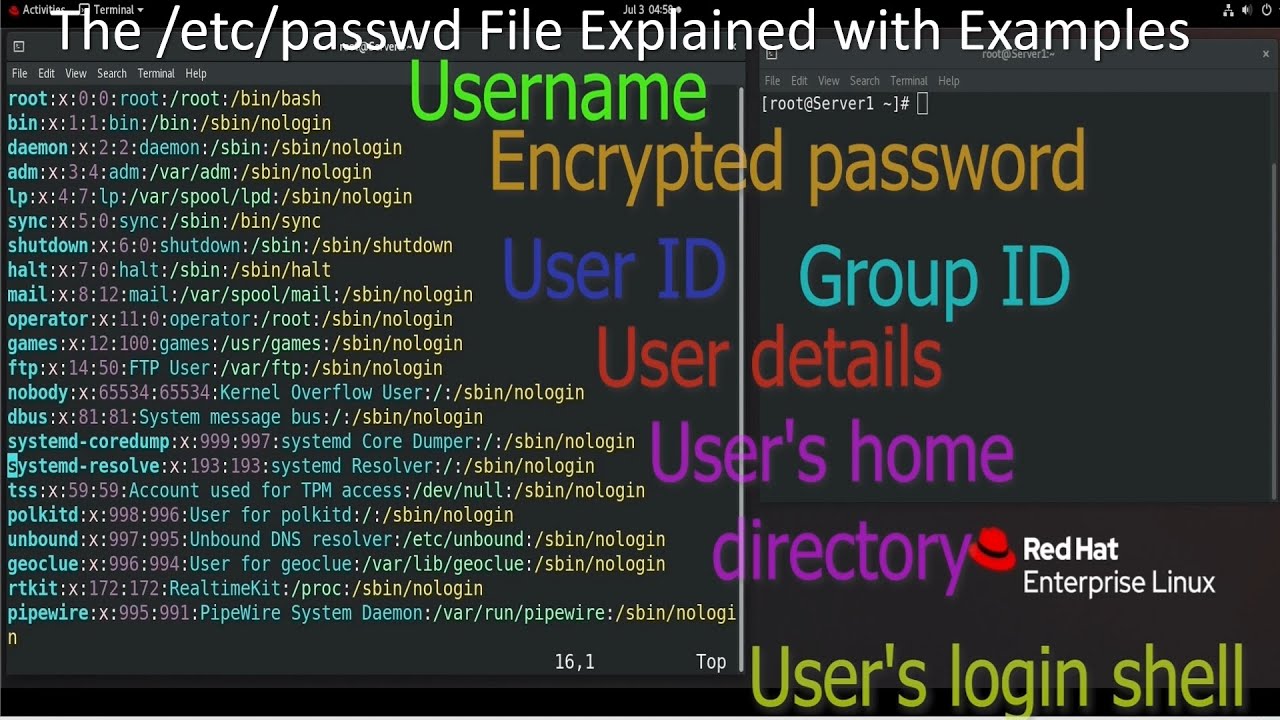
The /etc/passwd File Explained with Examples
Автор: ComputerNetworkingNotes
Загружено: 2024-07-10
Просмотров: 3099
Описание:
This video explains the purpose and contents of the /etc/passwd file. This video is based on the following tutorial.
https://computernetworkingnotes.com/l...
Video Description
Linux saves local user accounts' information in the /etc/passwd file on the local system. In other words, the /etc/passwd file is the database of all local user accounts.
When you use a local user account to log in, Linux uses this file to check the entered username. If the typed username and password are correct, it grants the login permission. If they are incorrect, it rejects the request.
The /etc/passwd is a regular text file. You can use any available text editor to edit or update this file. For example, you can use Vi, Vim, Emacs, or Gedit.
This file saves entries in lines. Each line represents a user account. For example, if this file has ten entries, there are ten user accounts.
Each entry has the following seven fields separated by colons (:).
User name or login name
Encrypted password
User ID
Group ID
User details
User's home directory
User's login shell
Let us understand these fields in detail.
User name
The first field saves user names. Each username must have a unique value. Two user accounts can not have the same username. The default limit of this field is 32 characters. Because of this, a username cannot be more than 32 characters in length. In addition to it, you are also not allowed to use colons and newlines characters in the username. A colon is a field separator, and a newline is an entry separator. Besides colons and newlines, you can use any other characters or symbols. However, to avoid unnecessary confusion, you should use only alphanumeric characters in the username. Usernames are case-sensitive. For example, the usernames John and John are different. Although you can use usernames in any case, lowercase names are traditional and easy to type.
This field gets value from the useradd command. The useradd command adds the new user account at the end of the file. To view the updated file, we have to close the opened file.
Now, open this file again.
Here is the entry for the user account we have just created.
The second field of this entry contains a placeholder value X.
Encrypted password
Historically, this field was used to store user passwords. Later, Linux moved passwords into a separate file, called /etc/shadow. Now, this field saves a placeholder value. The X here indicates that the password is available in another file.
User ID
The next field is the user ID. Linux assigns a unique ID to all user accounts. Linux uses it to track and manage all user actions, such as creating files, modifying system properties, starting applications and processes, etc. It reserves the first UID (0) for the root user account.
After assigning the UID to the root user account, it assigns UIDs to system accounts such as bin, lp, mail, news, games, ftp, etc. UIDs of regular user accounts usually start from 1000.
Group ID
The next field stores the user's primary group's ID. When we add a new user account, it creates a new group with the same name and makes it the primary group of the user. In this field, it saves that group's ID. Unless you manually change or customize the group ID, Linux picks a group ID similar to the user ID.
Linux saves all group-related information in the /etc/group file. It uses group ID instead of group names to track, monitor, and authenticate group activities.
User details
The next field stores descriptive information about the user account. For example, you can use this field to save the user's full name, email address, phone number, and position in the organization. The chfn command adds this information.
Home directory
The next field stores information about the user's home directory. The login process uses this information to decide where to put the user immediately after login. In other words, this is the default directory that the user gets immediately after the login process. If you skip this information when creating a user, the shell automatically sets it to /home/username.
Login shell
The last field stores information about the user's default shell. While creating a regular user account, if you skip this information, it uses the default shell. The default shell for a regular user account is /bin/bash.
Some special accounts never require shell access. Administrators usually assign a fake shell such as /bin/false, /sbin/nologin, or set this field to blank in these accounts. This precaution prevents hackers from breaking the system through these accounts.
System accounts that do not need shell access use /sbin/nologin in this field. This precaution prevents hackers from breaking the system through these accounts.
Повторяем попытку...
Доступные форматы для скачивания:
Скачать видео
-
Информация по загрузке: