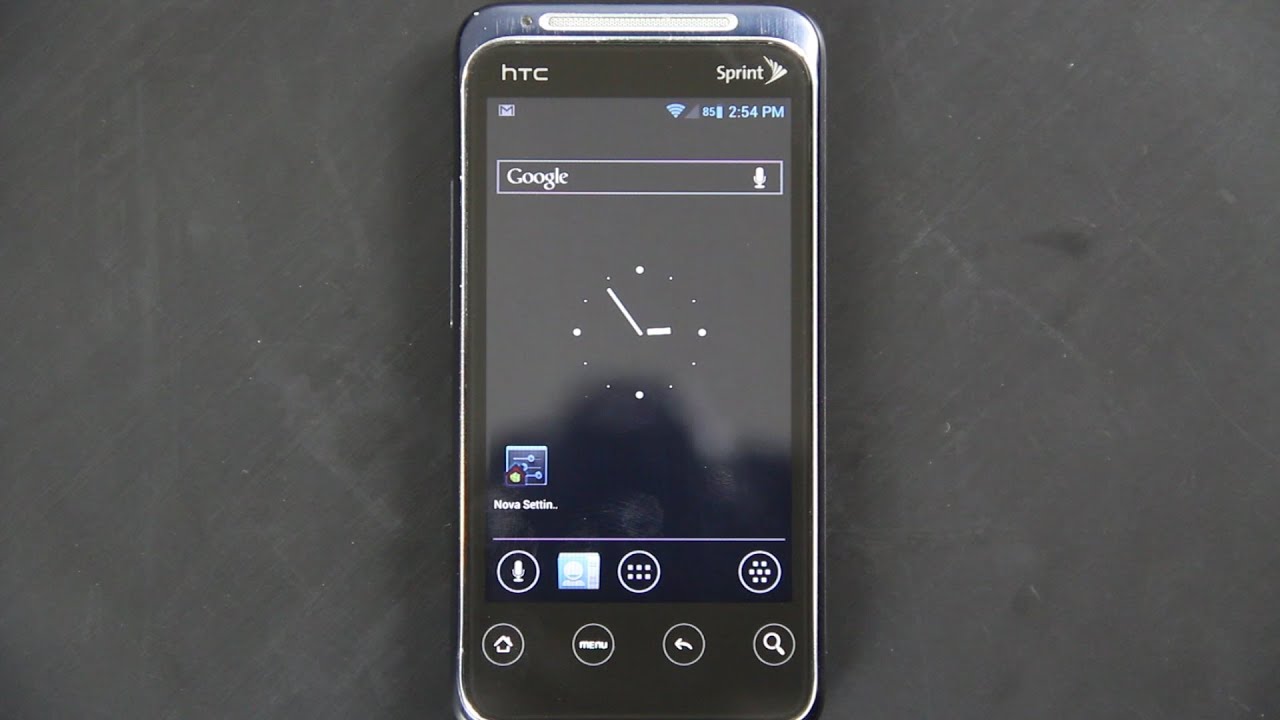
How to install ICS on the HTC Evo Shift 4G!
Автор: wwjoshdew
Загружено: 2012-06-19
Просмотров: 11719
Описание:
------ PLEASE CLICK "SHOW MORE" ------
Please Subscribe: http://tinyurl.com/wwjoshdew
If you Subscribe, you won't miss any new videos!
All of my Evo Shift 4G Videos: http://goo.gl/g2CWW
BEST PHONE EVER! ► http://goo.gl/tRVPb
New Links: http://wiki.cyanogenmod.org/w/Speedy_...
http://wiki.cyanogenmod.org/w/Install...
The HTC Evo Shift 4G has Android 4.1.1 Jelly Bean!
http://forum.xda-developers.com/showt...
http://forum.xda-developers.com/showt...
CyanogenMod 10 (CM10) Android 4.1.2 on the Evo Shift 4G!
http://forum.xda-developers.com/showt...
Thanks BRAD51000!
Rom [XDA] - http://goo.gl/1B8xa
Downloads - http://goo.gl/vIYsZ
Google Addons - http://goo.gl/PLK2B
GooManager Beta - http://goo.gl/AAuKa
TWRP Speedy: http://goo.gl/gPzgy
(ALL TWRP Recovery Downloads!)
http://goo.im/gapps/gapps-ics-2012042...
or my download my mirror - http://goo.gl/HFyMW
PLEASE MAKE SURE you put the 2 downloads (the ROM and Google Addons) in the GooManager folder on your sdcard. If there isn't one, then that means you haven't used the App yet and all you have to do is create one! "GooManager" Exactly like that without the quotes. Then put the two zips in there. OR just open the GooManager app, and change the storage location to JUST the sdcard (root directory, meaning NO FOLDERS) and put the two files on the root directory of your sdcard.
MAKE SURE you bookmark those links and check it often, as that's where you will be able to go and see if your rom has an update or not! I recorded this video several days ago, and there has already been updates! As of RIGHT NOW, cm-9-20120718-UNOFFICIAL-speedy.zip is the one you want to choose! :)
Mirror!
MD5: 8d7256cb07319715f050210c96d18fce
http://www.mediafire.com/?pkdbd0pw9o0a6
I recommend using WinMd5Sum to verify the MD5!
http://www.nullriver.com/products/win...
http://portableapps.com/apps/utilitie...
Alternatively, if you use Firefox (like I do), check this out!
https://addons.mozilla.org/en-US/fire...
It verifies MD5's, and SHA1's through SHA512's as well.
Screenshot: http://i45.tinypic.com/2m6tw1s.jpg
I haven't done to many videos on this phone because it's old (2010), doesn't have much space to install apps (about 400mb) and when you get used to the 4.3+ inch screens, it's hard to go back to this! BUT if this video does really well, then I'll buy another one some day to continue making videos with! Right now my priorities are the EVO 4G LTE, Galaxy Nexus, EVO 3D, Transformer Prime... and soon... the Sprint Samsung Galaxy S III! (SGS3) I won't be able to get the SGS3 on launch day, but I'll get it AS SOON AS I can come up with 600 bucks! If people want to help, let me know. I plan on making a FULL (NITTY GRITTY) review comparing the SGS3 to the EVO 4G LTE and letting people know WHICH ONE I PREFER over the other. I can't do that video until I have that phone. If you want to help, just let me know! If you read all of this, PLEASE comment!!!! It'll let me know you're awesome! :)
Need to go back to stock?
http://www.androidruu.com/index.php?d...
RUU_Speedy_S_Sprint_WWE_2.77.651.8_Radio_1.08.01.0111_NV_SPCS_2.97_01206_PRL60674_release_275849_signed.exe is the latest!
MD5: 0064d4796430b3b2ed5265010b702615
Super fast mirror: http://goo.gl/6crXD
Please follow me for the latest videos!
Twitter: / wwjoshdew
FB: / wwjoshdew
(Other Social Media links are below)
Watch me play games and live stream???
http://www.ustream.tv/channel/wwjoshdew
/ profile
(I'll Tweet when I'm live streaming.)
Please Subscribe to my YouTube Channel.
You'll get notified as soon as I upload a new video!
http://www.youtube.com/subscription_c...
Please STALK ME with the links below!
Gaming Channel: http://goo.gl/TvigNm
2nd Channel: http://goo.gl/CkHcwh
Instagram: http://goo.gl/ojTFn
Vimeo: http://goo.gl/7Zt31v
Vine: http://goo.gl/66FEbk
GPlus: http://goo.gl/imdZ1
Повторяем попытку...
Доступные форматы для скачивания:
Скачать видео
-
Информация по загрузке:










![Как сжимаются изображения? [46 МБ ↘↘ 4,07 МБ] JPEG в деталях](https://imager.clipsaver.ru/Kv1Hiv3ox8I/max.jpg)