How to Reset Oil Maintenance on Your BMW Using Launch X431 Pro
Автор: ECUHACK
Загружено: 2025-07-01
Просмотров: 711
Описание:
How to Reset Oil Maintenance on Your BMW Using Launch X431 Pro
Owning a BMW comes with the responsibility of maintaining it properly, and one crucial aspect of this maintenance is resetting the oil maintenance light. If you’ve ever been frustrated by the oil maintenance reminder on your dashboard, you're not alone. Many BMW owners find this task daunting, but it doesn’t have to be.
This guide will walk you through the steps to reset the oil maintenance light using the Launch X431 Pro diagnostic tool, ensuring your vehicle is ready for the road without the distraction of warning lights.
What You Will Learn
In this blog post, you will discover:
The core steps to reset the oil maintenance light on your BMW.
Key tips to ensure a smooth reset process.
Common mistakes to avoid during the reset.
What You’ll Need
Before diving into the steps, make sure you have the following:
Launch X431 Pro diagnostic tool.
Your BMW vehicle ready for the reset (ignition on).
A few minutes of your time to complete the process.
Step-by-Step Guide to Resetting Oil Maintenance
Step 1: Power On Your Diagnostic Tool
Begin by powering on your Launch X431 Pro. This is the first step that initiates the maintenance service function for your BMW.
Step 2: Access the Service Function Menu
Once your device is powered on, press the service function option. This will lead you to the various maintenance operations available for your vehicle.
Step 3: Select Oil Maintenance Reset
From the menu, select the oil maintenance reset option. After making your selection, click 'okay' to confirm. This action will prompt the system to process your request.
Step 4: Choose Your Vehicle Brand
When prompted, select BMW as your vehicle brand. This step is vital as it ensures the tool is configured specifically for your car's make and model.
Step 5: Prepare Your Vehicle
Next, the system will ask you to switch on the ignition. Make sure your car is ready for this step, as the reset process requires the vehicle to be in the correct state.
Step 6: Access Specific Functions for BMW
Select the maintenance reset option to access the specific functions for your BMW chassis. This will guide you to the next reset step.
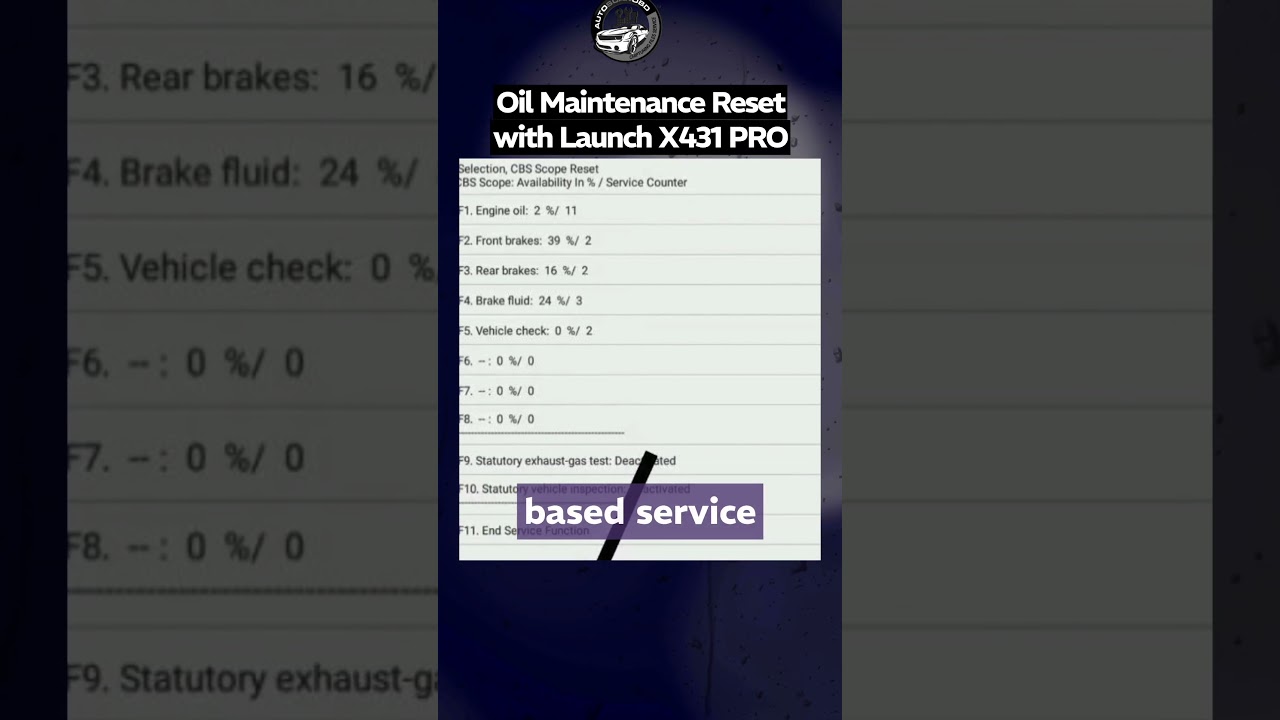
Step 7: Perform CBS Reset
Choose the CBS reset KWP option to perform the reset. This step is crucial as it updates the condition-based service settings in your vehicle.
Step 8: Confirm Date and Time
Once you select the CBS reset, the device will set the date and time in your vehicle. After this is confirmed, press the F2 button to continue.
Step 9: Monitor the CBS Reset Operation
The system will now begin the CBS reset operation. You can watch as the device reads the condition-based service contents, ensuring all maintenance data is accurately updated.
Step 10: Final Step Confirmation
Return to the menu and select F5 for the final step. Wait for the \performing CBS reset\ message, which confirms that the process is underway.
Step 11: Completion
Once the reset is complete, your service function is done, and your BMW is ready to hit the road again without the oil maintenance warning light.
Tips for a Smooth Reset Process
Ensure Proper Connection: Make sure the Launch X431 Pro is properly connected to your vehicle’s OBD-II port before starting the reset process.
Follow the Prompts: Pay close attention to the prompts on the diagnostic tool; they guide you through each step.
Double-Check Settings: Before finalizing the reset, verify the date and time settings to avoid any discrepancies.
Common Mistakes to Avoid
Ignoring the Ignition Requirement: Forgetting to turn on the ignition can halt the process, leading to frustration.
Skipping Steps: Each step is crucial; skipping any can result in an incomplete reset.
Using Incorrect Settings: Always ensure you select BMW as your vehicle brand to avoid compatibility issues.
Key Takeaways
Resetting the oil maintenance light on your BMW using the Launch X431 Pro is a straightforward process when you follow the outlined steps. By ensuring that you have the right tools and are attentive to the prompts, you can successfully complete the reset without hassle.
Next Steps for BMW Owners
Now that you know how to reset your oil maintenance light, take a moment to familiarize yourself with other maintenance functions available on the Launch X431 Pro. Regularly checking and resetting maintenance indicators will keep your BMW in top condition and enhance its longevity. Happy driving!
Powered by AutoscanOBD
https://www.autoscanobd.net/
Повторяем попытку...
Доступные форматы для скачивания:
Скачать видео
-
Информация по загрузке:





![[EN] How to add service history on a BMW iDrive | Masters of Motion](https://image.4k-video.ru/id-video/YocZuedofQ4)