Price Level Price List Tally ERP9 | Tally Chapter 19
Автор: RajivDigiTech
Загружено: 2020-05-13
Просмотров: 226
Описание:
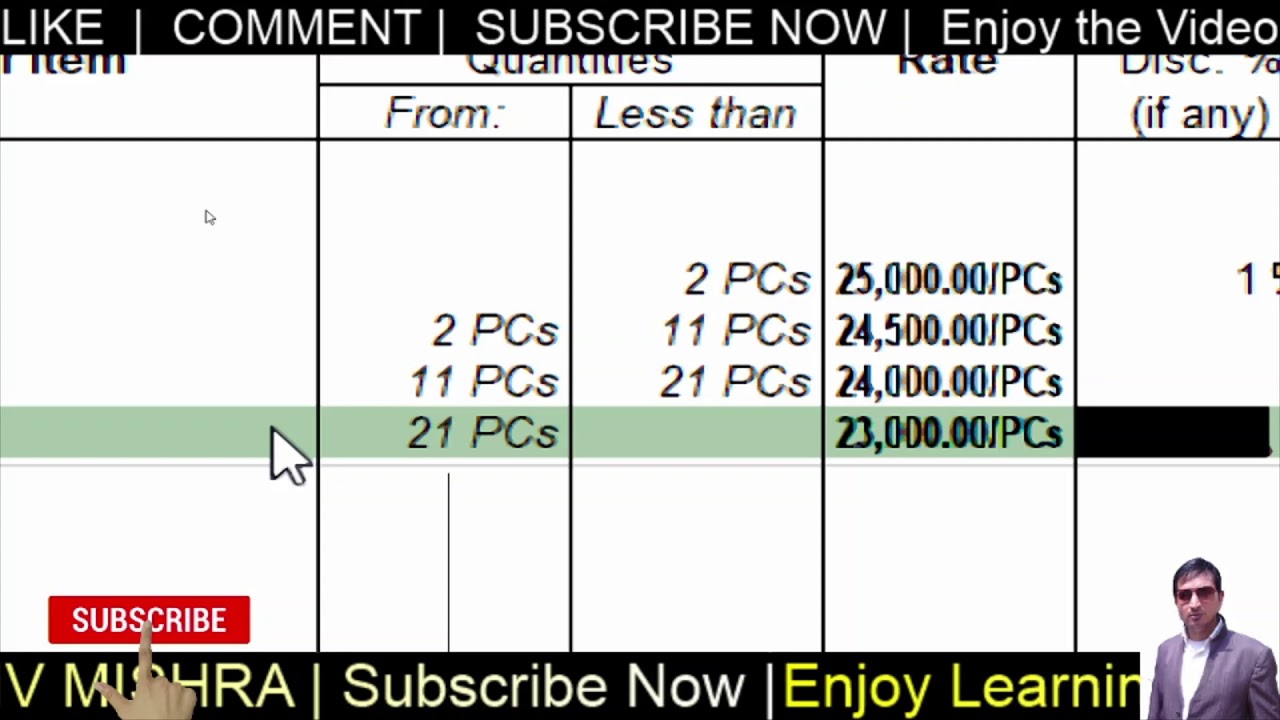
Price List & Level allows you to set a price based on Quantity. you can even set different price for New customer and old Customer. Tally helps you to set different price for different state customers. only you need to create Differnt Price Level for each category. In this video we made Price list named SUPER SUNDAY and decided our product price. we mentioned one product in the table. you can add as many as possible products in same table.
Download PDF here : https://drive.google.com/open?id=1PdX...
_____________________
TALLY CHAPTER 19.
Assignment
Rajiv Mishra Youtube Channel
1. State True or False.
1.1 Price list and Standard rates are different.
1.2 Rates are based on quantity in Price list.
1.3 We can decrease price in Price List Table.
1.4 We can give discount also in Price list Table.
1.5 Seprate discount collumn appears on Printed Bill.
2. Multiple Choice Questions.
2.1 How Many price level we can create?
A. Only one
B. more than one
C. As many as we want
D. None of these
2.2 Can we create new price level while creating price list ?
A. Yes
B. No
C. We need to go to inventory feature again to create
D. None of these
2.3 We find PRICE LIST option in _______?
A. Inventory info.
B. Account info.
C. Inventory Feature
D. Accounting Feature
2.4 To create Price List first we need to activate ______.
A. Stock Item
B. Stock Group
C. Price Level
D. None of these
2.5 Which quantity is correct in Price list? (individuak)
A. 1
B. 2
C. 0
D. A llof these
3. Write the answer of these questions
3.1 Price List is different then Standard Rate. How?
Practical Task
1. Create a new stock named Calculator
under Electronics, unit Pcs, Category, Casio
2. Create Price List for Calculator
1 pc Price is 350/- rs
2 – 24 each pc price is 300/- rs
25 – 48 each pc price is 200/- rs
Enjoy Learning!!!
Best Wishes
Повторяем попытку...
Доступные форматы для скачивания:
Скачать видео
-
Информация по загрузке: