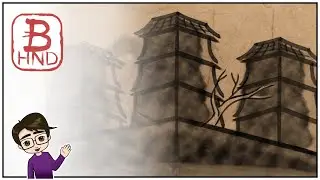
Battle - Booshido Prototype Art
Автор: Lunar Nebula Art
Загружено: 2023-01-08
Просмотров: 20
Описание:
Hello, dear viewer, and welcome to the Lunar Nebula Art Channel! I’m learning digital art and thought you might want to join me as I try my hand at a Sumi-e style painting in Affinity Designer 2. This is in response to the last poll I did for nature art, and it may turn into part of a larger project for a board game I'm working on. I hope you enjoy it, dear viewer!
#Booshido #affinitydesigner2
Affinity Designer 2 is described in the App Store as follows:
“Version 2 of the award-winning vector graphics app is here, equipped with tons of new features and hundreds of enhancements.
*Try for free for 30 days, no sign-up required*
Available to purchase in-app for a one-off cost – no subscription
Affinity Designer 2 for iPad takes the power and precision of the Apple Design Award-winning desktop app and converts it into an incredible touch-focused creative experience. Packed with tons of new features and hundreds of enhancements to optimize your workflow, it has everything you need to seamlessly create stunning illustrations, branding, icons, UI/UX designs, print projects, typography, concept art, digital illustrations and much more – all completely free from the confines of your desk.
OPTIMIZED FOR IPAD
• Redeveloped UI, tool, and button icons for a more familiar, touch-focused experience
• Fully integrated and optimized iPad gesture controls to speed up your workflow
• iOS16 ready, including optimization for virtual memory swap, dramatically increasing performance on large documents.
• Sensitive to pressure, tilt and angle, the app harnesses the full power and precision of Apple Pencil
• Command controller hosting on-screen modifiers
• Quick Menu for context-sensitive access to commands
POWERFUL NEW TOOLS & FUNCTIONALITY
• Vector Warp
• Shape Builder Tool
• Knife Tool
• DXF/DWF import
• Measure & Area tools
• Drawing scale – including ability for different scales set per artboard
• X-ray view mode
• Multiple shadow, outline and overlay layer effects per object
REAL-TIME PERFORMANCE
• Pan and zoom at 120fps
• Live gradients, transforms, effects, and adjustments
• Optimized for documents of any complexity, zoom to over 1,000,000% for absolute precision
• Live pixel, retina, wireframe, and x-ray views of vector artwork in and out of split screen mode
• Seamless switching between tools and editing modes for frustration-free design
• Incredibly accurate results with minimal nodes
PRECISE VECTOR TOOLS
• Rock solid vector tools that work just the way you want them to
• The best pen tool, node tool, curve editing and smart shape tools available
• Powerful contour tool to create abstract objects or increase the width of single open curves
• Pencil and brush stabilization for drawing super-smooth curves freehand
• Non-destructive Boolean operations
• Live effects, blend modes and image adjustments
• Incredibly smooth gradient and transparency controls
RASTER OR VECTOR, YOU DECIDE
• Switch between vector and raster workspaces with a single tap
• Use the strengths of vector and raster behaviors for the best of both worlds
• High quality raster tools for texturing, masking, and finishing artwork
• True creative freedom not found in other apps
SOPHISTICATED TYPOGRAPHY
• Flexible text handling including comprehensive support for OpenType
• Artistic text and text frames
• Full control over character and paragraph styles
• Flow text along any drawn path
BUILT FOR YOUR WORKFLOW
• Unlimited artboards
• Savable history with alternate futures
• Customizable shortcuts with attached keyboard or new quick menu
• PSD, AI, PDF, EPS, SVG, JPG, JPEG XL, TIFF, EXR, DXF and DWG file support
• Linked symbols and constraints
• Save documents as template files to re-use time and time again
• Quickly access royalty free images through the Stock panel
• Select Same and Select Object functions
PERFECT COLOR & OUTPUT
• Professional CMYK, LAB, RGB, PANTONE© and Greyscale color models
• Full 16-bit per channel editing
• End-to-end ICC color management
• Slice export for exporting multiple elements in a single tap
• Live pixel preview to see exactly how your design will export
• Live pixel preview to see exactly how your design will export"
Disclaimer: I’m not being paid by anybody to make this at this time.
Album name: JRPG Battle Quest
Song name: Loop_No Time to Lose
Album name: Adventure Game Loops
Song name: Army of Death
Album name: Ambiences_Sounds
Song name: Ambience_Earth_Moving_01_Loop
Song name: Ambience_Earth_Moving_01_Loop
Song name: Ambience_Fire_01_Loop
Song name: Ambience_Earthquake_Loop
Song name: Ambience_Warfare_Loop
The Outro Music for the channel is made by me in Garageband.
Повторяем попытку...

Доступные форматы для скачивания:
Скачать видео
-
Информация по загрузке:

![Почему работает теория шести рукопожатий? [Veritasium]](https://image.4k-video.ru/id-video/ggI1xKzoANs)