Autodesk Fusion 360 | QUICK TIP: Top 5 Fusion 360 Keyboard Shortcuts
Автор: Autodesk Fusion
Загружено: 2016-09-06
Просмотров: 26238
Описание:
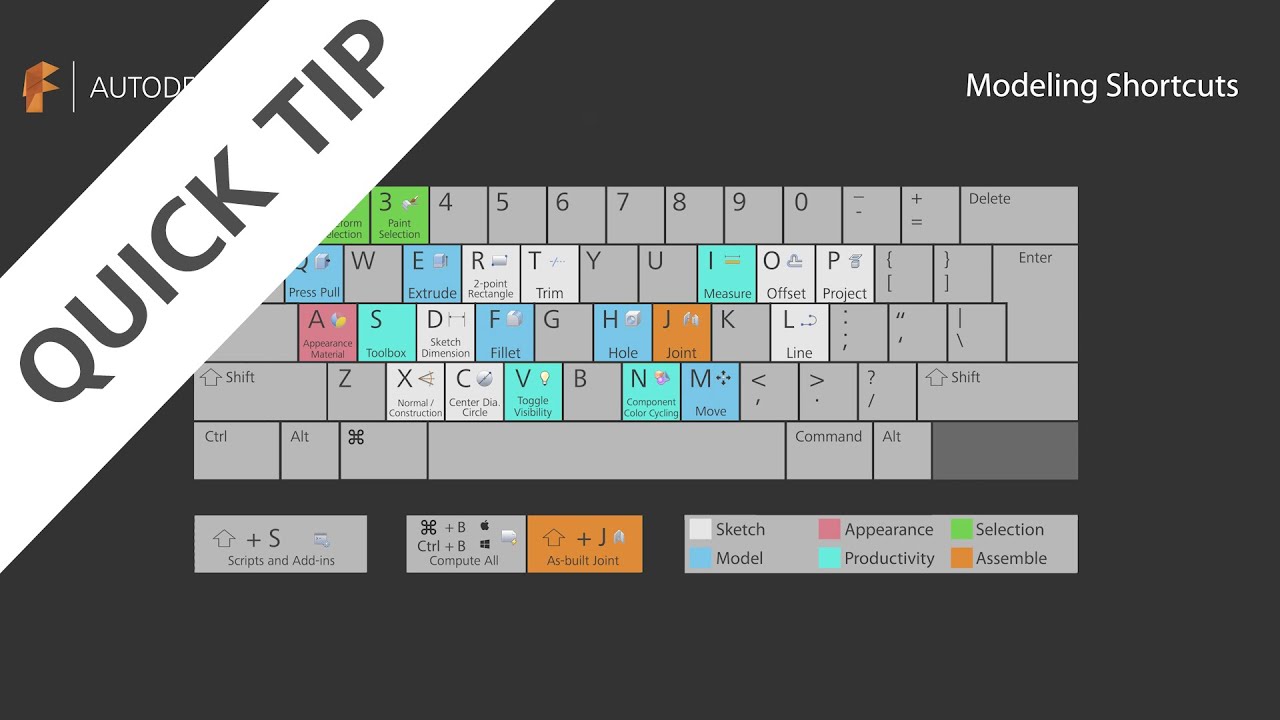
This QUICK TIP goes through our top five keyboard shortcut list in Autodesk Fusion 360. There are way more than five keyboard shortcuts, but if you take the time to learn just these, you'll find yourself churning through your 3D designs faster than ever before.
1. Hitting the A key will bring up your appearance dialog box, enabling you to add lifelike textures in record time.
2. Toggling On and Off when working with complex assemblies will turn your color component cycle on or off to help you visualize your 3D designs and differentiate between components.
3. Holding the Shift key and the J key simultaneously will add joints and as-built joints to help you assemble your 3D designs and efficiently build in the proper mechanics.
4. The Q key brings up the Press Pull Tool, which can fillet, extrude and even off-set faces.
5. The S key shortcut brings up your toolbox. The toolbox is customizable and even includes a search option. Using this method, you can access nearly any command in Fusion 360.
List of Autodesk Fusion 360 keyboard shortcuts available here:
http://fusion360.autodesk.com/learnin...
►FREE TRIAL | https://autode.sk/2uLm8a6
►SUBSCRIBE | https://autode.sk/2q61ZpD
►GET STARTED | https://autode.sk/2HaB2Jk
CONNECT with Fusion 360 on social media:
INSTAGRAM | https://autode.sk/2Enzh8P
FACEBOOK | http://autode.sk/19jII5A
TWITTER | http://autode.sk/19jIJXc
LISTEN to the Fusion 360 podcast "The New Possible":
BLOG | http://autode.sk/3qbFsFS
SPOTIFY | http://autode.sk/3txPz9O
APPLE | http://autode.sk/36LwBTE
GOOGLE | http://autode.sk/2YQccbC
Повторяем попытку...
Доступные форматы для скачивания:
Скачать видео
-
Информация по загрузке:




![Fusion 360: Когда и как использовать 3D Sketch? [Методы и многое другое]](https://image.4k-video.ru/id-video/7F2SkJhI2g0)


