buffer overflow tutorial in kali linux to execute shell command
Автор: gamingwithMB
Загружено: 2017-12-20
Просмотров: 10016
Описание:
disclaimer:- This video is for educational demonstration purpose
reference:-
• Running a Buffer Overflow Attack - Compute...
requirement:- kali linux 2016 32 bit
you have to disable stack security its not applicable on higher versions...!!!
Step1: Create a file called vuln.c
Step2: Disable random memory allocation
Step 3:compile C code for buffer overflow
step 4: then enter debugging mode using gdb
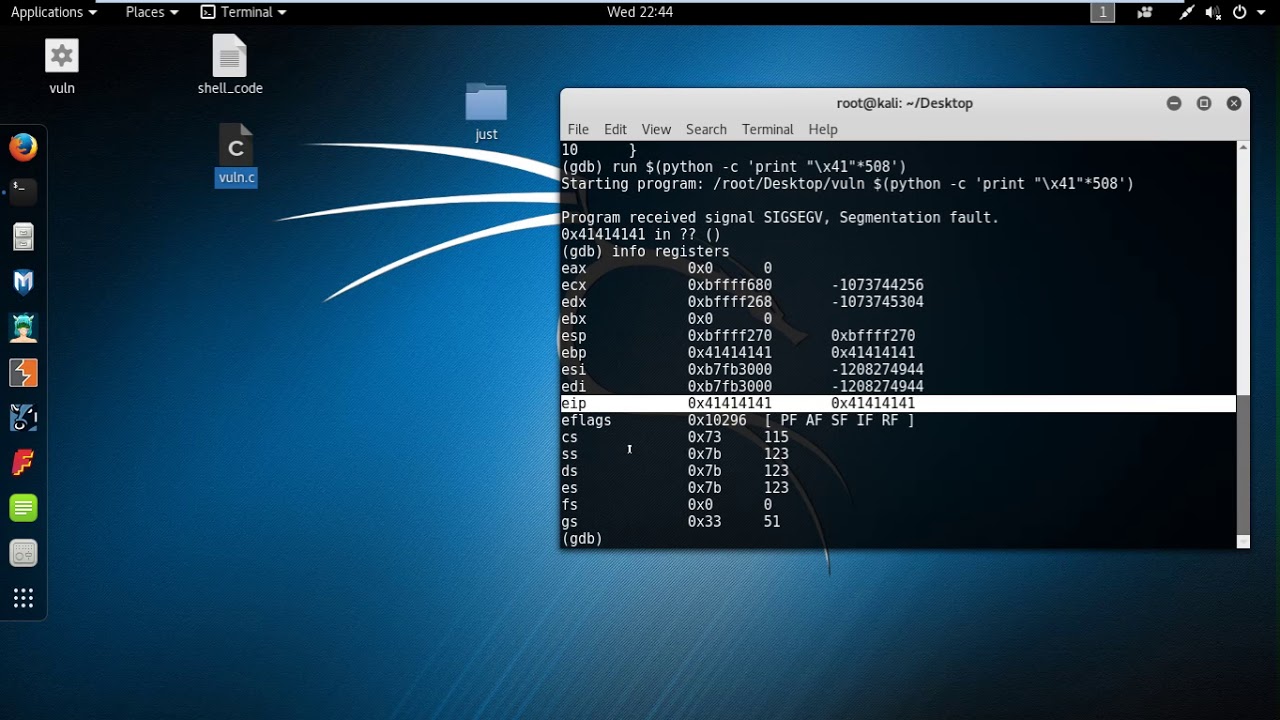
step 5: Trying buffer overflow point where \x41 is “A”
Step 6: checking register values for segmentation fault or buffer overflow
Step 7:now trying with the code replacing x41 with x90 where x90 is no-op code
And adding malicious code to run zhs shell script which is old insecure shell for linux and at end appending a dummy return address /x51/x51/x51/x51 and adding padding by multiplying with 10
Step 8: checking codes to memory allocation address where esp is stack pointer and 550 is full size of the stack i.e from beginning of stack
Now choosing a middle value address e.g. 0xbffff0ea
In intel processors address are endian so we have to write it in from back
ea f0 ff bf
Step 9:crafting real buffer overflow
Повторяем попытку...
Доступные форматы для скачивания:
Скачать видео
-
Информация по загрузке: