OnePlus 13: Fix "Image Boot Recovery Destroyed" | Free Auth Flash Guide | oneplus 13 auth flash
Автор: Sam Devs
Загружено: 2026-01-26
Просмотров: 73
Описание:
If you're staring at a "boot recovery destroyed" error on your OnePlus 13, don't panic. This usually happens after a failed update or a corrupted
flash attempt. This guide covers how to use our free authorization tool to get your device back to life.
Important Compatibility Note
This specific free tool is built to exploit vulnerabilities in older firmware versions.
Compatibility: This tool works only if your device is running OS 16.0.3 or lower.
Updated Devices: If your OnePlus 13 has been updated to the latest OS version (security patches beyond 16.0.3), the local exploit will be patched.
Running the latest OS? If you are updated past 16.0.3, the free tool will not be able to bypass the Auth. In this case, please contact us directly
for a remote session where we can perform the flash manually via our server.
What This Tool Fixes:
Bootlooping: Stuck on the OnePlus logo.
Recovery Destroyed: "The current image boot/recovery have been destroyed."
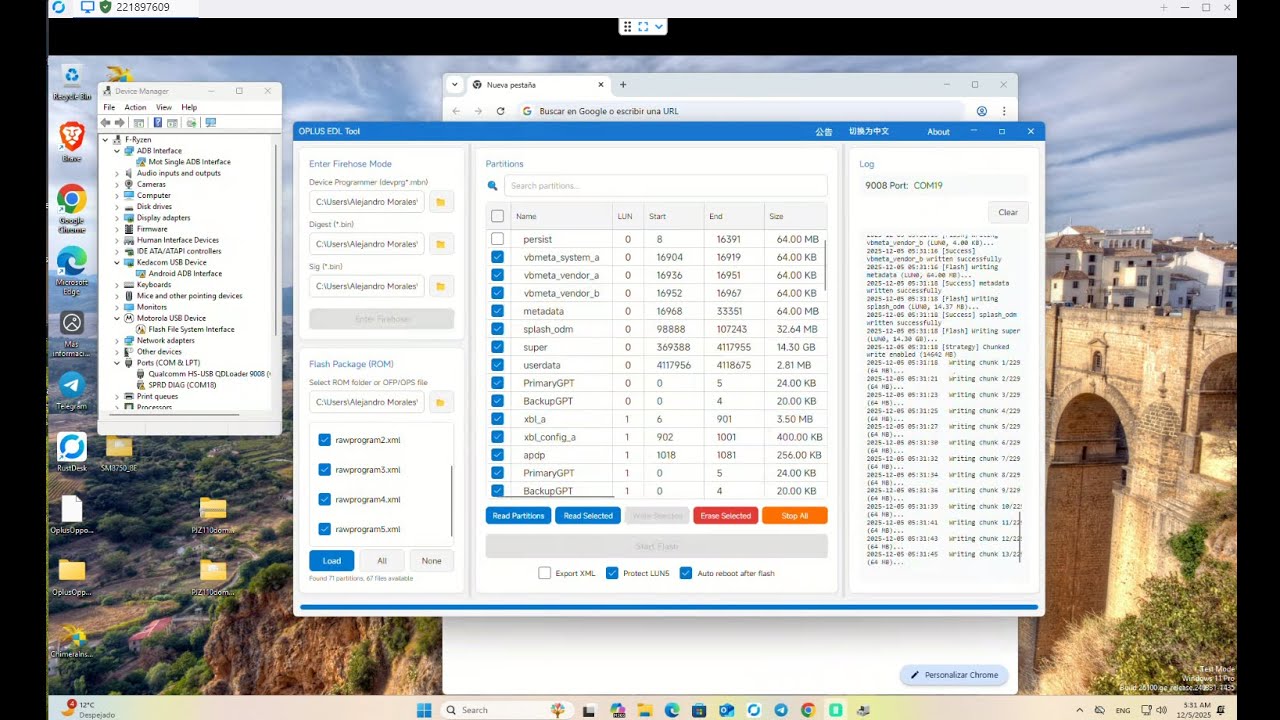
Brick Status: Device only recognized as "Qualcomm HS-USB QDLoader 9008."
Auth Bypass: No need to pay for official service account logins for older versions.
How to Use:
Download the Flash Package and the Free Auth Tool from the link in the pinned comment.
Install the necessary OnePlus/Qualcomm USB drivers.
Power off your device and hold Volume Up + Volume Down while connecting to your PC.
Run the Auth Tool; if your OS is 16.0.3 or lower, it will return "Authorized."
Select your firmware and hit "Start" to revive your phone.
Supported : OnePlus Oppo Realme Xiaomi Samsung Google Pixel Huawei Redmagic Vivo Moto FRP Iphone Icloud etc✅🔥⚡💥
all oneplus oppo realme region unlock avaliable. ✅💥🔥⚡
Oneplus global auth ✅💥🔥⚡
oneplus china auth✅💥🔥⚡
oppo global auth✅💥🔥⚡
oppo china auth✅💥🔥⚡
realme global auth✅💥🔥⚡
realme china auth✅💥🔥⚡
samsung os15 frp bypass✅💥🔥⚡
samsung os16 frp bypass✅💥🔥⚡
samsung KG lock MDM lock Retail Mode✅💥🔥⚡
To Book your Order Contact us on FB link is 👇
worldwide service on best price🌍on 24/7✅💥🔥⚡
no need to wait message me any time ✅Reply⚡💥🔥⚡
for all services contact us on FB page samdevs✅💥🔥⚡
/ samteams ✅💥🔥⚡
You're using a device that is only sold in china its communication functions will soon be restricted in your
region please go to the official oneplus website and contact customer service for help,
Region Lock supported Permanently Status 1 to 2💥💥🔥⚡
oneplus 15 the current image boot recovery have been destroyed and can not boot please flash the correct image or contact customer service to fix it💥🔥⚡
all oneplus convert to global✅
all oneplus ocdt error fixed✅
all oneplus auth flash ✅
all oppo auth flash✅
all realme auth flash✅
all moto frp bypass✅
all vivo frp bypass✅
一加中國認證閃斷✅
一加13中國認證閃斷✅
一加15中國認證閃斷✅
一加認證閃斷✅
一加區域鎖✅
OPPO 區域鎖定✅
realme區域鎖✅
⚠️ Disclaimer: This is an advanced technical procedure. Modifying system partitions can lead to a permanent brick if not done correctly. Proceed at your own risk.
oneplus 13 pjz110 the current image boot recovery have been destroyed and can not boot please flash the correct image or contact customer service to fix it💥🔥⚡
🔑 Key Information
Model: OnePlus 13 (PJZ110)
Error: Image Destroyed (Boot/Recovery)
Tool Used: Oplusedltool
Mode: EDL (9008)
#OnePlus13authflash #BootRecoveryDestroyed #FreeAuthFlash #QualcommFlash #HardBrickFix #OnePlusRepair #FirmwareUpdate #UnbrickOnePlus #MobileRepair
Повторяем попытку...
Доступные форматы для скачивания:
Скачать видео
-
Информация по загрузке: