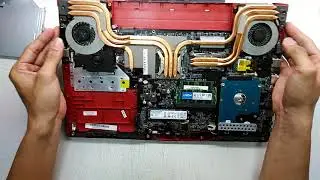
How to Disassemble Reassemble and Clean Gaming Laptop MSI GE62VR Apache Pro & Reapply Thermal Paste
Автор: Seven Heaven Haven
Загружено: 2021-08-16
Просмотров: 528
Описание:
I do a how to video on replacing the thermal paste inside my gaming laptop. I'm doing this on a Gaming Laptop MSI VR Ready GE62VR Apache Pro. I disassemble and open up the laptop removing the screws showing the insides. I then reassemble it after cleaning the heat pipes and fans for better air flow using isopropyl alcohol. I've used this before so it's safe with electronics. I rub off the older thermal paste from the CPU and GPU using cotton swabs and put in the new one. I used the Noctua thermal paste which is the same one I used on my Gaming Desktop. It's really good with lowering temperatures which is important for electronic devices. This is the longer full video version. I'll upload the shorter version later.
Here is the link to the Dogecoin Wallet https://dogecoin.com/
If this helped you out then I would appreciate it if you tip me some Doge!
Here is my Dogecoin Core public address for donations!
DRu1aT24eFvsLuSpYFXy5RLk9DQzaSqFBb
Here is my Bitcoin public address for donations!
bc1qjjy036uhvlelyq5575he2erlwuvyl4v4r0narz
Here is my Litecoin Core public address for donations!
MKKbKEiQ8khFLXSD3ZRspaPcDKQAWrDbYq
Thanks! Don't forget to subscribe, like this video, comment, share it and spread it around so that it can get some love on the youtube algorithm.
#Gaminglaptop #thermalpaste #MSI #gaming #clean #isopropylalcohol #Cotton #cottonswab #videogames #Nvidia #laptop #Disassemble #disassembly #Reassemble
Повторяем попытку...

Доступные форматы для скачивания:
Скачать видео
-
Информация по загрузке: