ycliper

Популярное

Музыка Кино и Анимация Автомобили Животные Спорт Путешествия Игры Юмор

Интересные видео

2025 Сериалы Трейлеры Новости Как сделать Видеоуроки Diy своими руками

Топ запросов

смотреть а4 schoolboy runaway турецкий сериал смотреть мультфильмы эдисон
Скачать

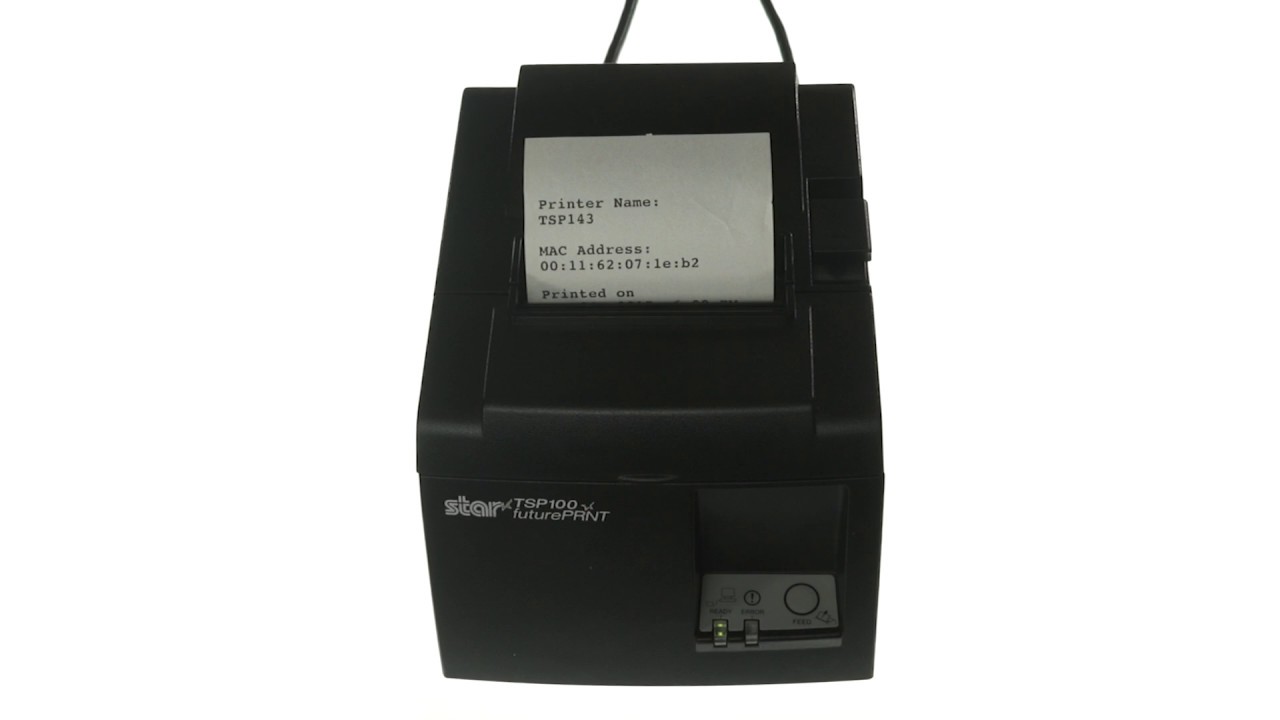
How to Set Up Your Ethernet Receipt Printer with the ShopKeep iPad Cash Register

Автор: Lightspeed S-Series

Загружено: 2016-11-02

Просмотров: 6778

Описание: This quick video tutorial shows you how to set up your ethernet receipt printer with the ShopKeep iPad cash register. Set up the Star Micronics TSP100 Ethernet Printer to start printing receipts. Connect a cash drawer to the printer so it pops open automatically when a cash transaction is run.

For further support, visit: https://www.shopkeep.com/support/hard...

Не удается загрузить Youtube-плеер. Проверьте блокировку Youtube в вашей сети.
Повторяем попытку...
How to Set Up Your Ethernet Receipt Printer with the ShopKeep iPad Cash Register

Поделиться в:

Доступные форматы для скачивания:

Скачать видео

  • Информация по загрузке:

Скачать аудио

Похожие видео

How To Set Up Your Bluetooth Receipt Printer with the ShopKeep iPad Cash Register

How To Set Up Your Bluetooth Receipt Printer with the ShopKeep iPad Cash Register

How To Connect The TMT82ii Ethernet Receipt Printer With posBoss

How To Connect The TMT82ii Ethernet Receipt Printer With posBoss

Smooth Jazz Chill Out Lounge with Female Vocals | Soulful Romantic Jazz Songs

Smooth Jazz Chill Out Lounge with Female Vocals | Soulful Romantic Jazz Songs

How to Set Up BigCommerce for use with the ShopKeep iPad Cash Register

How to Set Up BigCommerce for use with the ShopKeep iPad Cash Register

Как подключить чековый принтер | Учебное пособие по Square Register

Как подключить чековый принтер | Учебное пособие по Square Register

Winter Energy ❄️ Happy Day Playlist 2026 ☀️ Positive Chill House Music

Winter Energy ❄️ Happy Day Playlist 2026 ☀️ Positive Chill House Music

How to Set Up Kitchen Ticket Printing with ShopKeep Point of Sale

How to Set Up Kitchen Ticket Printing with ShopKeep Point of Sale

How to Pair Your iPad and iCMP Device

How to Pair Your iPad and iCMP Device

Pastel Pink Coquette Ribbons Aesthetic Background Wallpaper Screensaver | Coquette bow Frame TV art

Pastel Pink Coquette Ribbons Aesthetic Background Wallpaper Screensaver | Coquette bow Frame TV art

Epson Ticket Printer Setup with ShopKeep Point of Sale

Epson Ticket Printer Setup with ShopKeep Point of Sale

Mouse Jiggler 5 Hours - Keep Computer Awake

Mouse Jiggler 5 Hours - Keep Computer Awake

Камин & Легкая красивая музыка #огонь #гитара #релакс #камин #костер #romantic #relaxation

Камин & Легкая красивая музыка #огонь #гитара #релакс #камин #костер #romantic #relaxation

How to Set up the ShopKeep iPad Stand for use with ShopKeep

How to Set up the ShopKeep iPad Stand for use with ShopKeep

Chansons Françaises de Paris | Voyage Romantique en Musique

Chansons Françaises de Paris | Voyage Romantique en Musique

ES POS Tutorial - How to connect POS cash drawer To your 3

ES POS Tutorial - How to connect POS cash drawer To your 3" printer ?

How to Set Up Ingenico EMV Chip Card Reader with the ShopKeep iPad Register

How to Set Up Ingenico EMV Chip Card Reader with the ShopKeep iPad Register

Clover Mini Setup and Use with ShopKeep POS

Clover Mini Setup and Use with ShopKeep POS

Hearts and Flowers Oil Painting Screensaver | Vintage Romantic Floral Art | Pink Hearts and Floral

Hearts and Flowers Oil Painting Screensaver | Vintage Romantic Floral Art | Pink Hearts and Floral

Morning Coffee ☕❄️ Happy Music for Perfect Day ☀️ Relaxing Chillout House 2025 - 2026

Morning Coffee ☕❄️ Happy Music for Perfect Day ☀️ Relaxing Chillout House 2025 - 2026

Antique-framed realistic flower painting | TV art wallpaper, background, screensaver | HD | 3 hours

Antique-framed realistic flower painting | TV art wallpaper, background, screensaver | HD | 3 hours

© 2025 ycliper. Все права защищены.


  • Контакты
  • О нас
  • Политика конфиденциальности


Контакты для правообладателей: [email protected]