ycliper

Популярное

Музыка Кино и Анимация Автомобили Животные Спорт Путешествия Игры Юмор

Интересные видео

2025 Сериалы Трейлеры Новости Как сделать Видеоуроки Diy своими руками

Топ запросов

смотреть а4 schoolboy runaway турецкий сериал смотреть мультфильмы эдисон
Скачать

How to use Stop Mode Functions – RazorGage RG3 Saw Software

Автор: Razorgage

Загружено: 2024-07-03

Просмотров: 235

Описание: When using the RG3 Razorgage in Stop Mode, learn the different settings and functions used when using the RazorGage RG3 as a Stop.

For product information, training videos and more, visit our website at http://RazorGage.com

Whether you use the RG3 as an automatic pusher or a measuring stop, this digital measuring fence can be used with a chop saw, upcut saw, downcut saw, drill press, haunching, notching and punching machines.

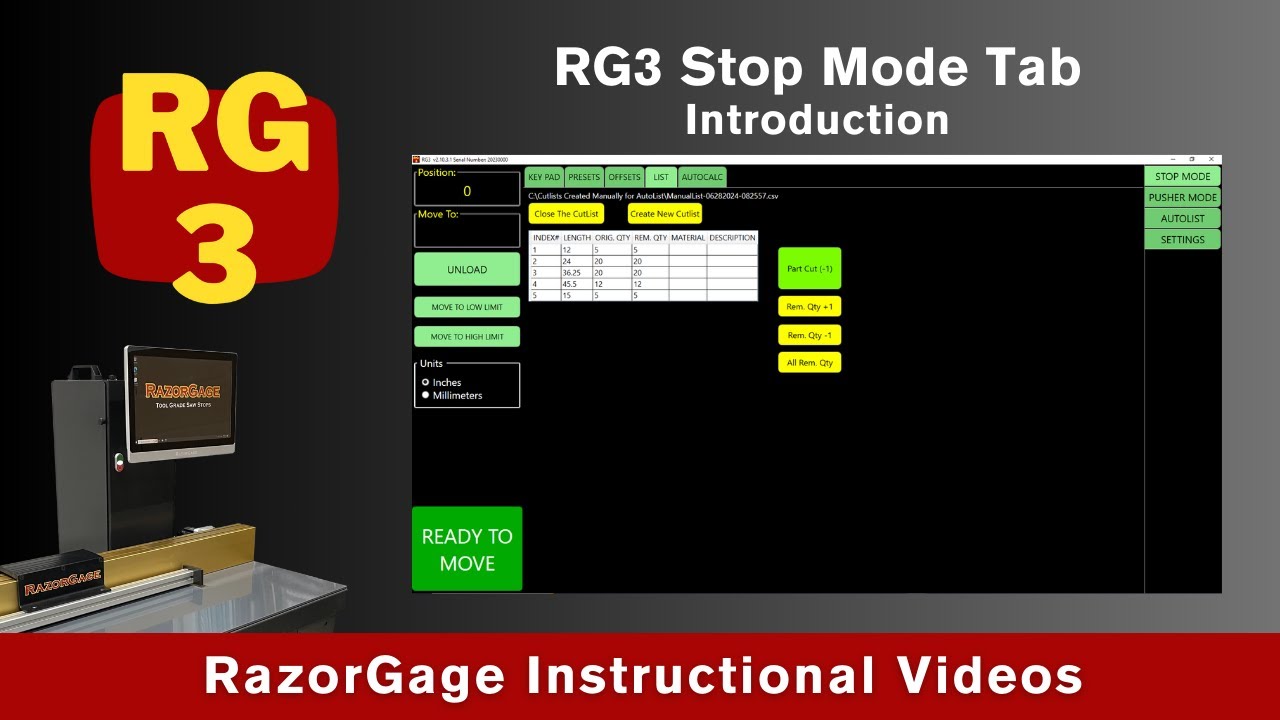
In Stop Mode, you have 5 tabs that help you set up and execute different functions of the RG3. These 5 tabs are KEY PAD, PRESETS, OFFSETS, LIST AND AUTOCALC.

KEY PAD is just what it sounds like. You have a screen with numbers and fractions so you can input your desired measure and the RazorGage stop moves to that position

PRESETS are hot keys that very useful and easy to use. You can set up as many preset hotkeys as you want. You create the specific measure that you use all the time, press the button and it goes to that position.

OFFSETS allow you to set up the RazorGage RG3 to use it with multiple machines. For instance, if you have a saw and a drill press setup in line with the RazorGage, rather than having to manually adjust your dimensions each time you want to use the drill press, you can set up an offset for the drill press, so the home position adjusts to the location of the drill press.

LIST is where you can create a list and run it. You enter your stock length, length of your parts, and quantity needed. You save your list and open it. When you cut your parts, your quantity is decremented for each cut so it tracks your progress. Once you have all your cuts for that part, you can select the next part from your cut list, the positioner adjusts to the new length and you repeat the process until you have completed the cut list.

AUTOCALC is a screen where you can define buttons with math behind them. Basically, you can create formulas to account for the proper length wanted for further cutting or shaping such as a mortise on the end of a rail. You can name the buttons and you can create as many sheets of these customized settings as you want.

There is a lot of functionality within the Stop Mode function and it is fairly intuitive to learn and use.

Subscribe to the RazorGage YouTube channel at    / razorgage  

Не удается загрузить Youtube-плеер. Проверьте блокировку Youtube в вашей сети.
Повторяем попытку...
How to use Stop Mode Functions – RazorGage RG3 Saw Software

Поделиться в:

Доступные форматы для скачивания:

Скачать видео

  • Информация по загрузке:

Скачать аудио

Похожие видео

How to use Pusher Mode Functions – RazorGage RG3 Saw Software

How to use Pusher Mode Functions – RazorGage RG3 Saw Software

Smoke Mood — Just Relax | Deep House Mix 2026 • Chill / Night Vibes / Stress Relief  #3

Smoke Mood — Just Relax | Deep House Mix 2026 • Chill / Night Vibes / Stress Relief #3

RazorGage Automatic Saw Measuring Systems

RazorGage Automatic Saw Measuring Systems

Как Сделать Настольный ЭЛЕКТРОЭРОЗИОННЫЙ Станок?

Как Сделать Настольный ЭЛЕКТРОЭРОЗИОННЫЙ Станок?

How to Use the RazorGage RG3 Software – RazorGage RG3 Positioner Software

How to Use the RazorGage RG3 Software – RazorGage RG3 Positioner Software

How to use AutoList to Optimize – RazorGage RG3 Optimizing Saw Software

How to use AutoList to Optimize – RazorGage RG3 Optimizing Saw Software

Мне 73. Я жалею, что понял это только сейчас.

Мне 73. Я жалею, что понял это только сейчас.

RG3 AutoList – Create Cutlist in Excel + Mapping

RG3 AutoList – Create Cutlist in Excel + Mapping

Calibrating your RazorGage RG3

Calibrating your RazorGage RG3

RG3 Software - RazorGage Automatic Positioners

RG3 Software - RazorGage Automatic Positioners

Понимание инженерных чертежей

Понимание инженерных чертежей

Как производятся микрочипы? 🖥️🛠️ Этапы производства процессоров

Как производятся микрочипы? 🖥️🛠️ Этапы производства процессоров

RazorGage RG3 - Automatic Saw Measuring System

RazorGage RG3 - Automatic Saw Measuring System

Сисадмины больше не нужны? Gemini настраивает Linux сервер и устанавливает cтек N8N. ЭТО ЗАКОННО?

Сисадмины больше не нужны? Gemini настраивает Linux сервер и устанавливает cтек N8N. ЭТО ЗАКОННО?

Как легко нарисовать схему электрощита в Visio: гайд для новичков ⚡️

Как легко нарисовать схему электрощита в Visio: гайд для новичков ⚡️

Основы ПЛК: релейная логика

Основы ПЛК: релейная логика

Понимание GD&T

Понимание GD&T

DeepSeek и Excel ➤ Используем Искусственный Интеллект для создания формул

DeepSeek и Excel ➤ Используем Искусственный Интеллект для создания формул

Understanding the Discrete Fourier Transform and the FFT

Understanding the Discrete Fourier Transform and the FFT

Red bright circles Background video | Footage | Screensaver

Red bright circles Background video | Footage | Screensaver

© 2025 ycliper. Все права защищены.


  • Контакты
  • О нас
  • Политика конфиденциальности


Контакты для правообладателей: [email protected]