Tutorial - How to install Bada 2.0 (flashing)
Автор: TODAYISEVERYDAY
Загружено: 2012-01-29
Просмотров: 125551
Описание:
Hello, this tutorial shows you how to install Bada 2.0. PLEASE READ THE TUTORIAL IN THE DESCRIPTION FIRST!!! Then you know what we're talking about. If you LIKE gaming, I'm also making videos for that, so please check out my other videos! The instructions given in the video are not complete. So please read the tutorial first. I'm not responsable for any damage to your phone. It's all at your own risk. Please back-up all of your files. To check out the Bada 2.0 features first: • Review Samsung Wave Bada 2.0
Make this video useful! If I helped you, please LIKE!
Download links: -MultiLoader: http://dl.dropbox.com/u/33889330/Mult...
-Bada 2.0 bootfiles Europe: http://dl.dropbox.com/u/33889330/GT-S...
-Bada 2.0 bootfiles India: https://hotfile.com/dl/152220940/21a5...
The Bada version is: bada 2.01112280622LISS8500XXKL6
----------------------------------------------------------------------------------------------------------------------------
Disclaimer: Follow these instructions at your own risk. I will not be responsible for any damages, injury or death resulting from use of these instructions.
Preparing for the flash:
1. Make sure your phone battery is full.
2. Backup your phone data through Kies.
3. Type *#7465625# on your phone and check whether Sim Lock and network lock is off. If it is on, don't try to flash your phone.
4. Download the firmware you want to install.
5. Download MultiLoader
6. Remove your microSD card and SIM card.
7. Make sure Kies is totally OFF before starting. Also the processes, so that Kies cannot find your phone.
Starting the flashing process:
1. Unpack the firmware files on your computer using Winrar or some other software.
2. Connect the cable to S8500 while you press Volume DOWN + LOCK key and Power Button (You can see 'DOWNLOAD' message on the display)
3. Run Multiloader and plug the phone to the computer using the USB cable.
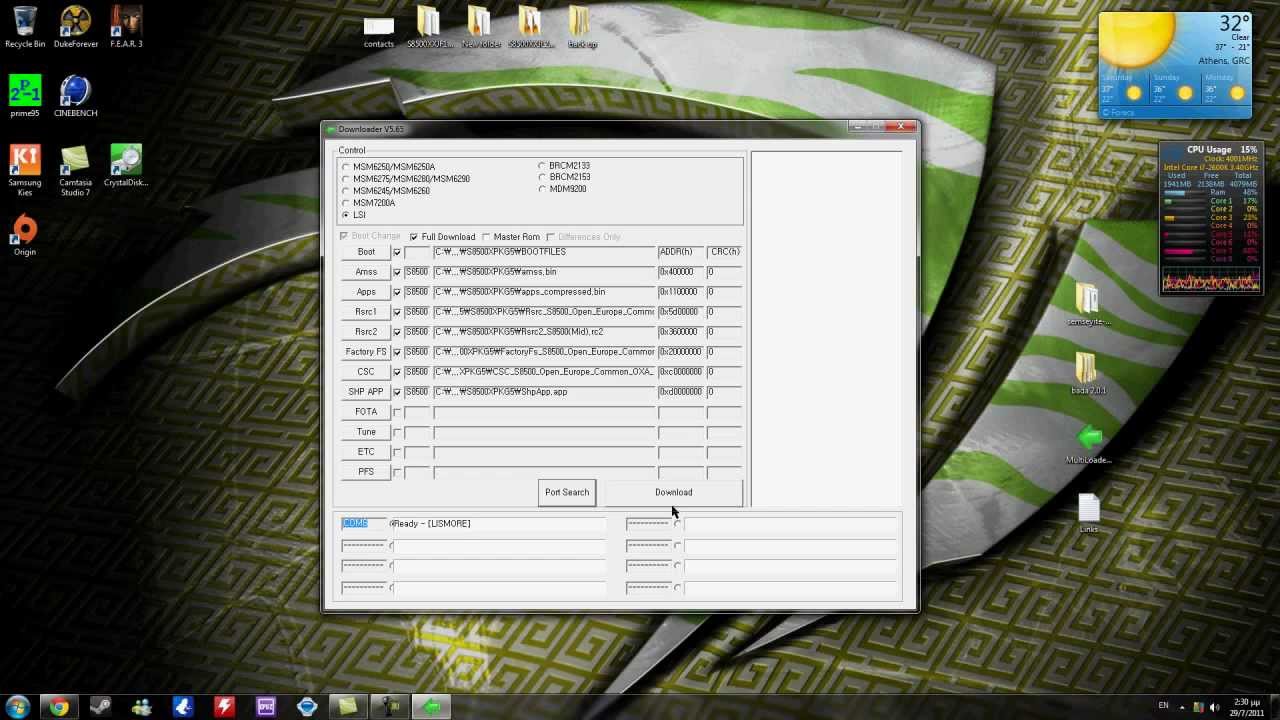
4. In multiloader, Select LSI
5. Tick Full Download
Click Boot and select BOOTFILES folder
"CAUTION : please do not select BOOTFILES_EVTSF folder"
Click AMSS and select 'amss.bin' file which is located in the PC
Click Apps and select 'apps_compressed.bin' file which is located in the PC
Click Rsrc1 and select 'Rsrc_ Open_Europe_Common.rc1'
Click Rsrc2 and select 'Rsrc2_ (Low/Mid).rc2'
Click Factory FS and select 'FactoryFs_ Open_Europe_Slav.ffs'
Click CSC and select 'S8500XXXXX.csc'
Click SHP APP and select 'ShpApp.app'
-Click the FOTA file
After connecting the mobile with PC, Multiloader will be find the COM port automatically. If it cannot find COM port please connect USB cable again and press port search.
Click Download [You will see the downloading progress bar on the right side of Multiloader].
Multiloader will show All files complete message and your phone will restart automatically confirming that the flash is successful.
After restart, dial 2767*3855# to hard reset the phone and then *#1234# to see the firmware version.
Now insert your memory card, SIM card and backup contacts using KIES.
COMMON PROBLEMS!!!
PS: To solve problem with Network settings:
FOR EVERYONE: Go to network, Choose Connection, Make a new profile with the following: Name: WIFI or INTERNET, Accesname: internet, Verification: PAP, Protocol: HTTP, No username or password, Proxyadress:0.0.0.0:80
Thats everything! After configuring your network profile, Select this profile for each application (when it asks for it)
PS: To solve problem with the camera (camera failed)
http://www.badaforums.net/forums/sams...
Download links in this link seems to be outdated
PS: Voor Nederlanders: de officiële Bada 2.0 is te downloaden via Samsung Kies!
PS: Added download link for India!
----------------------------------------------------------------------------------------------------------------------------
Thank you!
GamingMause
Повторяем попытку...

Доступные форматы для скачивания:
Скачать видео
-
Информация по загрузке: