Programming HomeLink® | How To | 2020 Jeep Gladiator
Автор: Mopar
Загружено: 2019-06-28
Просмотров: 67753
Описание:
This video explains how to use the Homelink® garage door opener in 2020 Jeep Gladiator. Learn about Homelink® programming The Homelink® universal transceiver can replace up to three different remote controls, including your garage door opener.
Transcript
[music playing]
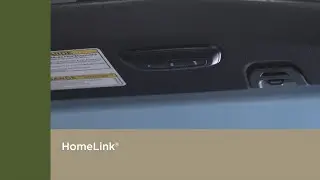
Your vehicle may be equipped with our convenient HomeLink® system. HomeLink® replaces up to three remote controls or handheld transmitters so you can operate devices such as garage door openers, motorized gates, lighting or home security systems from the safety of your driver’s seat. You’ll find the HomeLink® buttons in the overhead console or on the sun visor.
To start programming for a garage door opener, first make sure you’re parked outside the garage. It's also recommended that you put new batteries in the handheld device you'll be programming. The HomeLink® unit is powered by the vehicle's battery and does not require replacement. Then you’ll want to reset the HomeLink® system memory. To do this, simply push and hold the two outside buttons until the indicator light flashes. This could take up to 20 seconds. This procedure erases all three HomeLink® button programs, so you only need to do it once. Do not erase all three channels when programming additional buttons. Now, before you program your HomeLink® system, you’ll need to determine the type of garage door opener you have. Go to the garage door opener motor in the garage. See if you can find the Learn or Train button, which is usually found where the hanging antenna wire connects to the garage door opener motor. It is not the same button normally used to open and close the door, and it may vary by name or color depending on the manufacturer. If you can find a Learn or Train button on the opener motor, then you’re using a newer, “rolling code” garage door opener, and programming will involve a few additional steps. If there is no Learn or Train button, that means you have an older, non-rolling code garage door opener. Once you know what type of opener you’re using you’re now ready to program the HomeLink® system. Here we go. Put the ignition switch in the On/Run position, but don’t start the engine. Hold the handheld transmitter 1 to 3 inches or 3 to 8 centimeters away from your HomeLink® system. Now, simultaneously push and hold both the HomeLink® button you want to program and the handheld transmitter button. Watch the HomeLink® indicator light. It will flash slowly at first, and then rapidly. It may take 30 seconds or more for the rapid flashing to occur. When it does, release both buttons. The garage door may open and close while you’re programming. To check your programming, push and hold the just programmed HomeLink® button and observe the indicator light. If the indicator light stays on continuously, then programming is complete and the garage door should activate when the HomeLink® button is pushed.
At this point, if you have an older, non-rolling code garage door opener, you’re done. Your HomeLink® controls and garage door opener should now be in sync. If you have a rolling code garage door opener, here’s where those additional steps come into play. Go to the garage door opener and once again find the Learn or Train button. Firmly push and release it. You now have 30 seconds to return to the HomeLink® system, so move quickly. Better yet, it might be good to have a second person standing by at the HomeLink® system. Once there, push the HomeLink® button you’d like to program, twice. Hold the button for 2 seconds each time. If the opener is plugged in and activates, programming is complete. If it does not activate, push the button a third time for 2 seconds to complete the training.
Please note that HomeLink® will be disabled any time an onboard security alarm is active. If you have any problems or require assistance, please call toll-free 1-800-355-3515 or visit homelink.com for information or assistance.
This video is not intended to take the place of your Owner's Manual. For complete details and other important safety information, please see your Owner's Information.
Повторяем попытку...
Доступные форматы для скачивания:
Скачать видео
-
Информация по загрузке: