ycliper

Популярное

Музыка Кино и Анимация Автомобили Животные Спорт Путешествия Игры Юмор

Интересные видео

2025 Сериалы Трейлеры Новости Как сделать Видеоуроки Diy своими руками

Топ запросов

смотреть а4 schoolboy runaway турецкий сериал смотреть мультфильмы эдисон
Скачать

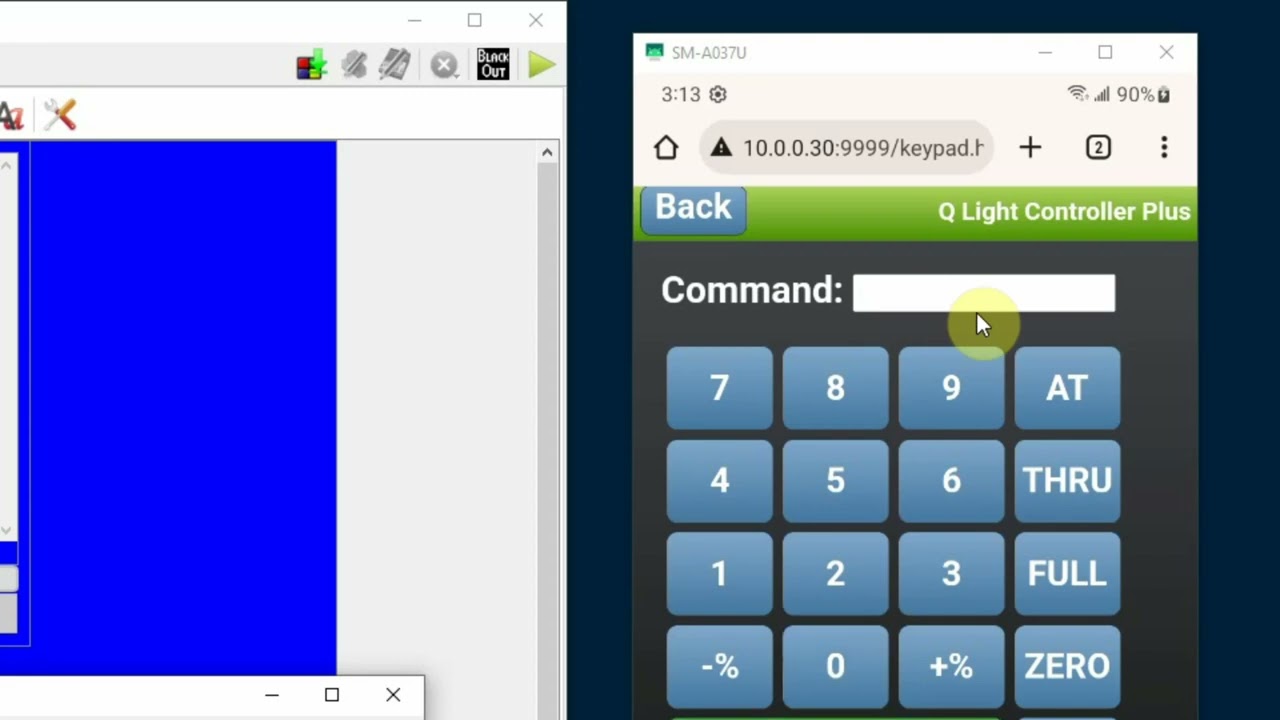
QLC+ Web Interface Part 2 "DMX Keypad"

Автор: Edward Richards

Загружено: 2024-02-10

Просмотров: 1288

Описание: This is part 2 of a three part tutorial that explains how to use the "Web Interface" feature of QLC+ lighting software. Using the web interface, you can display and access the "virtual console" and "simple desk" screens of QLC+ remotely using your smartphone or tablet web browser without having to use 3rd party software. In this tutorial (Part 2) I explain how to use the "DMX Keypad which serves as a remote focus tool. Be sure to watch Part 1 which gives a basic overview of the web interface and also explains how to get it up and running. In Part 3 I show how to design a custom desktop in QLC+ that will perfectly fit the resolution of your smartphone or tablet.
QLC+ is an excellent open source lighting control program that works with Windows PCs, Macs and Linux. In this video tutorial I am using the Windows PC version 4.12.7. You can find more information about the program here: https://www.qlcplus.org/
Please consider donating to the creators as a program like this would cost several hundred dollars if it were not open source.
I also maintain a website for community theater techs where I provide some information and resources for controlling lighting, audio and using show control in theater productions. My website can be found here:
https://comutinytech.com/TheaterTech/

Не удается загрузить Youtube-плеер. Проверьте блокировку Youtube в вашей сети.
Повторяем попытку...
QLC+ Web Interface Part 2 "DMX Keypad"

Поделиться в:

Доступные форматы для скачивания:

Скачать видео

  • Информация по загрузке:

Скачать аудио

Похожие видео

QLC+ Web Interface Part 3

QLC+ Web Interface Part 3 "Design A Custom Virtual Console"

QLC+ DMX Controller on Pi Zero 2W

QLC+ DMX Controller on Pi Zero 2W

Starting Data Governance with Fabric OneLake Catalog ~How Does It Differ from Microsoft Purview~

Starting Data Governance with Fabric OneLake Catalog ~How Does It Differ from Microsoft Purview~

Pixout Video Tutorials

Pixout Video Tutorials

QLC+ 4 - Video Tutorials

QLC+ 4 - Video Tutorials

MultiPlay OSC X32 Beringher

MultiPlay OSC X32 Beringher

120 МИЛЛИАРДОВ: КТО и Зачем создал БИТКОИН? Тайна Сатоши Накамото

120 МИЛЛИАРДОВ: КТО и Зачем создал БИТКОИН? Тайна Сатоши Накамото

Уличные выступления с QLC+

Уличные выступления с QLC+

Using Pages with Controllers in QLC+

Using Pages with Controllers in QLC+

Lighting 101

Lighting 101

HOW TO - Connect Novation Launchpad Pro to QLC+ Part 2: Programming buttons

HOW TO - Connect Novation Launchpad Pro to QLC+ Part 2: Programming buttons

How To Create Virtual Console Pages

How To Create Virtual Console Pages

QLC+: Control remoto (via web)

QLC+: Control remoto (via web)

Pt 1 Intro QLCplus

Pt 1 Intro QLCplus

Обзор веб-интерфейса QLC+, часть 1

Обзор веб-интерфейса QLC+, часть 1

Видеоурок QLC+ №7 — Позиции и эффекты

Видеоурок QLC+ №7 — Позиции и эффекты

nanokontrol2 no Q Light Controller +  Inteface midi

nanokontrol2 no Q Light Controller + Inteface midi

Обзор консоли Neo

Обзор консоли Neo

НАЧАЛО ГОДА СУЛИТ НОВЫЕ ПРОБЛЕМЫ YOUTUBE, GOOGLE и отключения ИНТЕРНЕТА. Разбираем важное

НАЧАЛО ГОДА СУЛИТ НОВЫЕ ПРОБЛЕМЫ YOUTUBE, GOOGLE и отключения ИНТЕРНЕТА. Разбираем важное

QLC plus part 2 - MIDI footswitch control

QLC plus part 2 - MIDI footswitch control

© 2025 ycliper. Все права защищены.


  • Контакты
  • О нас
  • Политика конфиденциальности


Контакты для правообладателей: [email protected]