Asus Maximus XIII Hero + two videocards - not detect NVME SSD in legacy mode
Автор: Diafilm-NSK
Загружено: 2023-04-26
Просмотров: 1642
Описание:
Discussion on Asus forum:
https://rog-forum.asus.com/t5/gaming-...
I have Asus ROG Maximus XIII Hero
BIOS 1701
i7-11700k
Two videocards Nvidia GTX 980Ti in SLI
NVME SSD Samsung 980pro
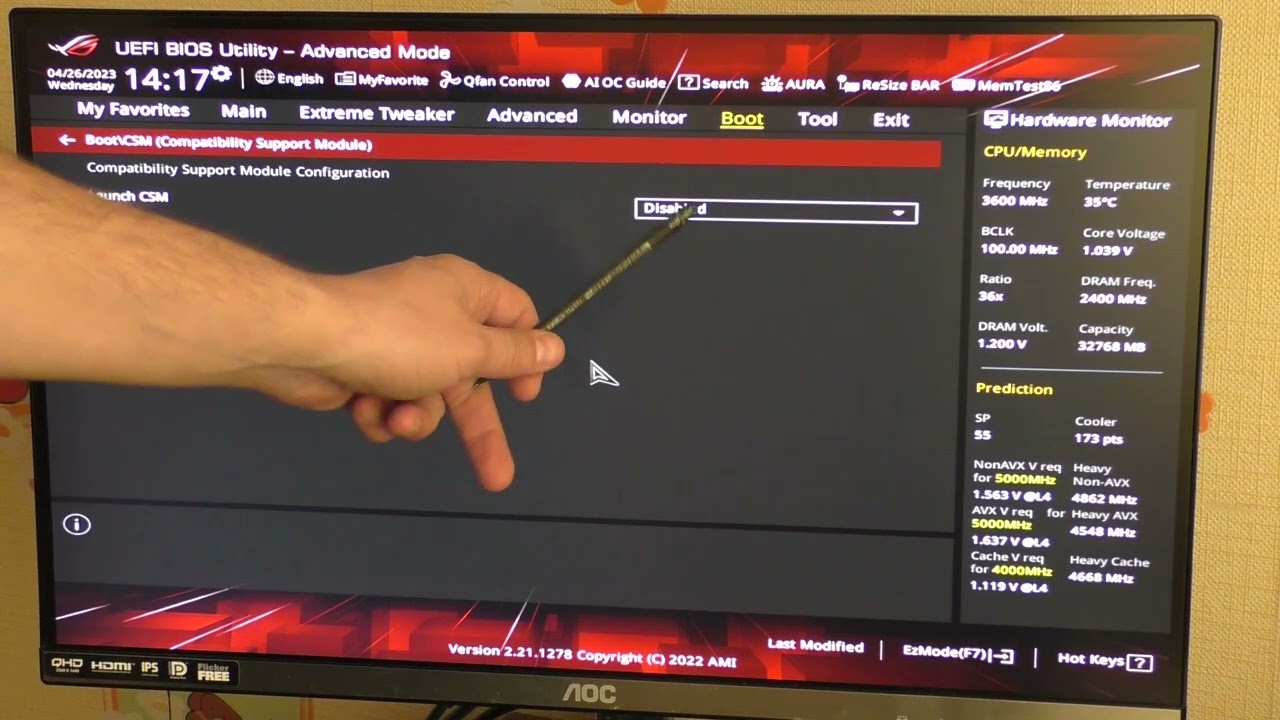
When installing two video cards, the NVME SSD is no longer detected. I checked sockets M.2_1 M.2_2 and M.2_3. SSD is not detected in any of them and the system does not boot. In the BIOS section
Advanced\NVMe controller and Drive information
No NVME Device Found
At the same time, in the section
Advanced\System Agent (SA) Configuration\PCI Express Configuration
I can see that the SSD is connected
M.2_1x4
PCIEX16_1x8
PCIEX16_2x8
I began to understand and found out that when switching Launch CSM - Disabled, SSD appears in the Advanced\NVMe controller and Drive information section.
when switching Launch CSM Enabled SSD is not detected. If I leave only one video card, then the SSD is determined
My SSD has an MBR structure, is divided into several partitions and has several OS installed, so I cannot disable CSM
Can I somehow configure it so that two video cards and an NVME SSD work with Launch CSM Enabled?
P.S. I used Asus ROG Maximus XI Hero WiFi and i7-9700k before - everything worked
I upgraded on Maximus XIII Hero and i7-11700k and it stopped working
Повторяем попытку...
Доступные форматы для скачивания:
Скачать видео
-
Информация по загрузке:








![How To Add More M.2 Storage Using PCIe | Asus Hyper M.2 [part 2]](https://imager.clipsaver.ru/c4Vdh5uTW9U/max.jpg)