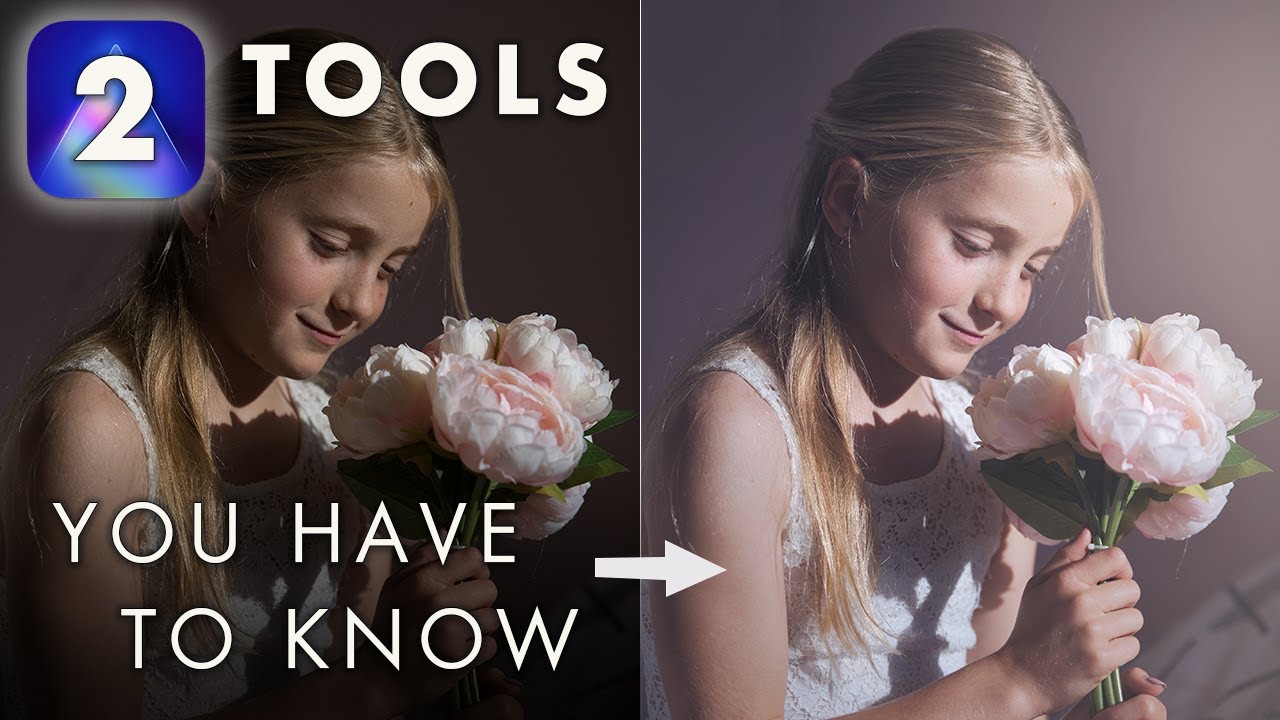
Two Tools Every Luminar AI User Has To Know! Portrait Edit with only 2 tools, Curves and Local Masks
Автор: Anthony Turnham
Загружено: 2021-06-14
Просмотров: 12773
Описание:
Get Luminar AI here: https://bit.ly/Lum-AI Use code ATSKY10 for a discount.
These are two MUST KNOW tools for every photo editor. They give you the power to craft your photos the way that suits your creative vision. Not the way Luminar's AI thinks it should be done. In this tutorial, I share a transformational photo edit using just 2 tools. Yep, just 2.
0:00 Intro
1:38 What we're working towards
2:33 Analysing the Shoot and the Photo
3:46 Camera / Lens Settings
4:46 Curves Part 1: Luminosity and Contrast Adjustments
10:31 Curves Part 2: Colour Toning with Curves and color channels
13:20 Color Grading our photo
14:25 Luminar AI discount code (ATSKY10)
14:35 Good and Bad - the traditional vignette tool
16:40 Creating a better custom vignette with Local Masks
20:19 Creative uses for local masks
22:45 Conclusion
22:57 Before and After
So what are they? Firstly we look at the curves panel that's hidden inside Luminar's light panel. Control your contrast, exposure, the black point, the white point and color grading ALL from this tool alone.
Secondly, we delve into local masking. This further allows super fine control over your photo editing process by making changes in specific areas.
These tools are two insanely powerful features of Luminar AI that will get you out of automation and allow you to take creative control. I do my best to make the explanations as clear as possible. I hope I've done a good job.
Please let me know what you think of the edit in the comments! Thanks so much for watching! 🙏 Share the love with a thumbs up and/or a comment 😄
🌅 Best Sky Library: http://bit.ly/2Ruj8KP-Skies Use code ANTHONY for a discount!
🖊 My fav graphics tablet: https://amzn.to/33mJxwN (best brand, best size IMHO)
🖱 Tourbox - for amazing efficiency: https://bit.ly/39TdQ1S (discount code: TB20210408XXL08)
👉 USEFUL PHOTOGRAPHY LINKS: 👈
🎧 Sonata. THE music library for creatives: https://bit.ly/3dyEsYv (great for slideshows!)
📷 Lens: https://amzn.to/2RZzV5M
🖥️ Monitor: https://amzn.to/346A64E
👉 My Camera Equipment: 👈
📷 New fav camera: https://amzn.to/3vHkMI6
📷 Pro Camera: https://amzn.to/3j3fQan
📷 My Wide Angle Lens: https://amzn.to/3j9I1Vb (used for 90% of my architectural work)
📷 Nifty fifty: https://amzn.to/3ifmY2t
📷 Mid-range zoom: https://amzn.to/33Xltkc
📷 Telephoto Lens: https://amzn.to/3cBAyMo
📷 Tripod Head for architecture: https://amzn.to/30cbJBq
These are affiliate links to the equipment I use - they are not sponsored by the manufacturer in any way. If you use these links it costs you no more than normal, but the small commission I get helps me to keep providing free content for you guys. Thanks for supporting the channel. I really appreciate it. 🙏
YOU CAN FOLLOW ME AND MY WORK HERE:
Architecture: / nz_architecture_photography
Website: https://www.architectural-photography...
My Landscape Prints: https://www.newzealandscapes.co.nz
Landscapes: / newzealandscapes
General Instagram: / anthony_turnham_photography
Website: https://anthonyturnham.com
Business Website: https://www.snapphotography.co.nz
Повторяем попытку...
Доступные форматы для скачивания:
Скачать видео
-
Информация по загрузке: