ycliper

Популярное

Музыка Кино и Анимация Автомобили Животные Спорт Путешествия Игры Юмор

Интересные видео

2025 Сериалы Трейлеры Новости Как сделать Видеоуроки Diy своими руками

Топ запросов

смотреть а4 schoolboy runaway турецкий сериал смотреть мультфильмы эдисон
Скачать

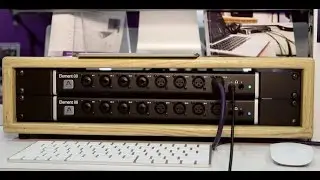
How To Set Up Apogee Element and Ensemble Thunderbolt Together

Автор: Apogee Electronics

Загружено: 2017-06-29

Просмотров: 12444

Описание: This is a quick How-To video on setting up the Apogee Element and Ensemble together! To learn more, please visit www.apogeedigital.com/support

Step 1
With both units powered down, connect Optical Out of Ensemble to Optical In of Element. Now, do the reverse, Optical Out of Element to Optical In of Ensemble

Step 2
Daisy-chain Element to Ensemble with Thunderbolt

Step 3
Power up Ensemble

Step 4
Connect another Thunderbolt cable from Ensemble to Mac. Wait for units to sync…

Step 5
Use Apogee Control app on Mac or iOS for Control and Routing options.

Optional Apogee Control hardware remote can be used for additional control.

Connect the remote to your computer via the USB cable.

Note: Connecting an Ensemble Thunderbolt and Element 88 with only 2 optical cables will limit all channels to a max sample rate of 48k. To use all channels at sample rates of 88.2 and 96k, 4 optical cables need to be linked between units.

Не удается загрузить Youtube-плеер. Проверьте блокировку Youtube в вашей сети.
Повторяем попытку...
How To Set Up Apogee Element and Ensemble Thunderbolt Together

Поделиться в:

Доступные форматы для скачивания:

Скачать видео

  • Информация по загрузке:

Скачать аудио

Похожие видео

Маленькая, да удаленькая звуковая карта APOGEE ONE

Маленькая, да удаленькая звуковая карта APOGEE ONE

Apogee Element Control

Apogee Element Control

UNRESOLVED - Mic Wells, Edward Lowell, Wizard Sideshow

UNRESOLVED - Mic Wells, Edward Lowell, Wizard Sideshow

Причины банкротства Native Instruments

Причины банкротства Native Instruments

Apogee - Element Series Interfaces

Apogee - Element Series Interfaces

Не покупайте интерфейс, пока не увидите этот список уровней

Не покупайте интерфейс, пока не увидите этот список уровней

Звуковая карта Apogee BOOM

Звуковая карта Apogee BOOM

Apogee Ensemble thunderbolt (Review) Apogee control and integration with Logic

Apogee Ensemble thunderbolt (Review) Apogee control and integration with Logic

Я проверил 240 миксов учеников и везде одни и те же 3 ошибки

Я проверил 240 миксов учеников и везде одни и те же 3 ошибки

12 месяцев выступлений научили меня вот чему в плане настройки звукового оборудования.

12 месяцев выступлений научили меня вот чему в плане настройки звукового оборудования.

Как подключить аудиоинтерфейс FireWire к Mac или ПК с Thunderbolt 3/USB-C

Как подключить аудиоинтерфейс FireWire к Mac или ПК с Thunderbolt 3/USB-C

Interface  de Áudio Apogee Element 46 | Unboxing e Review | PT-BR

Interface de Áudio Apogee Element 46 | Unboxing e Review | PT-BR

NAMM 2026 глазами звукорежиссёра -  Новинки музыкальной индустрии

NAMM 2026 глазами звукорежиссёра - Новинки музыкальной индустрии

Apogee Ensemble Thunderbolt Tutorial: Re Amping Guitar

Apogee Ensemble Thunderbolt Tutorial: Re Amping Guitar

Подключите микшер к аудиоинтерфейсу для записи

Подключите микшер к аудиоинтерфейсу для записи

Шаблон, который звучит сам по себе (на примере качественного инди-попа)

Шаблон, который звучит сам по себе (на примере качественного инди-попа)

Используете ли вы неправильный компрессор? Мастер-класс по сжатию

Используете ли вы неправильный компрессор? Мастер-класс по сжатию

Apogee Element Control for Mac - Overview

Apogee Element Control for Mac - Overview

Apogee Ensemble Thunderbolt Audio Interface Review by Sweetwater Sound

Apogee Ensemble Thunderbolt Audio Interface Review by Sweetwater Sound

Apogee Element Control Tutorial - Low Latency Recording with Reverb

Apogee Element Control Tutorial - Low Latency Recording with Reverb

© 2025 ycliper. Все права защищены.


  • Контакты
  • О нас
  • Политика конфиденциальности


Контакты для правообладателей: [email protected]