ycliper

Популярное

Музыка Кино и Анимация Автомобили Животные Спорт Путешествия Игры Юмор

Интересные видео

2025 Сериалы Трейлеры Новости Как сделать Видеоуроки Diy своими руками

Топ запросов

смотреть а4 schoolboy runaway турецкий сериал смотреть мультфильмы эдисон
Скачать

Mastercams Lathe Stock Recognition Setting to Save Your Tools

Автор: CamInstructor

Загружено: 2019-02-07

Просмотров: 5728

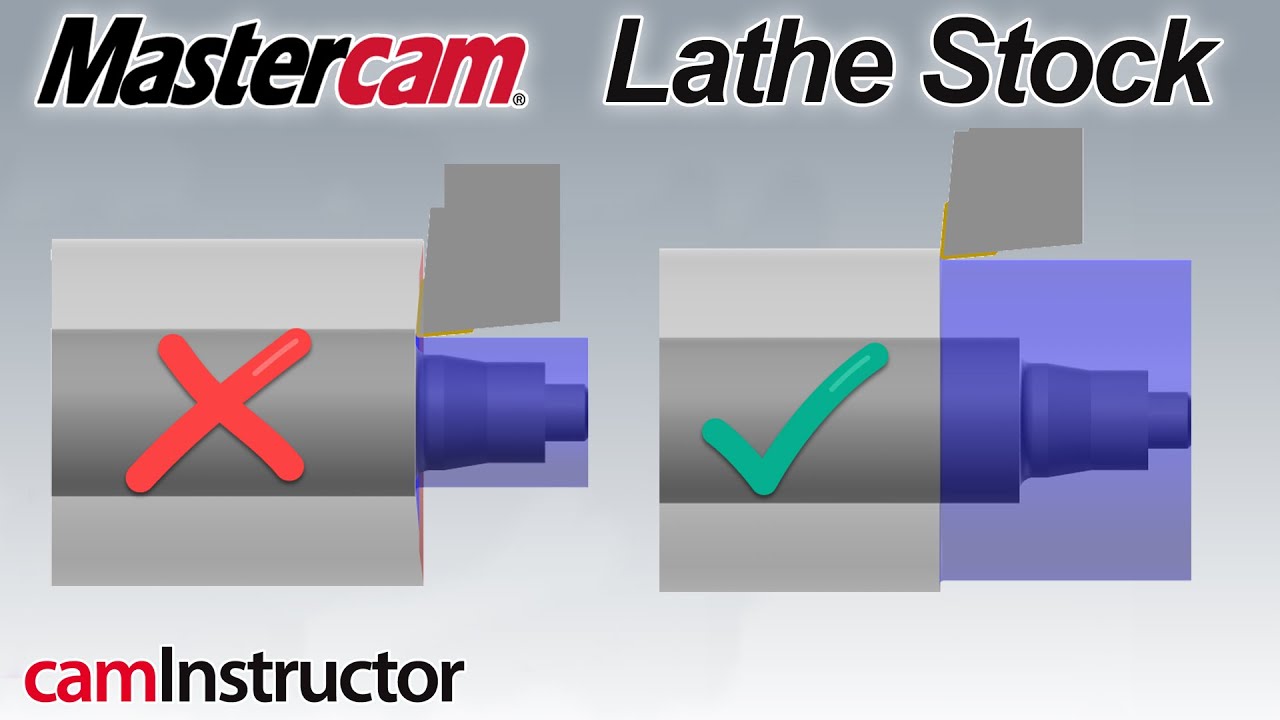
Описание: The use of Stock Recognition in Mastercam can be extremely valuable in the lathe environment. Stock Recognition can be used to ensure all roughing passes are the same depth and also automatically update toolpaths if the stock sized is changed. 

Often overlooked, Stock Recognition is one of the most powerful features in the Lathe environment in Mastercam. A common issue, when the piece of material you are going to cut is larger in diameter than your chained geometry. If you do not enable Stock Recognition on that roughing operation, the toolpath does not know where to start the toolpath from in regards to the diameter. Mastercam will start its roughing for that toolpath from the highest point in X of the chained geometry. So, lets say you have a 2" diameter bar. The chained geometry has a highest point on it's largest diameter, which is 1.50". The first cut that would happen would occur below the chained geometry by the cut amount of the operation. Needless to say, no matter what that depth cut is set at, you will be cutting more than 0.5" in diameter....a very aggressive cut. It's not Mastercam fault though, it's just working with the info you're giving it.

If you enable Stock Recognition, and have defined the Stock correctly in the machine setup, Mastercam can automatically start roughing from the current state of the stock. This will save you from accidentally cutting too much material on that first roughing pass.

Stock Recognition can be used in several different ways...

Remaining stock: uses only stock remaining from previous operations.
Use stock for outer boundary: uses a section of the stock boundary as the outer boundary.
Extend contour to stock only: linearly extends the ends of the chained contour to the stock.
Disable stock recognition: provides no stock recognition.

You also have the option to Adjust Stock. The Adjust Stock dialog box lets you adjust the area of the stock to be removed by the roughing operation. This option is available only if:

You define stock boundaries in the machine group properties.
The chained contour lies entirely within the stock boundary.
You select either the Use Stock for Outer Boundary or Extend Contour to Stock Only options.

See other blog posts
https://blog.caminstructor.com

Check out our website
https://caminstructor.com

#Mastercam #LearnCNC

Не удается загрузить Youtube-плеер. Проверьте блокировку Youtube в вашей сети.
Повторяем попытку...
Mastercams Lathe Stock Recognition Setting to Save Your Tools

Поделиться в:

Доступные форматы для скачивания:

Скачать видео

  • Информация по загрузке:

Скачать аудио

Похожие видео

How to Mark Faster in Mastercam

How to Mark Faster in Mastercam

Mastercam Tutorial: How to Add Multiple Solid Bodies to Stock Setup

Mastercam Tutorial: How to Add Multiple Solid Bodies to Stock Setup

Освоение 5 типов компенсации резака Mastercam

Освоение 5 типов компенсации резака Mastercam

MASTERCAM TURNING WITH TAILSTOCK/STOCK ADVANCE

MASTERCAM TURNING WITH TAILSTOCK/STOCK ADVANCE

Mastercam Tips

Mastercam Tips

MASTERCAM TIP: ROUGH TURNING USING CASTED STOCK

MASTERCAM TIP: ROUGH TURNING USING CASTED STOCK

Как снизить износ пластин? Первым делом — определяем вид износа!

Как снизить износ пластин? Первым делом — определяем вид износа!

Скорость и качество поверхности

Скорость и качество поверхности

Отвечаю на вопросы, почему я купил новый китайский станок, продав ТВ4

Отвечаю на вопросы, почему я купил новый китайский станок, продав ТВ4

НОВЫЕ Правила пользования маломерными судами вступают в силу 1 марта 2026

НОВЫЕ Правила пользования маломерными судами вступают в силу 1 марта 2026

Автомат Коровина — упущенный шанс Красной армии

Автомат Коровина — упущенный шанс Красной армии

Как в СССР добивались 6 СТЕПЕНИ ТОЧНОСТИ отверстий без ЧПУ станков?

Как в СССР добивались 6 СТЕПЕНИ ТОЧНОСТИ отверстий без ЧПУ станков?

3D Lathe Tools: The Essentials (Episode 1)

3D Lathe Tools: The Essentials (Episode 1)

Метод выбора цепочки каркаса в Mastercam || Цепочка каркаса || Простые методы выбора цепочки

Метод выбора цепочки каркаса в Mastercam || Цепочка каркаса || Простые методы выбора цепочки

Создание 3D-оснастки для токарного станка в Mastercam 2019

Создание 3D-оснастки для токарного станка в Mastercam 2019

Tech Tip - Using Mastercam Stock Model

Tech Tip - Using Mastercam Stock Model

Немцы Смеялись Над Его

Немцы Смеялись Над Его "Самодельными" Патронами — Пока Он Не Поразил 8 Целей ОДНОЙ Пулей!

Цифровой штангенциркуль из Китая. Неожиданные результаты.

Цифровой штангенциркуль из Китая. Неожиданные результаты.

Как работать с моделями и операциями в файлах деталей Mastercam | Часть вторая | Задать вопрос ин...

Как работать с моделями и операциями в файлах деталей Mastercam | Часть вторая | Задать вопрос ин...

ПРАВДА О ЛАТЫШСКИХ СТРЕЛКАХ: КЕМ ОНИ БЫЛИ НА САМО ДЕЛЕ??!

ПРАВДА О ЛАТЫШСКИХ СТРЕЛКАХ: КЕМ ОНИ БЫЛИ НА САМО ДЕЛЕ??!

© 2025 ycliper. Все права защищены.


  • Контакты
  • О нас
  • Политика конфиденциальности


Контакты для правообладателей: [email protected]