ycliper

Популярное

Музыка Кино и Анимация Автомобили Животные Спорт Путешествия Игры Юмор

Интересные видео

2025 Сериалы Трейлеры Новости Как сделать Видеоуроки Diy своими руками

Топ запросов

смотреть а4 schoolboy runaway турецкий сериал смотреть мультфильмы эдисон
Скачать

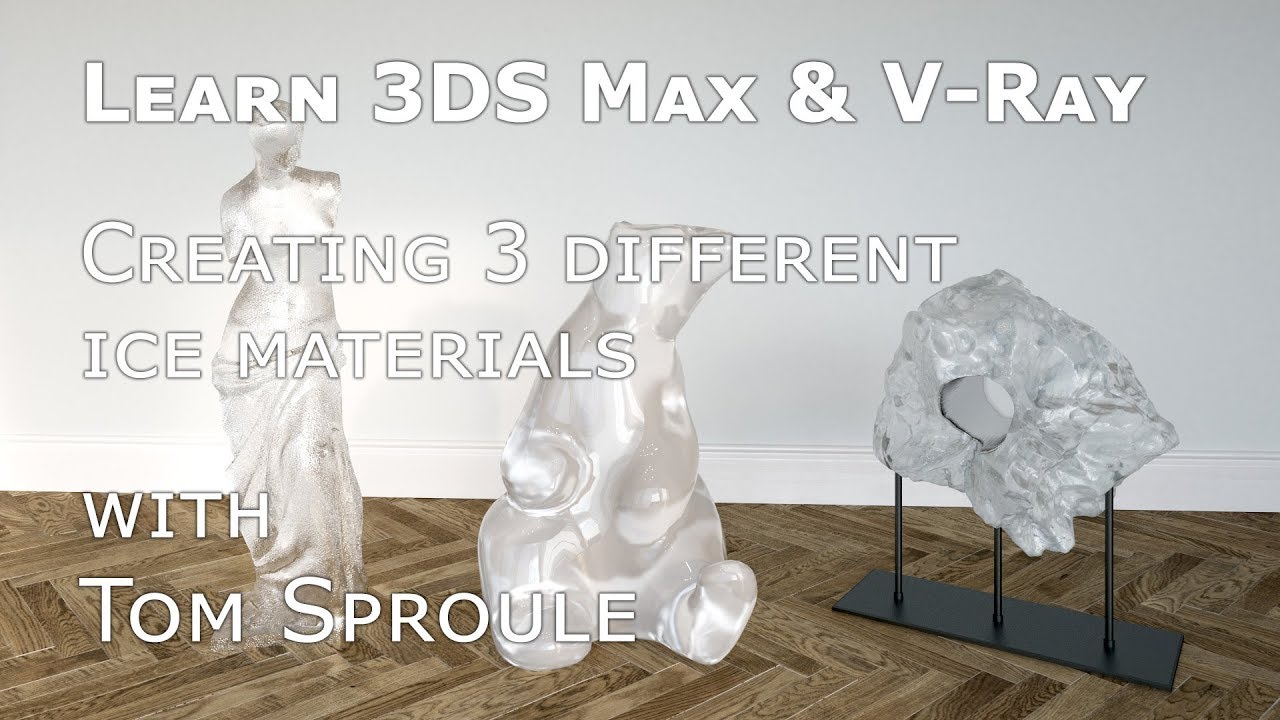
Learn 3DS Max & V-Ray: How to Create Ice Materials – Archviz & CGI Tutorial

Автор: leonleon51

Загружено: 2017-09-29

Просмотров: 8902

Описание: In this tutorial, I show how to create three different ice materials using 3DS Max and V-Ray, perfect for architectural visualization (archviz), CGI, or any scene requiring realistic ice effects. Ice can be tricky to get right, especially when you need results quickly without extensive trial and error. These materials are ready to apply to your models to achieve photorealistic ice surfaces.

The ice materials in this tutorial are applied to models downloaded from 3Dsky.org, which provides a wide range of 3D assets for archviz and CGI projects.

Key concepts covered:

Creating realistic ice materials in 3DS Max and V-Ray
Adjusting transparency, reflections, and refractions for ice
Applying materials to 3D models from 3Dsky.org
Optimizing materials for photorealistic renders
Quick methods for archviz and CGI scenes

Не удается загрузить Youtube-плеер. Проверьте блокировку Youtube в вашей сети.
Повторяем попытку...
Learn 3DS Max & V-Ray: How to Create Ice Materials – Archviz & CGI Tutorial

Поделиться в:

Доступные форматы для скачивания:

Скачать видео

  • Информация по загрузке:

Скачать аудио

Похожие видео

How to Create Realistic Plastic Materials in 3DS Max & V-Ray | Tutorial

How to Create Realistic Plastic Materials in 3DS Max & V-Ray | Tutorial

V-Ray | DIAMOND SHADER Photorealistic | Рефракционные материалы, дисперсия и Аббе, проблемы и реш...

V-Ray | DIAMOND SHADER Photorealistic | Рефракционные материалы, дисперсия и Аббе, проблемы и реш...

Creating Realistic Ice Material with #Vray5.1

Creating Realistic Ice Material with #Vray5.1

Create Anisotropic Metal in 3DS Max & V-Ray | Archviz Metal Tutorial

Create Anisotropic Metal in 3DS Max & V-Ray | Archviz Metal Tutorial

How to Create Acrylic and Plexiglass in 3DS Max and V-Ray | Photorealistic Plastic Material Tutorial

How to Create Acrylic and Plexiglass in 3DS Max and V-Ray | Photorealistic Plastic Material Tutorial

Photorealistic metals with 3DS Max and V-Ray

Photorealistic metals with 3DS Max and V-Ray

Создание реалистичного океана с пеной | Урок 3dsmax x Vray x Phoenix

Создание реалистичного океана с пеной | Урок 3dsmax x Vray x Phoenix

V-Ray | REALISTIC LEAVES + VEGETATION | Updated Translucency Workflow Explained

V-Ray | REALISTIC LEAVES + VEGETATION | Updated Translucency Workflow Explained

V-Ray | Realistic CRYSTAL Shading Tutorial | Quartz, Minerals

V-Ray | Realistic CRYSTAL Shading Tutorial | Quartz, Minerals

Create Photorealistic Gold Fast in 3DS Max & V-Ray | Archviz Metal Tutorial

Create Photorealistic Gold Fast in 3DS Max & V-Ray | Archviz Metal Tutorial

How to Create Photorealistic Coloured Glass in 3DS Max with V-Ray – Archviz & CGI Tutorial

How to Create Photorealistic Coloured Glass in 3DS Max with V-Ray – Archviz & CGI Tutorial

Creating photorealistic glass with 3DS Max and V-Ray

Creating photorealistic glass with 3DS Max and V-Ray

Learn 3DS Max - Liquid in Glass Tutorial | V-Ray Realistic Rendering

Learn 3DS Max - Liquid in Glass Tutorial | V-Ray Realistic Rendering

Creating Ice Cube in 3DsMax

Creating Ice Cube in 3DsMax

Vray 3DS Max Material Tutorial - Bump, Normal & Displacement Map | PBR materials

Vray 3DS Max Material Tutorial - Bump, Normal & Displacement Map | PBR materials

V-Ray for 3ds Max | Creating Hyper Realistic fabric Materials

V-Ray for 3ds Max | Creating Hyper Realistic fabric Materials

3ds max - vray realistic glass and juce, modeling, lighting and rendering

3ds max - vray realistic glass and juce, modeling, lighting and rendering

Модификатор Unwrap UVW в 3ds Max | Я упростил это

Модификатор Unwrap UVW в 3ds Max | Я упростил это

Create true displacement material in 3 steps! One-click tricks to fix messy UV and model topology.

Create true displacement material in 3 steps! One-click tricks to fix messy UV and model topology.

How to make a wet surface in V-ray  3dsMax using v-ray blend material

How to make a wet surface in V-ray 3dsMax using v-ray blend material

© 2025 ycliper. Все права защищены.


  • Контакты
  • О нас
  • Политика конфиденциальности


Контакты для правообладателей: [email protected]