Assign permissions to a domain account to configure Failover Cluster
Автор: IT vs AI
Загружено: 2017-07-22
Просмотров: 27258
Описание:
Donate Us : paypal.me/MicrosoftLab
Assign permissions to a domain account to configure Failover Cluster (account not a member of the domain Administrators group)
1. Prepare
DC11 : Domain Controller ( pns.vn )
DC12, DC13 : SQL Server, IP 10.0.0.12, 10.0.0.13
2. Step by step : Allow svr.cluster account configure Failover Cluster for SQL (svr.cluster not a member of the domain Administrators group)
DC11 : Create OU named Services and srv.cluster account
DC12, DC13 : Add srv.cluster to local administrators group and install Failover Cluster
Server Manager - Manage - Add Roles and Features - Features : Select "Failover Clustering" - Add Features - Install
DC12 : Logon using srv.cluster and configure Failover Cluster
Server Manager - Tools - Failover Cluster Manager - Right-click "Failover Cluster Manager" : Validate Configuration... - Select Servers or a Cluster
Browse... : DC12, DC13 - Next to Finish - Cluster Name : FCSQL, Address 10.0.0.200 - Next
=== Fail due to lack of permissions
DC11 : Assign more permissions for srv.cluster
Create a new computer account named FCSQL on Computers container, then disable FCSQL :
Active Directory Users and Computers - pns.vn - Right-click Computers - New - Computer - Computer name : FCSQL - Right-click FCSQL - Disable Account - Yes
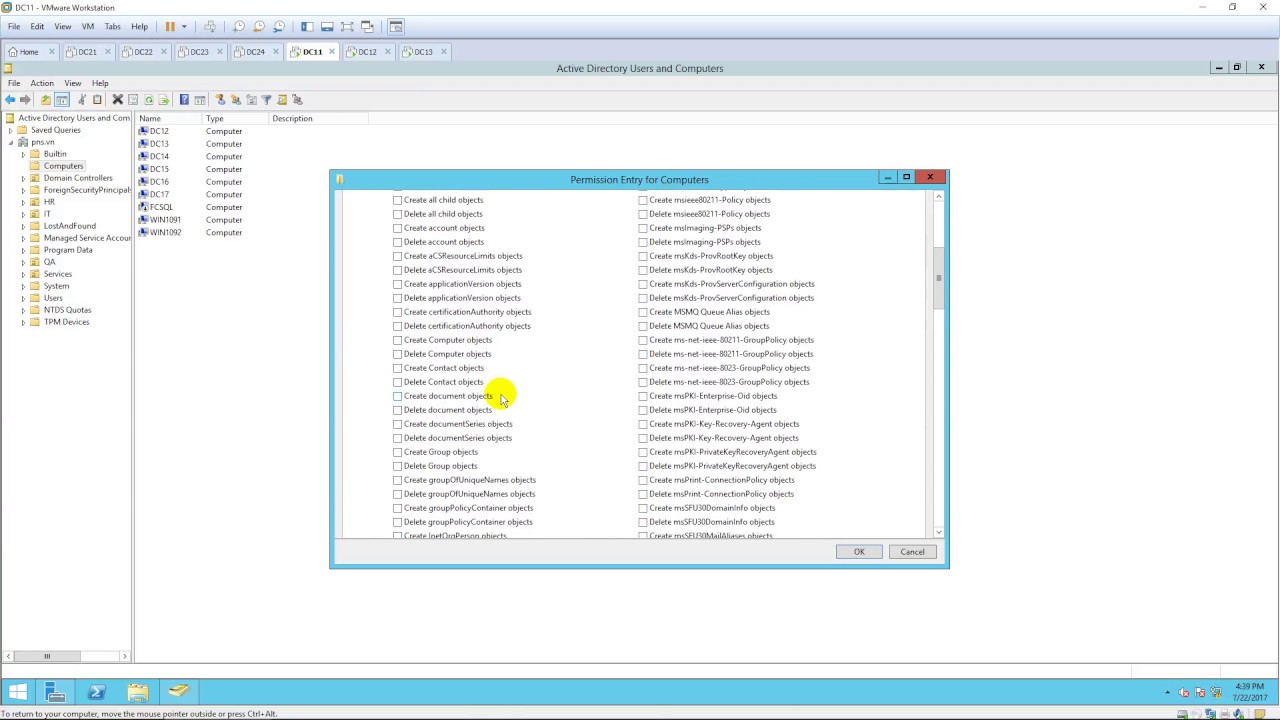
Assign Create Computer objects and Read All Properties permissions for srv.cluster and FCSQL account on Computer container :
Active Directory Users and Computers - View tab - Select "Advanced Features" - pns.vn - Right-click Computers - Properites - Security tab - Advanced - Add
Select a principal - Enter srv.cluster - Check "Create Computer objects" and "Read all properties" permissions - OK - Add the same for FCSQL computer account
Assign full permission for srv.cluster on FCSQL computer account :
Right-click FCSQL - Properties - Security tab - Add - Enter srv.cluster - Select Full control - OK
DC12 : Try using srv.cluster and configure Failover Cluster again === OK
Повторяем попытку...
Доступные форматы для скачивания:
Скачать видео
-
Информация по загрузке: